
aido
A spec-first, test-driven engineering workflow for Claude Code and GitHub Copilot CLI. Hand your coding agent the whole feature while you stay in the loop!…
Install with your AI
Paste into Claude Code, Cursor, or any agent — it reads the repo and wires the tool into your project.
Install and set up aido (claude-plugin project) into my current project.
Found on https://claudeers.com/aido
Repo: https://github.com/joebew42/aido
Homepage/docs: —
Detected install method: claude-plugin → /plugin install aido@joebew42/aido
Category: plugins. Platforms: cli, api.
Read the repo's README for exact setup and env vars, then install it and wire it into my project.

Claudeers Health Verdict:
unknown; community-verified: false. Confirm the source before running anything.
⚠ Unverified / not recently updated — review before pasting a run-this config.
/plugin marketplace add joebew42/aido
/plugin install aido@joebew42/aido
git clone https://github.com/joebew42/aido
// compatibility
| Platforms | cli, api |
|---|---|
| Operating systems | — |
| AI compatibility | claude |
| License | MIT |
| Pricing | open-source |
| Language | Shell |

aido 🥋
A spec-first, test-driven engineering workflow for Claude Code and GitHub Copilot CLI.
Hand the coding agent the whole feature while you stay in the loop! Works with any stack.
┌────────────────────────┐    ┌────────────────────────┐    ┌────────────────────────┐
│ 1 · Plan               │    │ 2 · Implement          │    │ 3 · Organize commits   │ ─┐
│ drafts the spec and    │ ─▶ │ builds it test-first,  │ ─▶ │ shapes a clean,        │  │
│ plans the work         │    │ checks the criteria    │    │ reviewable history     │  │
└────────────────────────┘    └────────────────────────┘    └────────────────────────┘  │
/aido:1-plan                  /aido:2-implement             /aido:3-organize-commits    │
  ┌─────────────────────────────────────────────────────────────────────────────────────┘
  ▼
┌────────────────────────┐    ┌────────────────────────┐
│ 4 · Open PR            │    │ 5 · Handle review      │
│ verifies, pushes and   │ ─▶ │ weighs the feedback,   │
│ opens the pull request │    │ acts on what you pick  │
└────────────────────────┘    └────────────────────────┘
/aido:4-open-pr               /aido:5-handle-review
Get started
Install the plugin in Claude Code, then start planning your first feature:
/plugin marketplace add joebew42/aido
/plugin install aido@aido
/aido:1-plan
Every skill is available as /aido:<skill>. To update aido later, run
claude plugin marketplace update aido, then claude plugin update aido@aido, and restart Claude
Code.
Using GitHub Copilot CLI? See Use it in GitHub Copilot CLI.
Your first feature, in five steps
| Skill | What happens | |
|---|---|---|
| 01 | /aido:1-plan | Draft and approve the specification and plan in SPEC.md. |
| 02 | /aido:2-implement | Build the feature test-first, and check every acceptance criterion. |
| 03 | /aido:3-organize-commits | Turn the work into a clean, reviewable commit history. |
| 04 | /aido:4-open-pr | Offer a verification, push with your approval, and open the pull request. |
| 05 | /aido:5-handle-review | Decide each review comment in turn: fix it, answer it, or park it in an issue. |
You approve what matters. aido proposes. It never decides what to build, rewrites history or pushes without asking you.
What planning looks like
Start from a GitHub issue, your own SPEC.draft.md, or a conversation where aido interviews you.
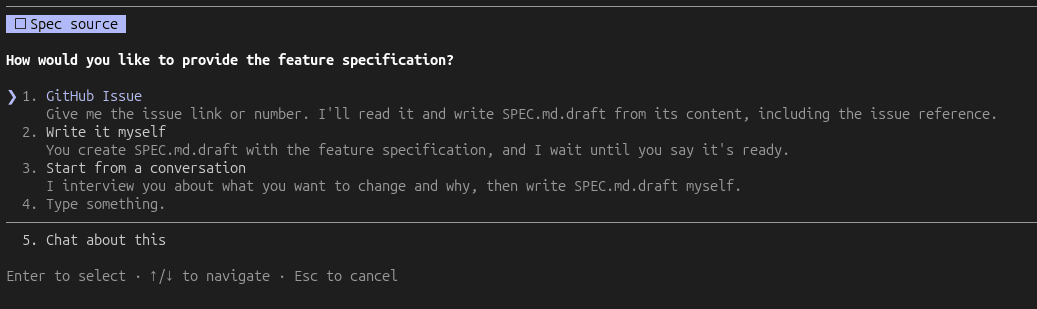
/aido:1-plan checks the draft against your repository and refines it with you. You approve it
three times: the draft, the specification and the plan. A small, clear change can take a lighter
route, where you approve a short specification and plan at once.
/aido:deliberate is an optional step before planning, for when a design really needs exploring. It
runs three agents on Fable, an expensive model, so use it at your discretion. Two agents each propose
a design on their own, one aiming for the best and one for the simplest. A third compares them and
recommends one. You approve the design, and /aido:1-plan plans from it, or /aido:multi-phase-plan
for a feature built in phases.
Each skill ends by offering the next one, so you don't have to remember the order. It recommends a
fresh context: run /clear, then the next skill. That skill picks up from SPEC.md and the git
history. Every skill ends with a short note: what it did, what it decided, and what it needs from you.
Recommended Claude Code settings
The guidelines ask for commits and PRs without AI attribution. A plugin can't set this itself, so
add this to ~/.claude/settings.json:
{
  "attribution": { "commit": "", "pr": "" }
}
What the plugin's hooks enforce
| Hook | Default | Turn it off |
|---|---|---|
Ask for your approval before every git push | on | not available |
Block commit messages containingCo-Authored-By trailers | on | git config aido.allowCommitAttribution true |
The opt-out applies to this repository, or everywhere with --global. The skills never set it.
Use it in GitHub Copilot CLI
Copilot CLI reads this marketplace as it is:
copilot plugin marketplace add joebew42/aido
copilot plugin install aido@aido
To update it later, run copilot plugin marketplace update aido, then
copilot plugin update aido@aido.
Run the skills by the same names, such as /aido:1-plan. Copilot keeps one skill per name, so a
skill with the same name in your repository or your personal skills hides aido's, and its /aido:
command with it. An aido skill that asks for the hidden one can't load it instead of yours, and is
instructed to stop and tell you. Rename or remove skills that clash with aido's.
Autopilot, --no-ask-user and prompt mode (-p) can continue or choose without asking you. The
guideline asks skills to stop at questions, but nothing enforces this. Approval checkpoints are
reliable only in an interactive session. Push stays protected: the hook denies it when it can't ask.
Copilot tells its agent to add a Co-authored-by trailer to every commit, and aido's hook denies
those commits. Turn the trailer off with copilot config includeCoAuthoredBy false, which writes
"includeCoAuthoredBy": false to ~/.copilot/settings.json. Without it, each commit is denied
until the agent retries it without the trailer, unless you turn the hook off as above.
In Copilot CLI, subagents run on Copilot's default model, nothing reminds a skill to reload after Copilot compacts the conversation, and the evals measure Claude Code only.
Why aido?
Delegate the work, not the judgement. The agent writes the specification, the tests, the code, the commits and the pull request. You decide what gets built, and you own the result.
The name aido means "AI do" and echoes sudo: the agent acts on your say-so.
- Test-driven. The tests come before the code, and each unit's tests must fail without its code.
- Engineering practices built in. Clean architecture, focused tests, deliberate refactoring and a tidy history.
- Your repository's conventions win. aido follows
CLAUDE.md,AGENTS.mdand your code, not a naming, testing or architecture scheme of its own.
For more on the idea, see AI-Augmented Software Engineering from Carnegie Mellon University.
How it works
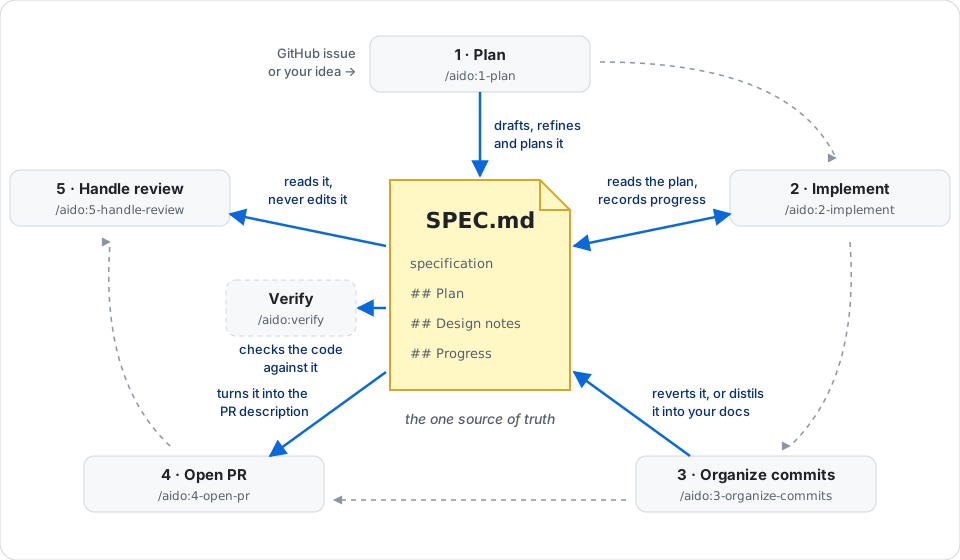
One specification connects the whole workflow
SPEC.md holds the feature: why (Context), what (Intent), what not (Out of scope), and
numbered Acceptance criteria (AC1, AC2, …). Planning adds how, as a plan. Every later skill
reads it.
aido is spec-first: a spec lives as long as its branch. Before the branch is merged, the spec is reverted. What lasts goes into the PR, the issue, or a doc distilled from the spec. Organizing the commits asks how to settle it, and so do opening the PR and handling a review, if nothing has settled it yet. A spec an earlier branch left on the default branch is caught before the next one is written.
Acceptance criteria stay visible
Every plan item names the criteria it serves. Implementation tests each criterion first, and checks
them all before it finishes. A criterion only you can check is marked (manual). When one isn't
met, you build it, change it or defer it. Deferred ones can become GitHub issues.
Uncertainty chooses how each part is built
Each plan item names its mode and why, so you can challenge it before any code exists.
| What's unknown | Mode | How it is built | History |
|---|---|---|---|
| Nothing: it follows existing code or a known contract | inside-out | Layer by layer | Inside-out, acceptance tests last |
| How the parts fit, or what an interface should be | outside-in | In tracer bullet slices | One group of commits per slice |
| Logic within one unit | in-unit | In that unit | As inside-out |
In every mode, "Step Size" in tdd.md decides how many tests come
before the code. A part is inside-out only if the plan can cite what it follows. When the plan proves
wrong, implementation switches the mode and tells you.
The repository is part of the conversation
Planning checks the specification against your code, CLAUDE.md and AGENTS.md. Implementation
checks again in case the default branch moved. On a conflict, aido shows the files and recommends
revising or rejecting the specification. You can still go ahead, and your reason is recorded.
Verify what was agreed
/aido:verify checks a branch or a PR against what was agreed, in a fresh context, so the agent
that built it isn't the judge. It changes nothing. A requirement is verified only by a test that
passed during the check, or by your confirmation. Otherwise it is insufficient evidence or
unmet. A PR without a specification is checked against its description and linked issues.
| Tool | Question |
|---|---|
/aido:verify | Did we build what we agreed to build? |
/code-review | Does the code have defects? |
Skills
Single-phase feature
| Skill | Purpose |
|---|---|
/aido:1-plan | Draft, refine, and plan a feature into SPEC.md. |
/aido:2-implement | Implement the feature using TDD. loop (or loop 7-9) runs each plan item in a fresh subagent, after asking whether to check each item with the whole test suite or only the relevant tests. The final design review adds the refactorings you accept to the spec's ## Refactorings, as r1, r2, …. loop r1 (or loop r1-r3) runs them the same way. |
/aido:3-organize-commits | Organize the commit history. |
/aido:4-open-pr | Open a pull request. |
/aido:5-handle-review | Handle PR review feedback one comment at a time, replying on the PR and parking some in issues. |
Multi-phase feature
| Skill | Purpose |
|---|---|
/aido:multi-phase-plan | Plan a feature in phases, and open the PR that tracks them. |
/aido:multi-phase-switch | Switch to the main plan branch. |
/aido:multi-phase-sync | Sync the main plan with progress. |
Utilities
| Skill | Purpose |
|---|---|
/aido:deliberate | Before planning, compare a best and a simplest design, and save the one you approve for /aido:1-plan or /aido:multi-phase-plan. |
/aido:verify | Check a branch or PR against the agreed requirements from a fresh context. |
/aido:stabilize | Take over a PR, remote branch, or local changes created outside this workflow. |
/aido:map-architecture | Build or update a slim map of domain areas and building blocks. |
/aido:assess-architecture | Assess the architecture area by area, and save the refactoring ideas you pick. /aido:1-plan offers them when a planned change fits. |
/aido:resolve-migration-conflict | Resolve migration conflicts after a rebase, with any migration tool. |
Other ways to use aido
Plan a multi-phase feature
- Optionally, run
/aido:deliberateto compare designs for the whole feature first. Each phase then plans from its part of the approved design. - Run
/aido:multi-phase-planto refine the overall specification, plan the phases and open the tracking PR. It starts from yourSPEC.draft.md, a GitHub issue, or a conversation. - For each phase (or independent phases in parallel), run
/aido:1-plan,/aido:2-implement,/aido:3-organize-commits, and/aido:4-open-pr. Planning can offer parallel worktrees. - Run
/aido:multi-phase-syncto update the main plan and begin the next phase.
Take over existing work
- Run
/aido:stabilizeagainst a PR, remote branch, or local changes. - Choose whether to plan it as one change or in phases. Large work, such as a proof of concept, is easier to build and review in phases.
- As one change, choose whether to reimplement from scratch or carry the changes over and adjust
them. Approve the plan written into
SPEC.md, then continue with implementation, commit organization, and PR creation. - In phases, continue with
/aido:multi-phase-plan, as in "Plan a multi-phase feature". Each phase rebuilds its part. The main spec names the original work, as a reference while planning the phases.
Review someone else's PR
Run /aido:verify <PR number> to compare it with the agreed requirements. Run /code-review to look
for defects.
Resolve a migration conflict
Run /aido:resolve-migration-conflict when another PR's database migration was merged while yours
was open.
Engineering guidelines
The skills follow the guidelines in plugins/aido/guidelines/.
Measuring it
Eval cases compare what agents do with aido, without it, or with an earlier version of it. So a change to a skill is measured, not judged by feel. See how to run and read them, and the current results.
aido 🥋
// faq
What is aido?
A spec-first, test-driven engineering workflow for Claude Code and GitHub Copilot CLI. Hand your coding agent the whole feature while you stay in the loop! Works with any stack.. It is open-source on GitHub.
Is aido free to use?
aido is open-source under the MIT license, so it is free to use.
What category does aido belong to?
aido is listed under plugins in the Claudeers registry of Claude-compatible tools.
// embed badge

[](https://claudeers.com/aido)
// retro hit counter

[](https://claudeers.com/aido)
// reviews
// guestbook
// related in Claude Plugins
 🔓
A single CLAUDE.md file to improve Claude Code behavior, derived from Andrej Karpathy's observations on LLM coding pitfalls.
 🔓
Claude Code is an agentic coding tool that lives in your terminal, understands your codebase, and helps you code faster by executing routine tasks, explainin…
 🔓
"CLI-Anything: Making ALL Software Agent-Native" -- CLI-Hub: https://clianything.cc/
🔓financial-services — a Claude ecosystem project on GitHub.