
AI-Project-Workflow
Universal AI-native project workflow for Cursor, Claude Code, Codex, TRAE, Qoder, CodeBuddy and other AI coding assistants.
Install with your AI
Paste into Claude Code, Cursor, or any agent — it reads the repo and wires the tool into your project.
Install and set up AI-Project-Workflow (git-clone project) into my current project.
Found on https://claudeers.com/ai-project-workflow
Repo: https://github.com/AlanHuang168/AI-Project-Workflow
Homepage/docs: https://www.npmjs.com/package/@dayahs/ai-project-workflow
Detected install method: git-clone → git clone https://github.com/AlanHuang168/AI-Project-Workflow
Category: devtools. Platforms: cli, web.
Read the repo's README for exact setup and env vars, then install it and wire it into my project.

Claudeers Health Verdict:
slowing; community-verified: false. Confirm the source before running anything.
git clone https://github.com/AlanHuang168/AI-Project-Workflow
// compatibility
| Platforms | cli, web |
|---|---|
| Operating systems | — |
| AI compatibility | claude |
| License | MIT |
| Pricing | open-source |
| Language | JavaScript |
AI Project Workflow
A universal, AI-native software delivery workflow for Cursor, Claude Code, Codex, Qoder, CodeBuddy, TRAE, and other AI coding assistants. One canonical core/ source, lightweight adapters per tool, a state file that tracks progress, and a CLI that installs and validates everything.
Why
AI coding agents rush into implementation while requirements, architecture, design, and tests are still unclear. The result is code nobody asked for, silent scope creep, and "all tests pass" reports for tests that never ran.
AI Project Workflow makes delivery explicit:
- Every stage has a Skill contract: preconditions, allowed changes, outputs, and stop conditions.
- Every deliverable is written to a file under
docs/, never only printed in chat. - Progress is tracked in
.ai-workflow/state.jsonand gated stage by stage. - Verification must be reported honestly: commands actually executed, real results, remaining risks.
How it works
                core/  (single canonical source)
                ├── rules/       global working rules
                ├── skills/      one contract per stage
                ├── agents/      role definitions
                ├── templates/   document skeletons
                └── schemas/     state file schema
                        |
        apw init <target> --platform <tool>
                        v
    your-project/
    ├── AGENTS.md, CLAUDE.md            entry points read by the AI tool
    ├── core/                           full copy of the canonical source
    ├── .cursor/ or .trae/ or ...       adapter files where your tool loads them
    └── .ai-workflow/state.json         workflow state
Enforcement is prompt-based. The adapter instructs the AI agent to read the active Skill, verify upstream documents, and update the state file before moving on. The CLI verifies the files (apw validate, apw status); the agent follows the contract because every entry point tells it to. If an agent drifts, point it back to AGENTS.md.
New to Node.js or command-line tools? Read the Beginner Installation Guide. It walks through installing Node.js, opening a terminal, and running your first
apw initcommand step by step.
Quick start
npx @dayahs/ai-project-workflow init . --platform cursor
Or install globally:
npm install -g @dayahs/ai-project-workflow
apw init my-app --platform cursor
Supported platforms: cursor, trae, qoder, codebuddy, claude-code, codex, all.
Verified platforms
| Platform | Status | Evidence |
|---|---|---|
| Cursor | ✅ Verified | Report |
| Claude Code | ✅ Verified | Report |
| Codex CLI | ✅ Verified | Report |
| TRAE | ✅ Verified | Report |
| CodeBuddy | ✅ Verified | Report |
| Qoder | ⏳ Pending | Report |
See the full compatibility matrix.
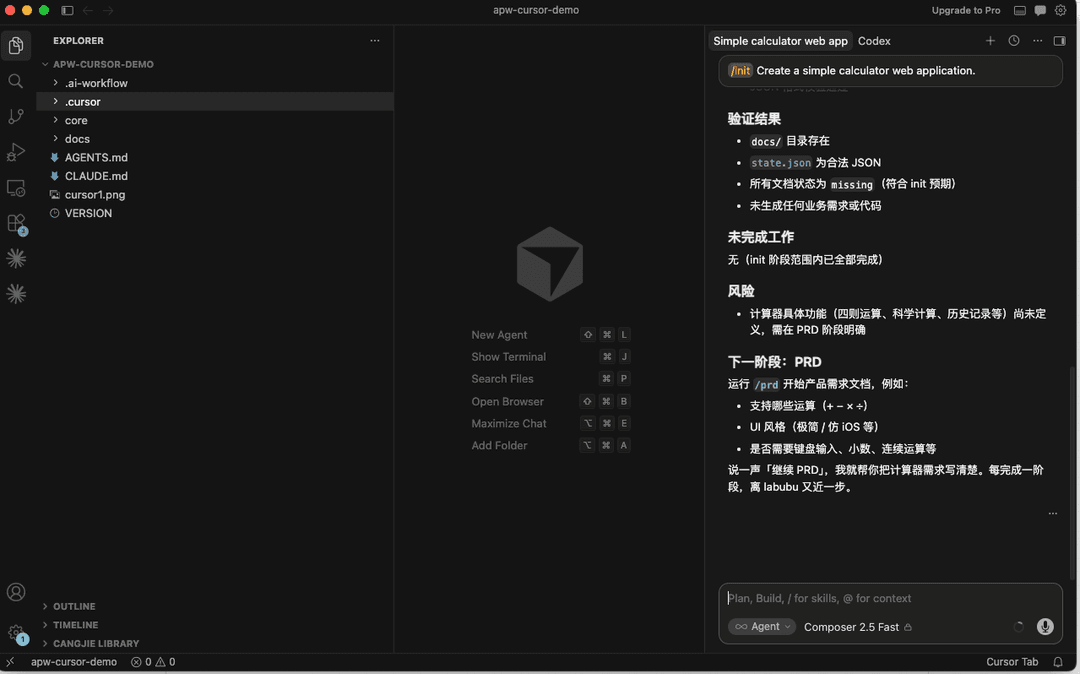
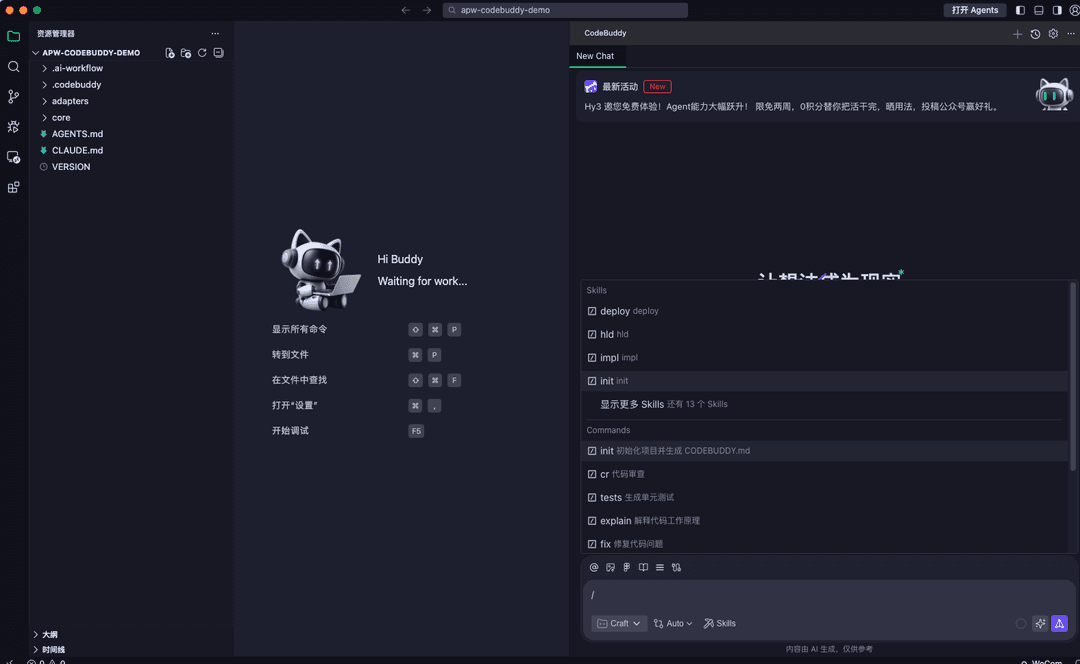
Your first project, end to end
This is what actually happens after installation, using a todo web app in Cursor as the example.
-
Install the workflow into a new project:
npx @dayahs/ai-project-workflow init todo-app --platform cursortodo-app/now containsAGENTS.md,core/,.cursor/, and.ai-workflow/state.jsonwithcurrentStage: "init". -
Start the first stage. Open
todo-appin Cursor and tell the agent:/prd I want to build a todo web app for small teamsThe rule in
.cursor/rules/ai-sdd.mdcis always attached, so the agent readscore/skills/prd/SKILL.md, asks clarifying questions first, then writesdocs/PRD.mdand updates the state file. -
Review and gate. Read
docs/PRD.mdyourself. The agent stops after each stage; nothing advances without your confirmation. -
Continue stage by stage:
/hldwritesdocs/ARCH.md,/sddwritesdocs/SDD.mdplusdocs/TEST.md,/implproduces code with real verification runs,/reviewwritesdocs/REVIEW.md, then/deployand/retro. -
Check progress at any time:
apw status .
apw validate .
At every step the agent must report: files modified, commands executed, real verification results, and remaining risks.
The eight stages
| Stage | Command | Reads | Writes | You confirm |
|---|---|---|---|---|
| init | /init | your brief | project skeleton, state file | project scope |
| prd | /prd | your brief | docs/PRD.md | requirements |
| hld | /hld | PRD | docs/ARCH.md | architecture |
| sdd | /sdd | PRD, ARCH | docs/SDD.md, docs/TEST.md | detailed design |
| impl | /impl | SDD, TEST | code plus verification results | implementation |
| review | /review | SDD, code | docs/REVIEW.md | findings and fixes |
| deploy | /deploy | REVIEW | docs/DEPLOY.md | going live |
| retro | /retro | everything | docs/RETRO.md | lessons learned |
Document priority — who wins on conflict:
PRD -> Architecture -> SDD -> Test Plan -> Code
Upstream documents are authoritative. If the code disagrees with the SDD, fix the code or formally revise the SDD first — never silently diverge. A stage may be skipped only with your explicit approval, and the skip plus its reason is recorded under skippedStages in the state file.
Configurable workflows
APW uses the built-in eight-stage workflow when a project has no .apw/project.yaml file:
init -> prd -> hld -> sdd -> impl -> review -> deploy -> retro
Projects can define a stage order in .apw/project.yaml:
protocolVersion: 1.0.0
stages:
  - init
  - discovery
  - id: build
    title: Build
    description: Build the release candidate
  - review
Stage ids must start with a lowercase letter and may contain lowercase letters, numbers, and hyphens. Duplicate ids, empty protocolVersion, empty stages, and unknown fields are rejected.
Custom stage Skills are resolved in this order:
1. .apw/skills/<stage>/SKILL.md
2. installed platform Skill
3. core/skills/<stage>/SKILL.md
The project-level YAML parser intentionally supports only this documented subset: scalar protocolVersion, a stages list, string stage ids, and object stage entries with id, title, and description. It does not support anchors, aliases, multiline blocks, inline collections, or arbitrary nesting.
Platform setup
What gets installed and how the workflow is triggered, per tool:
| Tool | Files installed | How it loads |
|---|---|---|
| Cursor | .cursor/rules/ai-sdd.mdc (always applied), .cursor/skills/, .cursor/agents/ | The rule auto-attaches to every chat and points the agent at the active Skill. Type the stage command (for example /prd) in chat. |
| Claude Code | CLAUDE.md, AGENTS.md, core/ | CLAUDE.md is read automatically at session start. |
| Codex | AGENTS.md, core/ | Codex reads AGENTS.md natively. |
| TRAE | .trae/rules.md, .trae/skills/, .trae/agents/ | Add .trae/rules.md as project rules. TRAE custom agents are configured in its UI — paste the role definitions from .trae/agents/ when creating them. |
| Qoder | .qoder/skills/, .qoder/agents/ | Reference the Skill files in your prompts, or rely on the root AGENTS.md. |
| CodeBuddy | .codebuddy/skills/, .codebuddy/agents/, adapter note | Minimal compatibility adapter; falls back to AGENTS.md. |
Claude Code was verified using natural-language stage instructions such as prd or start the PRD stage; native APW slash commands were not available in the tested environment. See the Claude Code report.
Use the stage invocation form your tool accepts: slash-style prompts such as /prd where supported, or natural-language stage instructions such as prd or start the PRD stage.
Workflow state
Target projects track progress in .ai-workflow/state.json:
{
  "workflowVersion": "1.0.0",
  "workflowProtocolVersion": "1.0.0",
  "workflowStages": ["init", "prd", "hld", "sdd", "impl", "review", "deploy", "retro"],
  "projectName": "todo-app",
  "currentStage": "sdd",
  "completedStages": ["init", "prd", "hld"],
  "blocked": false,
  "blockReason": "",
  "documents": { "prd": "complete", "arch": "complete", "sdd": "draft" },
  "skippedStages": [
    { "stage": "deploy", "reason": "library project, nothing to deploy", "approvedByUser": true }
  ],
  "lastUpdatedAt": "2026-07-14T12:00:00.000Z"
}
The schema lives at core/schemas/workflow-state.schema.json. The agent updates this file at the end of every stage; apw status reads it back.
CLI reference
apw init [target] --platform <tool>   # create target dir if needed, then install
apw install [target] --platform <tool># install workflow files into an existing dir
apw sync [target] [--platform <tool>] # regenerate adapter files from core/
apw validate [target]                 # check structure, config, frontmatter, state, adapters
apw status [target]                   # print workflow state and installed platforms
apw migrate [target] [--apply]        # move legacy layouts aside (dry-run by default)
apw --help
apw --version
Safety behavior:
- Existing user files are never overwritten. Conflicts are written next to the original as
.ai-sdd.newfiles for you to compare. --forceoverwrites intentionally;--dry-runpreviews every write without touching disk.- Generated adapter files are marked
AUTO-GENERATED; editcore/instead and runapw sync.
FAQ
The agent ignores the workflow and just starts coding.
Tell it to read AGENTS.md and the active Skill, then continue. Check that the adapter is actually loaded (for Cursor: the ai-sdd rule appears in the chat context). Enforcement is prompt-based, so an occasional nudge is expected.
Can I skip a stage, for example deploy?
Yes — say so explicitly. The agent records the skip and your reason in skippedStages, and later stages treat it as approved.
Can I use two tools on the same project?
Yes. Install with --platform all (or run apw install again with another platform). Adapters live in separate directories and coexist.
How do I upgrade after a new package version?
Update the package, then re-run apw install . in the project — your edited files are preserved and incoming changes appear as .ai-sdd.new files. Run apw validate . afterwards.
A stage went wrong. How do I go back?
Each Skill defines rollback rules: broken design returns to sdd, wrong architecture boundaries return to hld, missing requirements return to prd. Revise the upstream document first, then rerun the downstream stages.
How it compares
- GitHub Spec Kit focuses on spec-first development for a smaller set of stages. AI Project Workflow adds multi-tool adapters, a machine-readable state file, and an install/validate CLI.
- BMAD-METHOD centers on rich multi-agent role play. AI Project Workflow keeps roles lightweight and puts the contract in per-stage Skills that any single agent can follow.
- Plain rules files (a single
AGENTS.mdor rules document) state principles but cannot gate stages or track state. This project adds per-stage contracts, document templates, state tracking, and validation.
Project structure
AGENTS.md            entry point for agents that read it natively
CLAUDE.md            lightweight entry point for Claude Code
VERSION
bin/                 CLI entry
src/                 CLI implementation
core/                canonical source: rules, skills, agents, templates, schemas
adapters/            generated adapter trees, one per platform
examples/            minimal target project
examples/configurable-workflow/
test-node/           test suite (node --test)
core/ is the only canonical source. Adapter files are generated — edit core/ and run apw sync . --platform all.
Extending
Add a Skill: create core/skills/<name>/SKILL.md with the standard frontmatter and sections (Goal, Preconditions, Steps, Outputs, Acceptance Criteria, Stop Conditions, Rollback Rules, Completion Report). If it joins the core stage flow, update src/lib/constants.js and the tests. Then run apw sync . --platform all and apw validate ..
Add project stages: create .apw/project.yaml, then add a Skill for each custom stage under .apw/skills/<stage>/SKILL.md. Run apw validate . before asking an agent to follow the custom flow.
Add an adapter: add generation rules in src/lib/adapters.js, keep core/ canonical, mark generated files AUTO-GENERATED, add tests, then sync and validate.
See CONTRIBUTING.md for the full contributor guide.
Requirements
- Node.js >= 20 and npm. No other runtime is required.
Known limitations
- Enforcement is prompt-based: the CLI validates files and state, but only the AI tool's context (rules, entry points) makes the agent follow the process. Expect to redirect an agent occasionally.
- The workflow provides structure and validation; it does not replace project-specific engineering judgment.
- Deployment steps depend on the target project's stack and environment.
Contributing
See CONTRIBUTING.md.
Release notes
See CHANGELOG.md.
License
MIT. See LICENSE.
Built with the AI Project Workflow.
// faq
What is AI-Project-Workflow?
Universal AI-native project workflow for Cursor, Claude Code, Codex, TRAE, Qoder, CodeBuddy and other AI coding assistants.. It is open-source on GitHub.
Is AI-Project-Workflow free to use?
AI-Project-Workflow is open-source under the MIT license, so it is free to use.
What category does AI-Project-Workflow belong to?
AI-Project-Workflow is listed under devtools in the Claudeers registry of Claude-compatible tools.
// embed badge

[](https://claudeers.com/ai-project-workflow)
// retro hit counter

[](https://claudeers.com/ai-project-workflow)
// reviews
// guestbook
// related in Developer Tools
 🔓
🔓The agent harness performance optimization system. Skills, instincts, memory, security, and research-first development for Claude Code, Codex, Opencode, Curs…
 🔓
🔓Makes your AI agent think like the laziest senior dev in the room. The best code is the code you never wrote.
 🔓
🔓Use Garry Tan's exact Claude Code setup: 23 opinionated tools that serve as CEO, Designer, Eng Manager, Release Manager, Doc Engineer, and QA
 🔓
🔓AI coding assistant skill (Claude Code, Codex, OpenCode, Cursor, Gemini CLI, and more). Turn any folder of code, SQL schemas, R scripts, shell scripts, docs,…