
Ai-Latex
Ai-LaTex: A local-first LaTeX editor with PDF compilation, AI Agent collaboration, Codex/Claude Code support, and fine-grained academic writing assistance.
Install with your AI
This project is repository unavailable — not recommended for automated install, so we don't generate an auto-install prompt for it. Read the repo and decide for yourself.
// compatibility
| Platforms | cli, api, web |
|---|---|
| Operating systems | — |
| AI compatibility | claude |
| License | MIT |
| Pricing | open-source |
| Language | TypeScript |
Ai-LaTex
Ai-LaTex is an Overleaf-like / Prism-like LaTeX editor with Agent capabilities. It runs locally and provides intelligent assistance for LaTeX documents.
| LaTeX Editor | PDF Compiler | AI Agent |
|---|---|---|
| Monaco text editing + LSP-powered smart completion | latexmk build scheduler, including pdflatex, bibtex, and related tools | Supports local Codex and Claude Code login-based services, as well as custom provider URLs and API keys |
- Beautiful: the frontend is built with
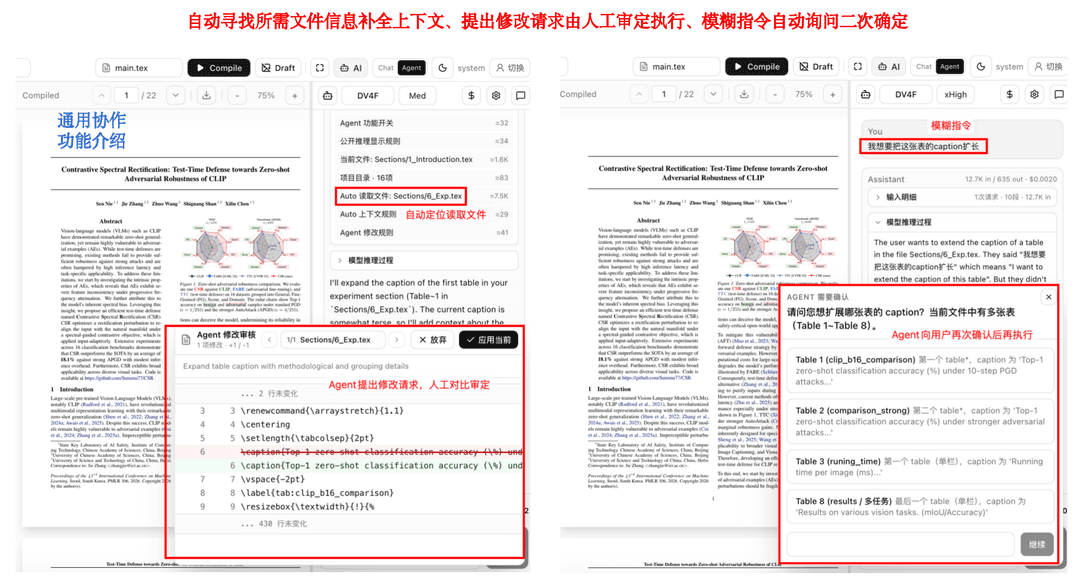
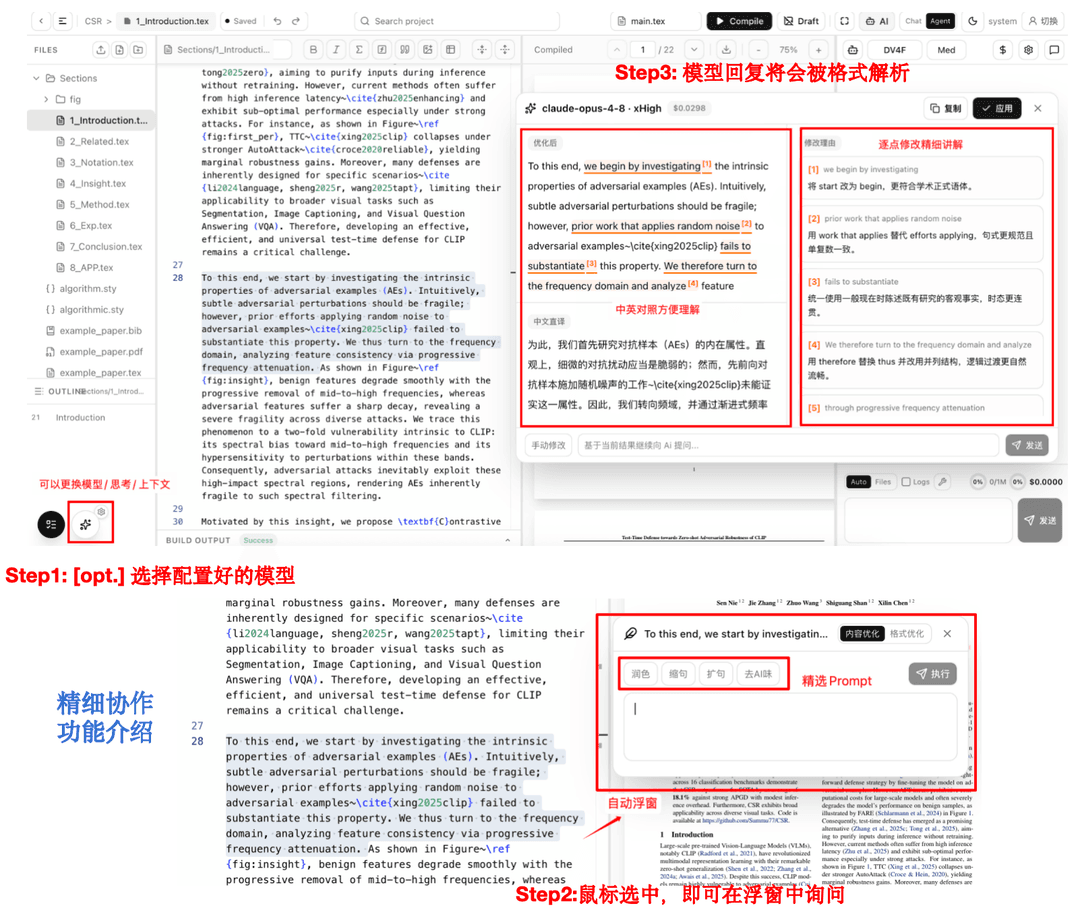
Next.jsandTypeScript, with a Tailwind-style UI. - Intelligent: the Agent can decide or propose actions such as reading files, modifying content, and asking clarification questions. Fine collaboration mode supports content-level and format-level refinement, and lets you customize preset quick prompts. See awesome-ai-research-writing for related prompt ideas.
New
- [2026-07-03] Migrated storage from IndexedDB to local folder storage; added non-TeX file preview and single-file download.
- [2026-06-17] Changed the fine collaboration workflow; use
Ctrl + Dto open or close it. - [2026-06-15] Added support for multimodal input and attachment input; added PDF-LaTeX mutual positioning.
- [2026-06-15] Added support for Agent large rewrites, streaming edits, no-confirm mode, and web access; added supplementary Other Data context for model understanding; added user-selectable compile engines.
- [2026-06-13] Added support for directly using local Codex and Claude Code login-based services.
- [2026-06-13] Fixed many permission/security issues and compatibility problems found with Claude.
- [2026-06-12] Refined the overall feature layout to make the interface cleaner, easier to use, and more logically organized; added keyboard shortcuts.
General Interface
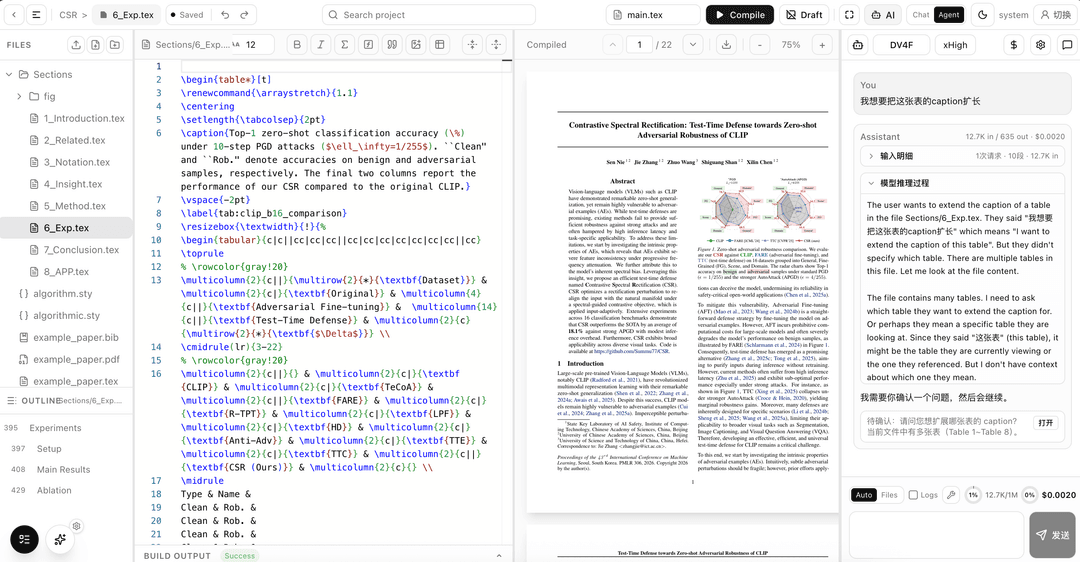
Agent General Collaboration
Agent Fine Collaboration
Quick Start
This section covers fast local usage. Some interfaces for collaboration are reserved but not fully implemented yet.
Step 1: Make sure the required environment is installed.
- npm, core requirement
- Node.js 20+, for the frontend
- .NET 10 SDK, for the backend
- A LaTeX distribution with
latexmkavailable onPATH, for PDF compilation- MacTeX / TeX Live are full distributions.
- BasicTeX / TinyTeX / MiKTeX are lightweight distributions.
Step 2: Install and start the application. Git is recommended because it makes future updates easier.
git clone https://github.com/Summu77/Ai-Latex.git
cd Ai-Latex
./start.sh
Step 3: Use and personalize the app.
Open http://localhost:3001 to start using Ai-LaTex. You can configure AI services from the settings panel in the upper-right corner.
If you have already logged in locally with Codex or Claude Code, choose OpenAI Codex OAuth or Claude Code CLI in the configuration panel to use those services directly.
Ai-LaTex also supports URL + API key subscriptions, such as https://opencode.ai/zen/go/v1, and can automatically fetch model lists for compatible providers.
Optional Configuration
Skip this section for the fastest local start. It is not needed in most cases.
Use it only when you want server-side default AI settings or Supabase email/GitHub login.
For optional server-side configuration, create local files from the examples:
cp .env.example .env
cp src/web/.env.local.example src/web/.env.local
cp src/server/ClaTeX.Api/appsettings.example.json src/server/ClaTeX.Api/appsettings.Development.json
Fill in only your own local values. Do not commit real keys.
The root .env file is the local reference copied from .env.example. Put private backend secrets here when running locally:
OPENCODE_API_KEY=replace-with-your-key
AI__BaseUrl=https://opencode.ai/zen/go/v1
AI__Model=deepseek-v4-flash
AI__ContextWindowTokens=1000000
AI__ThinkingEffort=xHigh
AI_LATEX_SYSTEM_USERNAME=system
AI_LATEX_SYSTEM_PASSWORD=change-this-password
Supabase__Url=https://your-project.supabase.co
Supabase__Key=replace-with-your-supabase-key
The backend API also reads src/server/ClaTeX.Api/appsettings.Development.json. Use it for ASP.NET Core settings such as AI provider defaults and Supabase server-side credentials:
{
  "AI": {
    "BaseUrl": "https://opencode.ai/zen/go/v1",
    "ApiKey": "replace-with-your-key",
    "Model": "deepseek-v4-flash",
    "ContextWindowTokens": 1000000,
    "ThinkingEffort": "xHigh"
  },
  "Supabase": {
    "Url": "https://your-project.supabase.co",
    "Key": "replace-with-your-supabase-key"
  }
}
The Next.js frontend reads src/web/.env.local. Put browser-exposed values here. These variables must be safe to expose to the client:
NEXT_PUBLIC_SUPABASE_URL=https://your-project.supabase.co
NEXT_PUBLIC_SUPABASE_ANON_KEY=replace-with-your-supabase-anon-key
Y_SWEET_CONNECTION_STRING=ys://localhost:8080
NEXT_PUBLIC_API_URL=http://localhost:51430
AI providers can also be configured from the application UI. Provider URLs, API keys, default models, and thinking settings are intentionally not hardcoded in this repository.
Acknowledgements
This project is built on the original foundation of EvanLuo42/ClaTex. Thank you!
Part of the Agent implementation was inspired by Nanobot. Thank you!
License
This project keeps the upstream MIT license. See LICENSE.
// faq
What is Ai-Latex?
Ai-LaTex: A local-first LaTeX editor with PDF compilation, AI Agent collaboration, Codex/Claude Code support, and fine-grained academic writing assistance.. It is open-source on GitHub.
Is Ai-Latex free to use?
Ai-Latex is open-source under the MIT license, so it is free to use.
What category does Ai-Latex belong to?
Ai-Latex is listed under automation in the Claudeers registry of Claude-compatible tools.
// embed badge

[](https://claudeers.com/ai-latex)
// retro hit counter

[](https://claudeers.com/ai-latex)
// reviews
// guestbook
// related in Automation & Workflows
 🔓
🔓 🔓
🔓The API to search, scrape, and interact with the web at scale. 🔥
 🔓
🔓🌐 Make websites accessible for AI agents. Automate tasks online with ease.
 🔓
🔓Taste-Skill - gives your AI good taste. stops the AI from generating boring, generic slop