
ai-dispatch
Your daily AI intelligence dispatch to Email 📧· Robotics, Agents & LLMs analyzed by Claude Opus · 每日多源聚合 + 深度分析,GitHub Actions 一键部署,无需服务器
Install with your AI
Paste into Claude Code, Cursor, or any agent — it reads the repo and wires the tool into your project.
Install and set up ai-dispatch (release-binary project) into my current project.
Found on https://claudeers.com/ai-dispatch
Repo: https://github.com/Yifannnnnnnnw/ai-dispatch
Homepage/docs: —
Detected install method: release-binary → inspect the README
Category: automation. Platforms: cli, api, web.
Read the repo's README for exact setup and env vars, then install it and wire it into my project.

Claudeers Health Verdict:
slowing; community-verified: false. Confirm the source before running anything.
Grab the latest release asset from GitHub.
# download a build from https://github.com/Yifannnnnnnnw/ai-dispatch/releases
git clone https://github.com/Yifannnnnnnnw/ai-dispatch
// compatibility
| Platforms | cli, api, web |
|---|---|
| Operating systems | — |
| AI compatibility | claude |
| License | MIT |
| Pricing | open-source |
| Language | Python |
📡 AI Dispatch
Your daily AI intelligence briefing, delivered to your inbox.
Automatically aggregates the latest in AI, Robotics, and Agents every morning — analyzed by an LLM of your choice, delivered to your inbox. Runs entirely on GitHub Actions. No server. No subscription.
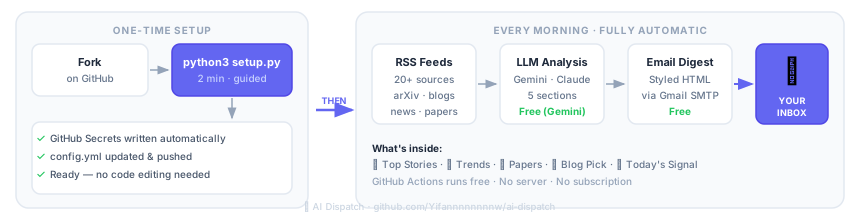
What You Get
Every email contains five structured sections:
| Section | Content |
|---|---|
| 📌 Top Stories | 10–15 curated items, each with significance analysis and cross-story connections |
| 📈 Trend Analysis | Cross-article patterns with evidence and forward predictions |
| 🔬 Papers Worth Reading | Selected arXiv papers with core contributions and reading focus |
| 📖 Blog Pick | One deep-read recommendation (never repeats, auto-deduped) |
| 💡 Today's Signal | The one judgment that matters most today, in one sentence |
Quick Start
No terminal required — everything runs in your browser.
Prerequisites
- GitHub account (free)
- Gmail account
Step 1 — Fork this repo
Click Fork in the top right → create it under your own account.
Step 2 — Run the Setup workflow
Go to Actions → ⚙️ Setup → Run workflow and fill in the form:
| Field | What to enter |
|---|---|
| LLM provider | gemini (free) or anthropic (paid) |
| Gmail address | your Gmail address |
| Recipient email | leave blank to use the Gmail address above |
| Send time (UTC) | hour 0–23 — Beijing 08:00 → 0, London BST 07:00 → 6, New York 07:00 → 11 |
| Output language | English or 中文 |
The workflow updates config.yml and prints a checklist of the secrets you need to add next.
Step 3 — Add secrets
Go to Settings → Secrets and variables → Actions → New repository secret
Add these 4 secrets (the Setup workflow tells you exactly what to put in each):
| Secret | Value |
|---|---|
GEMINI_API_KEY | Free key from aistudio.google.com/apikey — or ANTHROPIC_API_KEY if you chose Anthropic |
GMAIL_USER | Your Gmail address |
GMAIL_APP_PASSWORD | 16-character app password — how to get one ↓ |
RECIPIENT_EMAIL | Destination inbox |
Gmail App Password
Gmail requires an app-specific password, not your account password.
- Go to myaccount.google.com/security
- Confirm 2-Step Verification is enabled
- Search App Passwords → open it
- Select Mail + Mac → click Generate
- Copy the 16-character password (shown only once, no spaces)
Step 4 — Verify
Go to Actions → ✅ Check Setup → Run workflow
── GitHub Secrets ──────────────────────────────────
  ✅  GEMINI_API_KEY     (set)
  ✅  GMAIL_USER         (set)
  ✅  GMAIL_APP_PASSWORD (set)
  ✅  RECIPIENT_EMAIL    (set)

── config.yml ──────────────────────────────────────
  ✅  config.yml found
  ✅  topics configured  (3 topics)
  ✅  news_feeds configured  (9 sources)
  ✅  blog_feeds configured  (8 blogs)

── LLM API ──────────────────────────────────────────
  ✅  API connection successful

── Gmail SMTP ───────────────────────────────────────
  ✅  Gmail login successful ([email protected])

── Test email ───────────────────────────────────────
  ✅  Test email sent (check your inbox)

══════════════════════════════════════════════════════
  🎉  All checks passed! Your daily digest starts tomorrow.
══════════════════════════════════════════════════════
Once all green, AI Dispatch runs automatically every day. The default send time targets 07:00 BST / 07:00 GMT — change it via send_hour_utc in config.yml.
Prefer the command line?
Set up locally with the interactive wizard (requires Git, Python 3.10+, and GitHub CLI).
Step 0 — Install Git and GitHub CLI
Install Git
# macOS — comes pre-installed; if missing:
xcode-select --install
# Windows
winget install Git.Git
# Linux (Debian / Ubuntu)
sudo apt install git
Windows: After
wingetinstalls Git, close and reopen your terminal before continuing.
Install GitHub CLI
# macOS
brew install gh
# Windows — open a new terminal after this completes
winget install GitHub.cli
# Linux (Debian / Ubuntu)
sudo apt install gh
Windows: Same as above — reopen your terminal after installation so
ghis on your PATH.
Log in to GitHub
gh auth login
Follow the prompts — select GitHub.com → HTTPS → Login with a web browser.
Step 1 — Fork, clone, and launch
# macOS / Linux
gh repo fork Yifannnnnnnnw/ai-dispatch --clone
cd ai-dispatch        # use the folder name printed by gh above
python3 setup.py
# Windows
gh repo fork Yifannnnnnnnw/ai-dispatch --clone
cd ai-dispatch        # use the folder name printed by gh above
python setup.py
ghprints the local path after cloning, e.g.Cloned fork's Git repository to ai-dispatch.
The wizard asks a few questions and handles everything else — secrets, config, and push.
Step 2 — Verify
Go to Actions → ✅ Check Setup → Run workflow and confirm all checks pass.
Cost
GitHub Actions is always free. The only potential cost is the LLM API call, depending on which provider you use.
Default (Gemini — free):
| Model | Cost | Notes |
|---|---|---|
gemini-2.0-flash | Free | Default — 1,500 requests/day limit, more than enough for a daily digest |
gemini-2.5-pro | Free within quota | Higher quality, with per-minute rate limits |
Optional (Anthropic — paid):
| Model | Per day | Per month | Notes |
|---|---|---|---|
claude-sonnet-4-6 | ~$0.05 | ~$1.50 | Great quality |
claude-opus-4-7 | ~$0.67 | ~$20 | Highest quality |
To switch providers, update provider and digest.model in config.yml.
File Structure
ai-dispatch/
├── config.yml              ← Your personalization (the only file to edit)
├── setup.py                ← Interactive setup wizard
├── fetch_news.py           ← Main pipeline
├── check_setup.py          ← Setup verification script
├── requirements.txt
├── sent_history.json       ← Auto-maintained dedup log (do not edit manually)
└── .github/workflows/
    ├── daily_news.yml      ← Daily cron job
    ├── setup.yml           ← First-time setup wizard (browser-based)
    └── check_setup.yml     ← One-click setup check
FAQ
Q: Test email arrived but no daily digest? Check Actions → AI Dispatch for errors. GitHub Actions cron can occasionally delay 15–30 minutes.
Q: Gmail login fails (SMTPAuthenticationError)? Make sure you're using the 16-character app password, not your Gmail account password.
Q: How do I change the output language?
Edit output_language in config.yml. Default is English — change it to 中文 for Chinese output. The setup wizard also lets you choose during initial setup.
Q: How do I add my own RSS sources?
Add a line under news_feeds or blog_feeds in config.yml: Source Name: https://rss-url.
Q: Blog picks keep repeating?
sent_history.json tracks all previously sent URLs. To reset, clear the urls array in that file.
📡 AI Dispatch(中文)
每天早上,AI 驱动的深度简报,自动聚合分析,发到你的邮箱。
全程运行在 GitHub Actions 上,不需要服务器,不需要订阅费,Fork 即用。
效果预览
每封邮件包含五个固定板块:
| 板块 | 内容 |
|---|---|
| 📌 重点新闻 | 10–15 条精选,每条附意义分析和关联判断 |
| 📈 趋势分析 | 跨文章归纳的行业/技术趋势及预判 |
| 🔬 值得深挖 | 精选 arXiv 论文,说明核心贡献和阅读重点 |
| 📖 今日推荐博客 | 1 篇深度导读,自动去重不重复 |
| 💡 今日信号 | 一句话最关键判断 |
快速开始
前置条件
- GitHub 账号(免费)
- Gmail 账号
全程在浏览器完成,无需安装任何软件。
第一步:Fork 仓库
点击右上角 Fork → 创建到你自己的账号下。
第二步:运行 Setup workflow
进入仓库 → Actions → ⚙️ Setup → Run workflow,填写表单:
| 字段 | 填写内容 |
|---|---|
| LLM provider | gemini(免费)或 anthropic(付费) |
| Gmail 地址 | 你的 Gmail 地址 |
| 收件邮箱 | 留空则默认与 Gmail 地址相同 |
| 发送时间(UTC) | 小时 0–23 — 北京 08:00 → 0,伦敦 BST 07:00 → 6,纽约 07:00 → 11 |
| 输出语言 | English 或 中文 |
workflow 运行完成后会自动更新 config.yml,并在日志中打印需要添加的 Secrets 清单。
第三步:添加 Secrets
进入仓库 → Settings → Secrets and variables → Actions → New repository secret
按 Setup workflow 日志中的提示,添加以下 4 个 Secrets:
| Secret 名称 | 填写内容 |
|---|---|
GEMINI_API_KEY | 在 aistudio.google.com/apikey 免费申请;若选 Anthropic 则改为 ANTHROPIC_API_KEY |
GMAIL_USER | 你的 Gmail 地址 |
GMAIL_APP_PASSWORD | 16 位应用密码 — 获取方法 ↓ |
RECIPIENT_EMAIL | 收件邮箱 |
Gmail 应用密码
Gmail 不允许直接用账号密码,需要生成专用的「应用密码」。
- 打开 myaccount.google.com/security
- 确认两步验证已开启(未开启则先开启)
- 搜索框输入 App Passwords → 进入
- 选择「邮件」+「Mac」→ 点击生成
- 复制显示的 16 位密码(只显示一次,去掉空格填入)
第四步:验证配置
进入仓库 → Actions → ✅ Check Setup → Run workflow
── GitHub Secrets ──────────────────────────────────
  ✅  GEMINI_API_KEY     (已设置)
  ✅  GMAIL_USER         (已设置)
  ✅  GMAIL_APP_PASSWORD (已设置)
  ✅  RECIPIENT_EMAIL    (已设置)

── config.yml ──────────────────────────────────────
  ✅  config.yml 存在
  ✅  topics 已配置      (3 个主题)
  ✅  news_feeds 已配置  (9 个来源)
  ✅  blog_feeds 已配置  (8 个博客)

── LLM API ──────────────────────────────────────────
  ✅  API 连接成功

── Gmail SMTP ───────────────────────────────────────
  ✅  Gmail 登录成功 ([email protected])

── 测试邮件 ─────────────────────────────────────────
  ✅  测试邮件已发送 (请检查收件箱)

══════════════════════════════════════════════════════
  🎉  所有检查通过!查收测试邮件后即可等待每日简报。
══════════════════════════════════════════════════════
全部绿色后每天自动运行,默认目标到达时间为 BST 07:00 / GMT 07:00。
偏好命令行?
使用本地交互向导配置(需要 Git、Python 3.10+ 和 GitHub CLI)。
第零步:安装 Git 和 GitHub CLI
安装 Git
# macOS — 一般已预装;如果没有:
xcode-select --install
# Windows
winget install Git.Git
# Linux(Debian / Ubuntu)
sudo apt install git
Windows 注意:
winget安装完后,关闭终端重新打开再继续。
安装 GitHub CLI
# macOS
brew install gh
# Windows — 安装完成后需要重新打开终端
winget install GitHub.cli
# Linux(Debian / Ubuntu)
sudo apt install gh
Windows 注意: 同上,安装后重新打开终端,
gh才能被识别。
登录 GitHub
gh auth login
按提示选择 GitHub.com → HTTPS → Login with a web browser。
第一步:Fork、clone 并启动向导
# macOS / Linux
gh repo fork Yifannnnnnnnw/ai-dispatch --clone
cd ai-dispatch        # 用 gh 输出的文件夹名,通常就是 ai-dispatch
python3 setup.py
# Windows
gh repo fork Yifannnnnnnnw/ai-dispatch --clone
cd ai-dispatch        # 用 gh 输出的文件夹名,通常就是 ai-dispatch
python setup.py
向导会自动写入所有 Secrets、更新 config.yml 并推送。
第二步:验证配置
进入仓库 → Actions → ✅ Check Setup → Run workflow,确认所有检查通过。
费用参考
GitHub Actions 完全免费。唯一的可能成本是 LLM API 调用(取决于你选择的 provider)。
Gemini(默认,免费):
| 模型 | 费用 | 说明 |
|---|---|---|
gemini-2.0-flash | 免费 | 默认,每天 1500 次请求限额,日报绰绰有余 |
gemini-2.5-pro | 免费额度内免费 | 质量更高,有每分钟请求限制 |
Anthropic(付费,可选):
| 模型 | 每天约 | 每月约 | 说明 |
|---|---|---|---|
claude-sonnet-4-6 | ¥0.36 | ¥11 | 质量很好 |
claude-opus-4-7 | ¥4.80 | ¥144 | 最高质量 |
切换 provider 只需改 config.yml 中的 provider 和 digest.model 字段。
文件说明
ai-dispatch/
├── config.yml              ← 你的个性化配置(唯一需要编辑的文件)
├── setup.py                ← 交互式配置向导
├── fetch_news.py           ← 主程序
├── check_setup.py          ← 配置验证脚本
├── requirements.txt
├── sent_history.json       ← 已推送博客记录(自动维护,请勿手动编辑)
└── .github/workflows/
    ├── daily_news.yml      ← 每日定时任务
    └── check_setup.yml     ← 一键验证配置
常见问题
Q: 测试邮件收到了但每日邮件没来? 检查 Actions → AI Dispatch 里有没有报错。GitHub Actions 的 cron 有时会延迟 15–30 分钟。
Q: Gmail 登录失败 (SMTPAuthenticationError)? 确认用的是「应用专用密码」(16位)而不是 Gmail 账号密码本身。
Q: 如何切换输出语言?
修改 config.yml 中的 output_language 字段。默认为 English,改为 中文 即输出中文。配置向导中也可以在初始设置时选择。
Q: 如何添加自己的 RSS 源?
在 config.yml 的 news_feeds 或 blog_feeds 下新增一行:名称: RSS链接。
Q: 推荐博客一直重复?
sent_history.json 记录已推送内容,如需重置,清空该文件的 urls 数组即可。
// faq
What is ai-dispatch?
Your daily AI intelligence dispatch to Email 📧· Robotics, Agents & LLMs analyzed by Claude Opus · 每日多源聚合 + 深度分析,GitHub Actions 一键部署,无需服务器. It is open-source on GitHub.
Is ai-dispatch free to use?
ai-dispatch is open-source under the MIT license, so it is free to use.
What category does ai-dispatch belong to?
ai-dispatch is listed under automation in the Claudeers registry of Claude-compatible tools.
// embed badge

[](https://claudeers.com/ai-dispatch)
// retro hit counter

[](https://claudeers.com/ai-dispatch)
// reviews
// guestbook
// related in Automation & Workflows
 🔓
🔓 🔓
🔓The API to search, scrape, and interact with the web at scale. 🔥
 🔓
🔓🌐 Make websites accessible for AI agents. Automate tasks online with ease.
 🔓
🔓Taste-Skill - gives your AI good taste. stops the AI from generating boring, generic slop