
ai-community-skills
Skills for Claude Code, Codex, and Grok are scattered across dozens of GitHub repositories. ai-community-skills pulls them into one local catalog you can sea…
Install with your AI
Paste into Claude Code, Cursor, or any agent — it reads the repo and wires the tool into your project.
Install and set up ai-community-skills (npm project) into my current project.
Found on https://claudeers.com/ai-community-skills
Repo: https://github.com/xm1k3/ai-community-skills
Homepage/docs: https://xm1k3.github.io/ai-community-skills/
Detected install method: npm → npm install ai-community-skills
Category: skills. Platforms: cli, web.
Read the repo's README for exact setup and env vars, then install it and wire it into my project.

Claudeers Health Verdict:
active; community-verified: false. Confirm the source before running anything.
npm install ai-community-skills
git clone https://github.com/xm1k3/ai-community-skills
// compatibility
| Platforms | cli, web |
|---|---|
| Operating systems | — |
| AI compatibility | claude |
| License | MIT |
| Pricing | open-source |
| Language | TypeScript |

ai-community-skills
All the community Agent Skills scattered across GitHub, in one local catalog. Search them, browse them, and install them into Claude Code, Codex, or Grok, with a risk check on every skill as a bonus.
- Sources
- Getting started
- Web dashboard
- Risk analysis
- Reference
- Disclaimer
- License
Sources
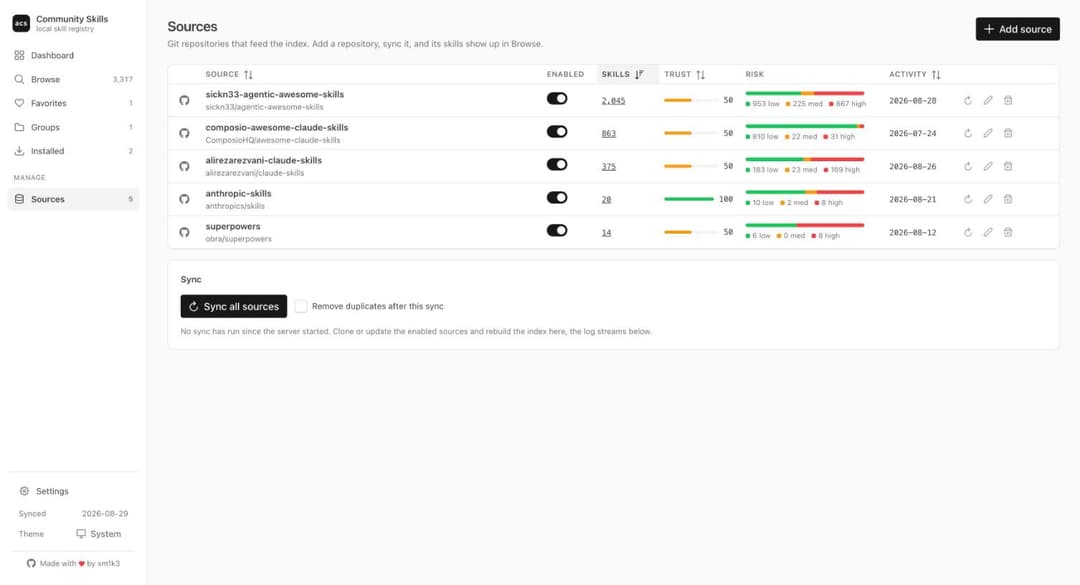
The curated list of community repositories lives in config.json at the root of this repository. acs init downloads the latest version of that file and writes it to ~/.acs/config.json, so a fresh install always starts from the current list (pass --offline to use the copy bundled with the package instead).
| Source | Repository | Enabled |
|---|---|---|
| anthropic-skills | anthropics/skills | yes |
| superpowers | obra/superpowers | yes |
| composio-awesome-claude-skills | ComposioHQ/awesome-claude-skills | yes |
| sickn33-agentic-awesome-skills | sickn33/agentic-awesome-skills | yes |
| alirezarezvani-claude-skills | alirezarezvani/claude-skills | yes |
| behisecc-awesome-claude-skills | BehiSecc/awesome-claude-skills | yes |
| travisvn-awesome-claude-skills | travisvn/awesome-claude-skills | yes |
| humanlayer-skills | humanlayer/skills | yes |
| mattpocock-skills | mattpocock/skills | yes |
| k-dense-scientific-agent-skills | K-Dense-AI/scientific-agent-skills | yes |
| cloudflare-security-audit-skill | cloudflare/security-audit-skill | yes |
| ayghri-i-have-adhd | ayghri/i-have-adhd | yes |
Know a good repository of skills that is missing? Open a pull request that adds it to config.json:
{ "name": "owner-repo", "repo": "https://github.com/owner/repo", "enabled": true }
name is the folder the repository is cloned into and the label used everywhere in the catalog, repo accepts https URLs, owner/name GitHub shorthand, ssh URLs, or local file:// URLs. trust (0-100, default 50) says how much the copy from that repository should win when the same skill exists in more than one source.
Installation
npm install -g ai-community-skills
Or run it without installing anything:
npx ai-community-skills init
The binary is available as ai-community-skills and as the short alias acs. Node.js 20 or newer and git on PATH are required. After installing, run acs init to write the default config to ~/.acs/config.json, then acs sync to build the catalog.
Commands
| Command | Description |
|---|---|
acs init | Download the curated source list and write ~/.acs/config.json. --offline uses the bundled copy. |
acs sync | Clone or update every enabled source and rebuild the index. |
acs list | List indexed skills with filters for category, risk, source, and findings. |
acs search <query> | Search skills by name, description, category, and tags. |
acs info <skill> | Full metadata, risk flags, findings, source reputation, and install state. |
acs validate [skill] | Check frontmatter, referenced paths, and description quality. |
acs install <skill> | Install a skill after a risk summary and a confirmation. |
acs uninstall <skill> | Remove an installed skill. |
acs dedupe | Remove duplicate copies of the same skill across sources. |
acs stats | Counts by category, source, risk level, and finding. |
acs export-awesome-list | Generate an awesome-list style markdown file from the catalog. |
acs ui | Start the local web dashboard on port 8080. |
Every command that writes to disk has a --dry-run flag or asks for confirmation unless --yes is passed. Run acs <command> --help for the full list of flags.
Usage
Build the catalog:
$ acs sync
Syncing anthropic-skills (https://github.com/anthropics/skills) ... updated, 19 skills indexed, 1 skipped
Syncing superpowers (https://github.com/obra/superpowers) ... unchanged, 14 skills kept
...
Index rebuilt with 3315 skills from 5 source(s).
A source whose repository did not change since the last sync keeps its index entries instead of being rescanned, so a routine sync takes a few seconds. The index is rebuilt anyway after upgrading acs, or on demand with acs sync --force.
Search and inspect:
$ acs search "frontend design"
$ acs info frontend-design
Install into Claude Code (personal scope, ~/.claude/skills/<name>), into the current project, into Codex, or into Grok Build:
$ acs install frontend-design
$ acs install frontend-design --project
$ acs install frontend-design --target codex
$ acs install frontend-design --target grok
$ acs install frontend-design --target web
--target web produces a zip in ./acs-exports/ for manual upload to claude.ai. When a skill name exists in more than one source, add --source <name>. Installed copies are never updated automatically: acs sync warns when the upstream copy changed, and you decide whether to reinstall.
Web dashboard
acs ui
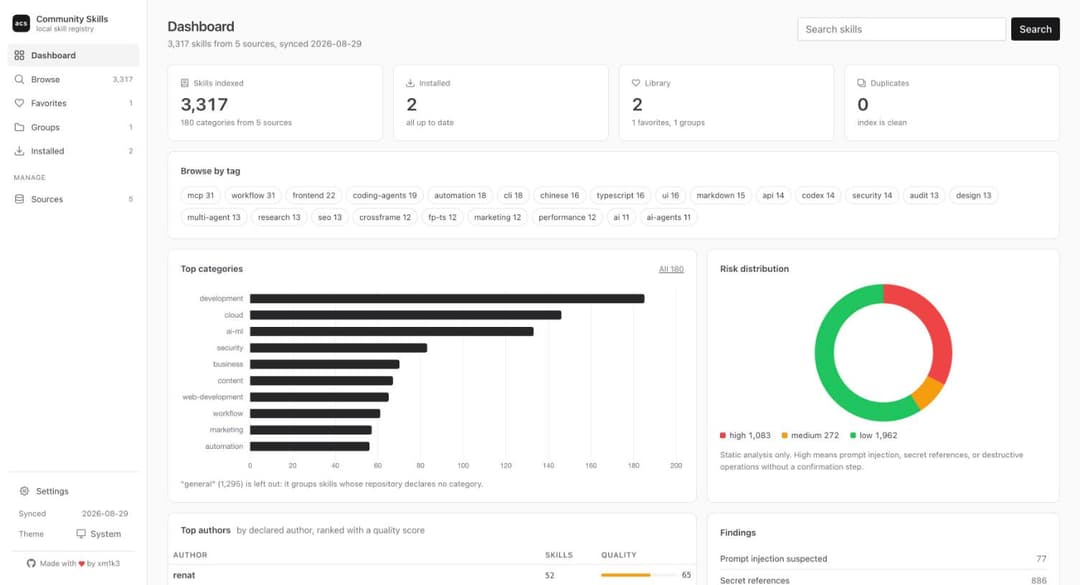
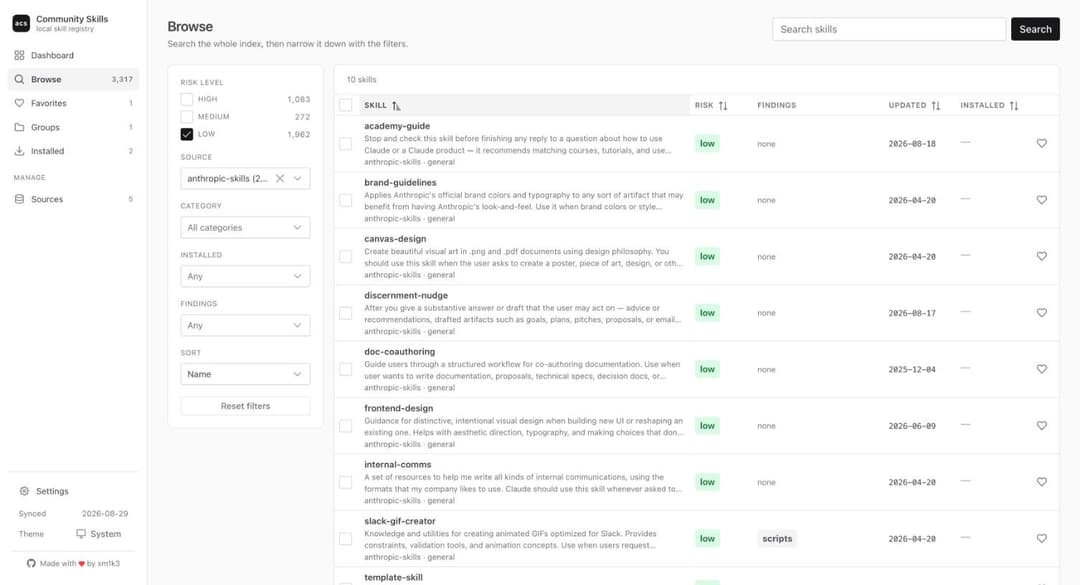
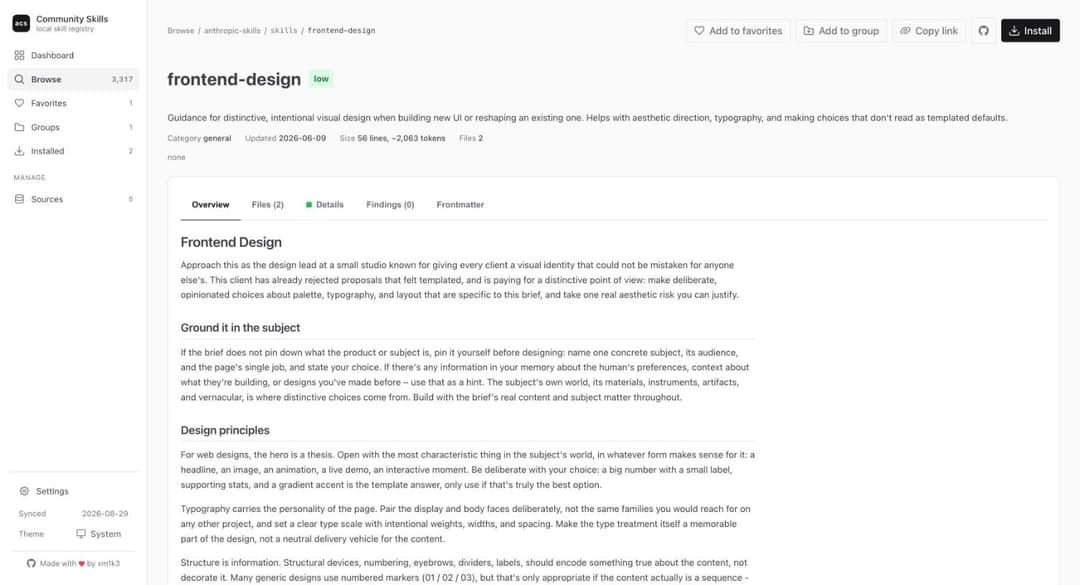
Opens a local dashboard on http://127.0.0.1:8080 with the same catalog: search and filters, skill pages with rendered SKILL.md and a file browser, every risk finding with a link to the exact line, favorites and groups that can be installed in one go and shared as JSON, source management with a trust level per repository, and duplicate cleanup. Every view has a shareable URL.
Risk analysis
Every skill is analyzed statically, nothing found in a skill is ever executed. Each entry records whether it ships scripts, references network calls, contains destructive operations and whether they are paired with a confirmation, uses Claude Code specific frontmatter, contains prompt injection patterns, or references secrets and credential files. The result is a low, medium, or high risk level plus the list of findings, each with file, line, and excerpt, so you can judge false positives yourself before installing.
Duplicates across sources are detected with a normalized content hash that ignores catalog metadata and whitespace, and the copy from the most trusted source is kept.
Config
Your local ~/.acs/config.json is yours to edit, from the file or from the Sources page of the dashboard:
{
  "sources": [
    { "name": "anthropic-skills", "repo": "https://github.com/anthropics/skills", "enabled": true, "trust": 100 },
    ...
  ],
  "dedupeAfterSync": true
}
All data lives under ~/.acs/ (config, index, install records, favorites and groups, cloned sources). Set ACS_HOME to use a different directory.
Updates
Once a day (once an hour while acs ui is running) acs asks the npm registry for the latest published version. When a newer one exists, every command prints a short notice on stderr and the dashboard footer shows an upgrade button with the command to run:
npm install -g ai-community-skills@latest
The check never blocks a command for more than a moment, the result is cached in ~/.acs/update-check.json, and nothing else is sent. Set ACS_NO_UPDATE_CHECK=1 to turn it off.
Disclaimer
Skills are community content pulled from third-party repositories. The risk analysis is heuristic and static: it will produce false positives and can miss real problems. Read a skill before installing it, especially anything rated high. The author is not responsible for what an installed skill does in your environment.
License
ai-community-skills is distributed under the MIT License.
// faq
What is ai-community-skills?
Skills for Claude Code, Codex, and Grok are scattered across dozens of GitHub repositories. ai-community-skills pulls them into one local catalog you can search, browse, and install from, with a risk check on every skill as a bonus.. It is open-source on GitHub.
Is ai-community-skills free to use?
ai-community-skills is open-source under the MIT license, so it is free to use.
What category does ai-community-skills belong to?
ai-community-skills is listed under skills in the Claudeers registry of Claude-compatible tools.
// embed badge

[](https://claudeers.com/ai-community-skills)
// retro hit counter

[](https://claudeers.com/ai-community-skills)
// reviews
// guestbook
// related in Claude Skills
 🔓
🔓An agentic skills framework & software development methodology that works.
 🔓
🔓 🔓
🔓💫 Toolkit to help you get started with Spec-Driven Development
 🔓
🔓AI coding assistant skill (Claude Code, Codex, OpenCode, Cursor, Gemini CLI, and more). Turn any folder of code, SQL schemas, R scripts, shell scripts, docs,…