
ai-code-fusion
Desktop app to process repository content into one file
Install with your AI
Paste into Claude Code, Cursor, or any agent — it reads the repo and wires the tool into your project.
Install and set up ai-code-fusion (git-clone project) into my current project.
Found on https://claudeers.com/ai-code-fusion
Repo: https://github.com/codingworkflow/ai-code-fusion
Homepage/docs: https://www.codingworkflow.com/
Detected install method: git-clone → git clone https://github.com/codingworkflow/ai-code-fusion
Category: devtools. Platforms: cli, api, desktop.
Read the repo's README for exact setup and env vars, then install it and wire it into my project.

Claudeers Health Verdict:
active; community-verified: false. Confirm the source before running anything.
git clone https://github.com/codingworkflow/ai-code-fusion
// compatibility
| Platforms | cli, api, desktop |
|---|---|
| Operating systems | — |
| AI compatibility | claude |
| License | GPL-3.0 |
| Pricing | open-source |
| Language | TypeScript |
AI Code Fusion
Features
A desktop app to prepare code repositories for AI workflows.
- Visual directory explorer for selecting code files
- File filtering with custom patterns and
.gitignoresupport - Token counting support for selected files
- Processed output ready to copy/export for AI tools
- Export format selector: Markdown or XML
- Cross-platform support (Windows, macOS, Linux)
- UI panel screenshots:
docs/APP_VIEWS.md
Processed Output Example
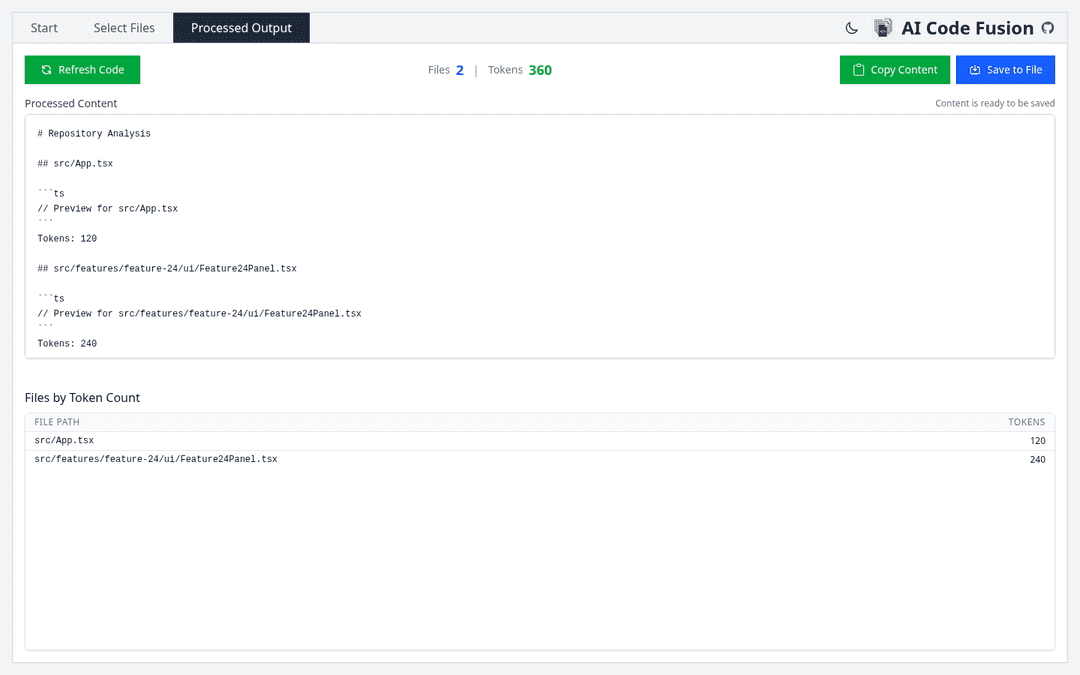
Full sample files:
- Markdown:
docs/examples/output-markdown.md - XML:
docs/examples/output.xml
Markdown export example
# Repository Analysis

## src/App.tsx

```ts
export function App() {
  return <main>Hello AI Code Fusion</main>;
}
```

Tokens: 120
XML export example
<?xml version="1.0" encoding="UTF-8"?>
<repository totalFiles="1" totalTokens="120">
  <file path="src/App.tsx" tokens="120"><![CDATA[
export function App() {
  return <main>Hello AI Code Fusion</main>;
}
  ]]></file>
</repository>
Download Release
Download the latest packaged build from GitHub Releases: https://github.com/codingworkflow/ai-code-fusion/releases
- Windows: download and run the
.exeinstaller - macOS: download the
.dmg, drag app to Applications - Linux: download the
.AppImage, then run:
chmod +x *.AppImage
./*.AppImage
Build from Source
Requirements:
- Node.js (v20 or later)
- npm
- Git
git clone https://github.com/codingworkflow/ai-code-fusion
cd ai-code-fusion

npm ci
npm run build:webpack
npm run build
Optional platform-specific builds:
npm run build:win
npm run build:linux
npm run build:mac
Renderer Structure
src/renderer/public/: static HTML shell (index.html)src/renderer/styles/: renderer stylesheet sourcessrc/renderer/components/,context/,i18n/: runtime renderer codesrc/assets/: canonical app icons and static media assets
Dev Container
This repo includes .devcontainer/ for a reproducible local environment.
- Node.js: 20 (matches CI)
- npm: bundled with Node 20 (currently 10.x)
- Container user:
vscode - UID/GID is aligned by Dev Containers defaults for bind-mount compatibility
- No host home or SSH key directory is mounted in the container by default
Smoke test with Dev Containers CLI:
devcontainer read-configuration --workspace-folder .
devcontainer build --workspace-folder .
devcontainer up --workspace-folder .
devcontainer exec --workspace-folder . node -v
devcontainer exec --workspace-folder . npm -v
devcontainer exec --workspace-folder . id -u
devcontainer exec --workspace-folder . npm run lint
Bug Reports & Support
For ai-code-fusion and claude-code-api, use this discussion thread for bug reports and troubleshooting:
Governance
License
GPL 3.0
// faq
What is ai-code-fusion?
Desktop app to process repository content into one file. It is open-source on GitHub.
Is ai-code-fusion free to use?
ai-code-fusion is open-source under the GPL-3.0 license, so it is free to use.
What category does ai-code-fusion belong to?
ai-code-fusion is listed under devtools in the Claudeers registry of Claude-compatible tools.
// embed badge

[](https://claudeers.com/ai-code-fusion)
// retro hit counter

[](https://claudeers.com/ai-code-fusion)
// reviews
// guestbook
// related in Developer Tools
 🔓
🔓The agent harness performance optimization system. Skills, instincts, memory, security, and research-first development for Claude Code, Codex, Opencode, Curs…
 🔓
🔓Makes your AI agent think like the laziest senior dev in the room. The best code is the code you never wrote.
 🔓
🔓Use Garry Tan's exact Claude Code setup: 23 opinionated tools that serve as CEO, Designer, Eng Manager, Release Manager, Doc Engineer, and QA
 🔓
🔓AI coding assistant skill (Claude Code, Codex, OpenCode, Cursor, Gemini CLI, and more). Turn any folder of code, SQL schemas, R scripts, shell scripts, docs,…