
AgentVerse-OS
Personal cloud OS for a developer and their AI agents on a single server. One-command install on Ubuntu, then everything in the browser: a windowed desktop,…
Install with your AI
Paste into Claude Code, Cursor, or any agent — it reads the repo and wires the tool into your project.
Install and set up AgentVerse-OS (release-binary project) into my current project.
Found on https://claudeers.com/agentverse-os
Repo: https://github.com/agentverse-os/AgentVerse-OS
Homepage/docs: —
Detected install method: release-binary → inspect the README
Category: devtools. Platforms: cli, api, desktop, web.
Read the repo's README for exact setup and env vars, then install it and wire it into my project.

Claudeers Health Verdict:
active; community-verified: false. Confirm the source before running anything.
Grab the latest release asset from GitHub.
# download a build from https://github.com/agentverse-os/AgentVerse-OS/releases
git clone https://github.com/agentverse-os/AgentVerse-OS
// compatibility
| Platforms | cli, api, desktop, web |
|---|---|
| Operating systems | — |
| AI compatibility | claude |
| License | Apache-2.0 |
| Pricing | open-source |
| Language | Rust |
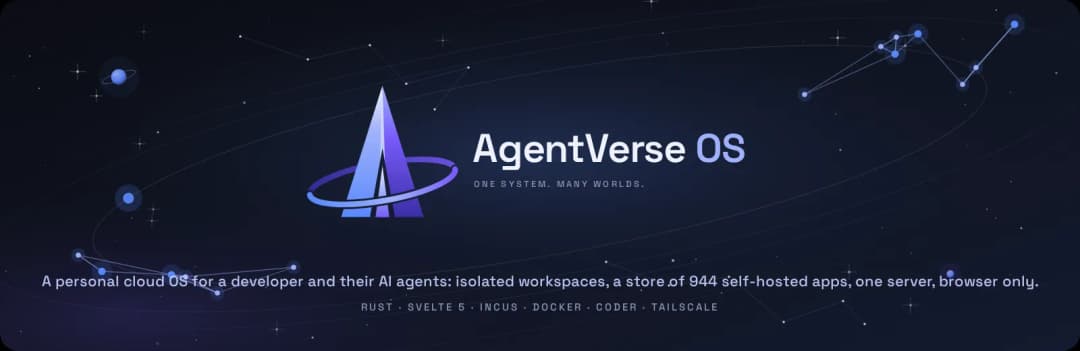
AgentVerse OS is a personal cloud operating system for a developer and their AI agents: your own cloud running on a single server, used from any device through the browser. It is built as a cross-platform vibe coding flow: the same desktop, workspaces and agents open on a laptop, a tablet or a phone, the workspace and its agents stay on the server, and the work continues where you left it. One command installs it on a clean Ubuntu; everything after that happens in the browser: a windowed desktop, isolated workspaces with VS Code and agents (Claude Code, Codex), a store of 944 self-hosted apps, backups and updates. Nothing is exposed to the internet: access goes through Tailscale with real certificates, no root CAs to install on your devices.
The project is in alpha and lives on a single test box. It works as a personal server for one person; there are no user accounts or permissions yet. See Status for what is done and what is not.
What it looks like
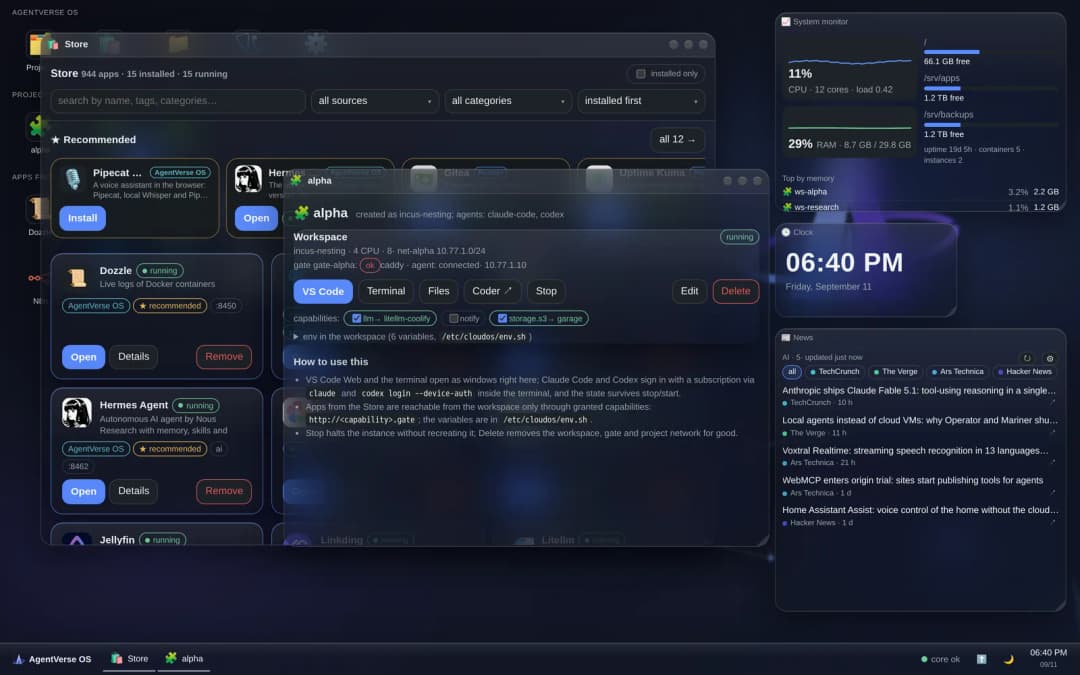
Desktop on a computer: the Store catalog, a project card with its workspace and capabilities, widgets. Monolith theme, glass surfaces.
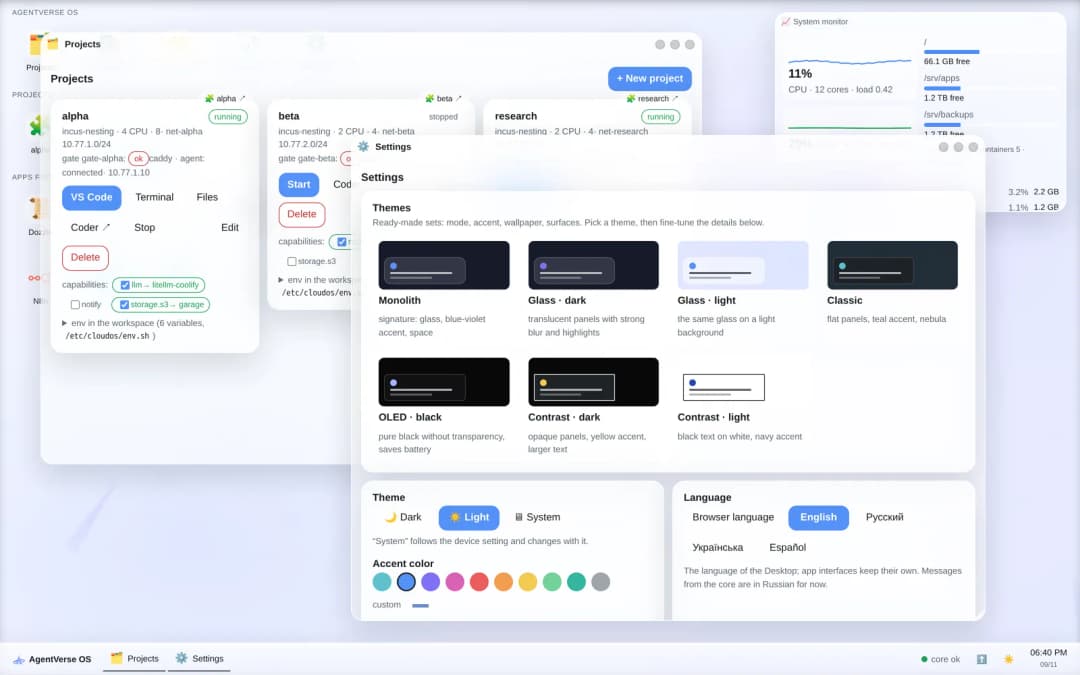
Light theme: projects and appearance settings. Seven presets, including OLED and high contrast. |
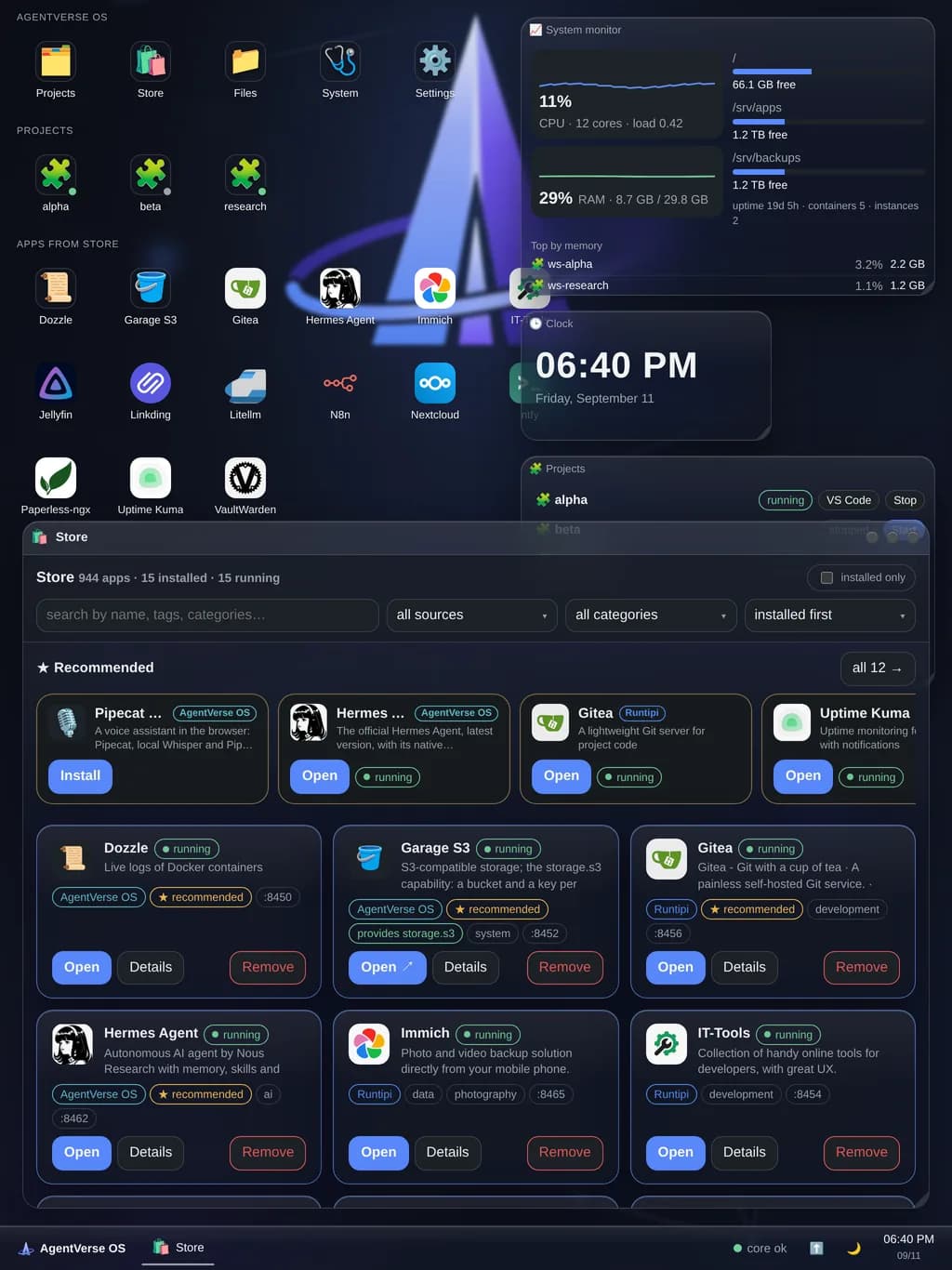
Tablet: the same windows and widgets, portrait wallpaper. |
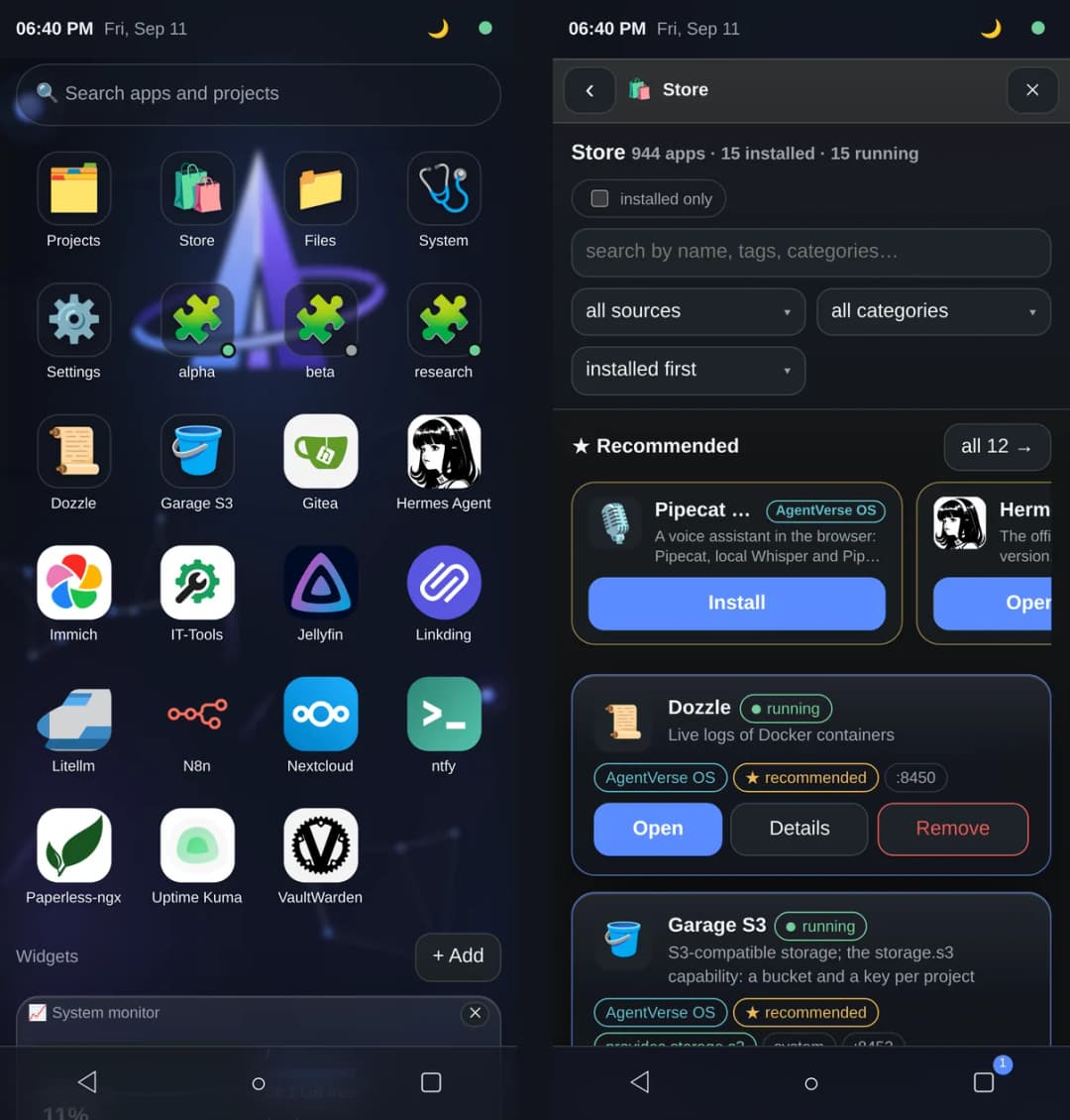
Phone: a home screen instead of a desktop, full-screen windows, PWA. One Desktop adapts to the device.
What it does
- Projects and workspaces. Every project gets its own network, its own gate and an isolated Incus container with Docker inside. Inside: VS Code in the browser, a terminal and agents; Claude Code and Codex log in with your subscriptions. Stop/start keeps the instance, resources are changed from the project card.
- A Store of 944 apps. The Runtipi, Coolify and Umbrel catalogs merged into one, with source badges. Guided install, login credentials right in the card, logs, automatic repair of data-directory permissions, links between apps (e.g. n8n → LiteLLM), per-app snapshots and rollback.
- Capabilities instead of addresses. A project asks for
storage.s3,llmornotify; the core connects the project's gate to the provider's network and drops environment variables into the workspace. Swapping Garage for another S3 does not touch the project. - Browser only. The first-run wizard joins Tailscale via a link or QR code, checks DNS and the certificate, creates the first project. System and app updates come from the Updates window: a package with automatic rollback if the new version does not come up.
- Backups. Scheduled ZFS snapshots and a restic repository taken from a snapshot; roll back a single app in two clicks. Off by default.
- A desktop like a desktop OS. Windows, taskbar, start menu, widgets (monitor, clock, news, weather, projects), Files over app data and workspace homes, Passwords & Access, themes and wallpapers, boot screen, offline overlay, screensaver. The UI speaks English, Russian, Ukrainian and Spanish; the language follows the browser or is set once for all devices.
- Two assistants already in the catalog. Hermes Agent with a web panel, and Pipecat Voice, a voice assistant in the browser with local speech recognition and synthesis. Voice control of the system itself is on the roadmap.
Architecture
flowchart LR
  subgraph devices["Your devices (tailnet)"]
    B["Browser · Desktop PWA<br/>laptop · tablet · phone"]
  end

  subgraph host["Server · Ubuntu · ZFS"]
    E["edge Caddy<br/>TLS from tailscaled<br/>:443 Desktop · :8444 Coder · :8450+ apps"]
    C["cloudd (Rust)<br/>API · CLI · Desktop embedded<br/>projects · apps · capabilities · backups · updates"]
    subgraph ws["Project alpha"]
      G["gate-alpha (Caddy)<br/>the only door into the workspace"]
      W["workspace · Incus<br/>Docker inside · VS Code · Claude Code · Codex"]
    end
    K["Komodo · App Runtime<br/>compose stacks of apps"]
    subgraph apps["Store apps · one network each"]
      S3["Garage · storage.s3"]
      LLM["LLM gateway · llm"]
      N["ntfy · notify"]
      X["Gitea · n8n · Nextcloud …"]
    end
    CO["Coder · workspace control plane"]
  end

  B -- "https · MagicDNS" --> E
  E --> C
  E --> CO
  E --> X
  C -- "project.yaml" --> CO
  CO -- "Incus API" --> W
  C -- "grant storage.s3" --> G
  G --> S3
  G --> LLM
  G --> N
  W -- "http://storage.s3.gate" --> G
  C -- "install / upgrade" --> K
  K --> apps
The core is small: seven entities (project, workspace, gate, app, capability, grant, route) and four contracts. Everything else is proven third-party software: Coder runs the workspaces, Incus isolates them, Komodo deploys compose stacks, Caddy holds the entry point, Tailscale provides the network and certificates.
Quick start
You need a clean Ubuntu 22.04+ (tested on 26.04), 8 GB of RAM or more, preferably a separate disk for ZFS, and a Tailscale account.
From the release package, nothing to build:
curl -LO https://github.com/agentverse-os/AgentVerse-OS/releases/download/v0.2.0/agentverse-os-0.2.0-x86_64.tar.gz
mkdir agentverse-os && tar xzf agentverse-os-0.2.0-x86_64.tar.gz -C agentverse-os && cd agentverse-os
sudo DISKS="/dev/disk/by-id/<disk for ZFS>" bootstrap/install.sh
Or from source:
git clone https://github.com/<owner>/agentverse-os && cd agentverse-os
cd desktop && npm install && npm run build && cd ..        # Desktop → cloudd/static
cd cloudd && cargo build --release && cd ..                # core with the Desktop embedded
sudo DISKS="/dev/disk/by-id/<disk for ZFS>" bootstrap/install.sh
The installer goes step by step: host checks → ZFS → Docker and Incus → Tailscale (a link and QR code to authorize the node, waits
for your confirmation, checks MagicDNS and HTTPS Certificates) → Coder → Komodo → edge → core → catalog → template → summary with
addresses. A checkout can also install from a package instead of a locally built binary: PACKAGE=agentverse-os-<version>-<arch>.tar.gz
(a file or an https URL); packages are built by scripts/release.sh.
When it finishes, open https://<node>.<tailnet>.ts.net/ and the first-run wizard completes the setup in the browser. Updates come
from the Updates window or sudo agentverse-update; the update channel is the stable.json of the latest release, e.g.
https://github.com/agentverse-os/AgentVerse-OS/releases/download/v0.2.0/stable.json.
Repository
| Directory | Contents |
|---|---|
cloudd/ | the core in Rust (axum, rusqlite, bollard): the /api/* API (60 routes, OpenAPI at /api/openapi.json), CLI, embedded Desktop; adapters for Incus, Docker, Coder, Komodo, Caddy; backups, updates, first-run wizard |
desktop/ | the Desktop in Svelte 5 and Vite, PWA: windows, widgets, Store, Files, Passwords, Settings; dictionaries for four languages in src/lib/i18n/; npm run build outputs to cloudd/static/ |
store/ | app manifests: manifest.yaml + compose.yaml; 938 imported from Runtipi, Coolify and Umbrel, 6 hand-written; recommended.yaml |
bootstrap/ | install.sh, update.sh (installed as agentverse-update), compose files for edge / Coder / Komodo / docker-proxy, host scripts, systemd unit |
templates/incus/ | the Coder → Incus workspace template |
assets/ | the Monolith mark, lockups, PWA icons, wallpapers, font, screenshots; build.py assembles everything into desktop/public |
scripts/ | release.sh builds the update package and channel manifest; demo/ holds demo data and the screenshot pipeline for this README |
tests/ | end-to-end tests on the live test box, shell tests for the installer; Desktop e2e with Playwright lives in desktop/e2e/ |
Development
cd cloudd && cargo test                       # 40 unit tests: contracts, gate and edge rendering, storage, updates
cd desktop && npm run dev                     # Vite with /api proxied to cloudd (CLOUDD_URL)
cd desktop && npm run check                   # svelte-check, including dictionary keys across the four languages
tests/shell/install_functions_test.sh         # installer functions against a tailscale shim, no sudo needed
sudo tests/e2e-stand.sh                       # on the test box: full scenario against live Incus, Docker, Coder, Komodo
The Desktop is embedded into the core binary with rust-embed: after npm run build, rebuild cloudd. Desktop e2e tests run on the
test box inside a Playwright container; see the headers of the tests in desktop/e2e/.
Status
| Done and verified on the test box | Partial | Not yet |
|---|---|---|
| core, projects, workspaces, capabilities, gate | voice: the assistant talks but does not control the system | user accounts and permissions, a second user |
| Store, install, links, logs, permission repair, snapshots, app updates | backups: no remote repository, no whole-system restore | a Host section in the UI: reboot, disks, core logs |
| Desktop on three devices and three browser engines, themes, wallpapers | a from-scratch install has been verified step by step, not in one run | |
| Tailscale, first-run wizard, self-update with rollback, update channel on GitHub Releases | UI in four languages; messages from the core (events, API errors) are Russian only |
License
Apache-2.0. The apps in the Store belong to their authors and ship under their own licenses; this repository only holds manifests and compose files imported from the open Runtipi, Coolify and Umbrel catalogs.
// faq
What is AgentVerse-OS?
Personal cloud OS for a developer and their AI agents on a single server. One-command install on Ubuntu, then everything in the browser: a windowed desktop, isolated workspaces with VS Code, Claude Code and Codex, a store of 944 self-hosted apps, backups and updates. Access only via Tailscale, nothing exposed to the internet. Rust core, Svelte UI.. It is open-source on GitHub.
Is AgentVerse-OS free to use?
AgentVerse-OS is open-source under the Apache-2.0 license, so it is free to use.
What category does AgentVerse-OS belong to?
AgentVerse-OS is listed under devtools in the Claudeers registry of Claude-compatible tools.
// embed badge

[](https://claudeers.com/agentverse-os)
// retro hit counter

[](https://claudeers.com/agentverse-os)
// reviews
// guestbook
// related in Developer Tools
 🔓
🔓The agent harness performance optimization system. Skills, instincts, memory, security, and research-first development for Claude Code, Codex, Opencode, Curs…
 🔓
🔓Makes your AI agent think like the laziest senior dev in the room. The best code is the code you never wrote.
 🔓
🔓Use Garry Tan's exact Claude Code setup: 23 opinionated tools that serve as CEO, Designer, Eng Manager, Release Manager, Doc Engineer, and QA
 🔓
🔓AI coding assistant skill (Claude Code, Codex, OpenCode, Cursor, Gemini CLI, and more). Turn any folder of code, SQL schemas, R scripts, shell scripts, docs,…