
AgentPlus
统一管理 AI 编程 Agent(Codex、Claude Code、OpenCode 等)的供应商与模型列表的桌面工具 · Desktop app to manage providers and model lists for AI coding agents
Install with your AI
Paste into Claude Code, Cursor, or any agent — it reads the repo and wires the tool into your project.
Install and set up AgentPlus (git-clone project) into my current project.
Found on https://claudeers.com/agentplus
Repo: https://github.com/cnklpz/AgentPlus
Homepage/docs: https://agent-plus.org
Detected install method: git-clone → git clone https://github.com/cnklpz/AgentPlus
Category: devtools. Platforms: cli, api, desktop, web.
Read the repo's README for exact setup and env vars, then install it and wire it into my project.

Claudeers Health Verdict:
active; community-verified: false. Confirm the source before running anything.
git clone https://github.com/cnklpz/AgentPlus
// compatibility
| Platforms | cli, api, desktop, web |
|---|---|
| Operating systems | — |
| AI compatibility | claude |
| License | AGPL-3.0 |
| Pricing | open-source |
| Language | Rust |


Features
- Provider library. Put an API URL and key in once and every agent can use it. There are 21 templates for common providers and coding plans; most need nothing from you but a key.
- Import links. A relay's "Import to CC Switch" button (Sub2API, New API…) can fill in the add-provider dialog: paste its link under Providers → Import link, or let AgentPlus open
ccswitch://links (Settings, Windows). See Import links. - Model lists. Fetch what a provider offers, then choose what each agent shows.
- Change preview. Nothing is written until you've looked at the diff, and whatever gets replaced is saved to
~/.agentplus/backups/first. - Local gateway. Converts between OpenAI Chat, OpenAI Responses and Anthropic Messages, streaming and tool calls included — which is how Claude Code can use a provider that only speaks OpenAI.
- Connection tests. Latency, plus a real request, so you know the URL, key and model work before you switch.
- WSL. Agents inside a WSL distro share the same provider library as Windows.
- Privacy mode.
Ctrl+Shift+Hhides keys, service URLs and usernames before a screenshot or a screen share.
Agents can also be restarted from the app. Then there's the command palette (Ctrl+K), a tray icon that keeps the gateway running after you close the window, in-app updates that check their own signature, and the interface in English or Chinese.
Install
Download the latest build from Releases.
Windows 10/11 (x64) — AgentPlus_<version>_x64-setup.exe. The installer isn't code-signed yet, so SmartScreen may warn you on first launch; click More info → Run anyway.
macOS 11+ (experimental) — _aarch64.dmg for Apple silicon, _x64.dmg for Intel. The app isn't notarized, so allow it under System Settings → Privacy & Security. If macOS insists it's damaged:
xattr -cr /Applications/AgentPlus.app
Linux packages aren't available yet.
Updates are checked on startup and installed from Settings → General → About.
Screenshots
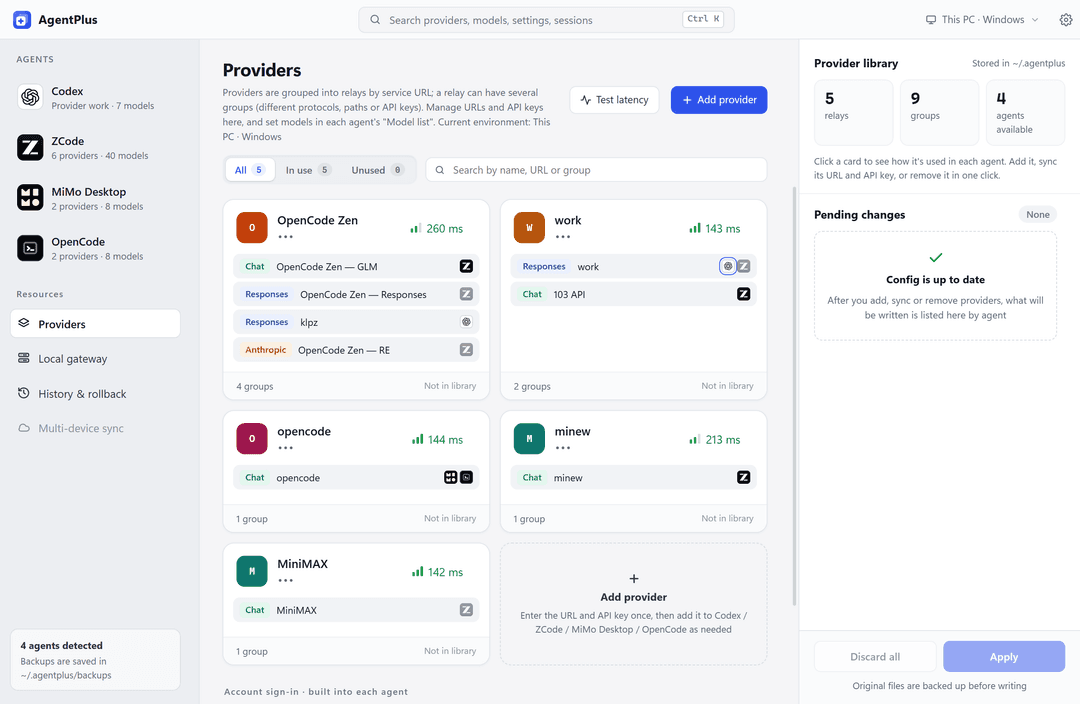 | 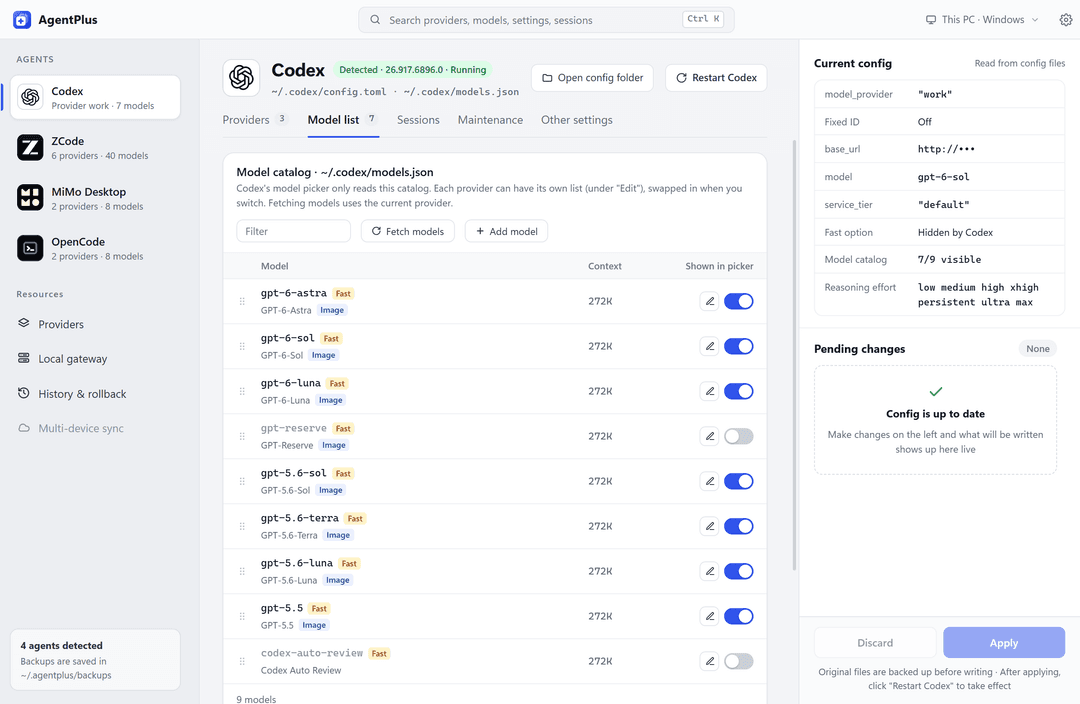 |
| The provider library, grouped by API service | Choosing which models Codex shows |
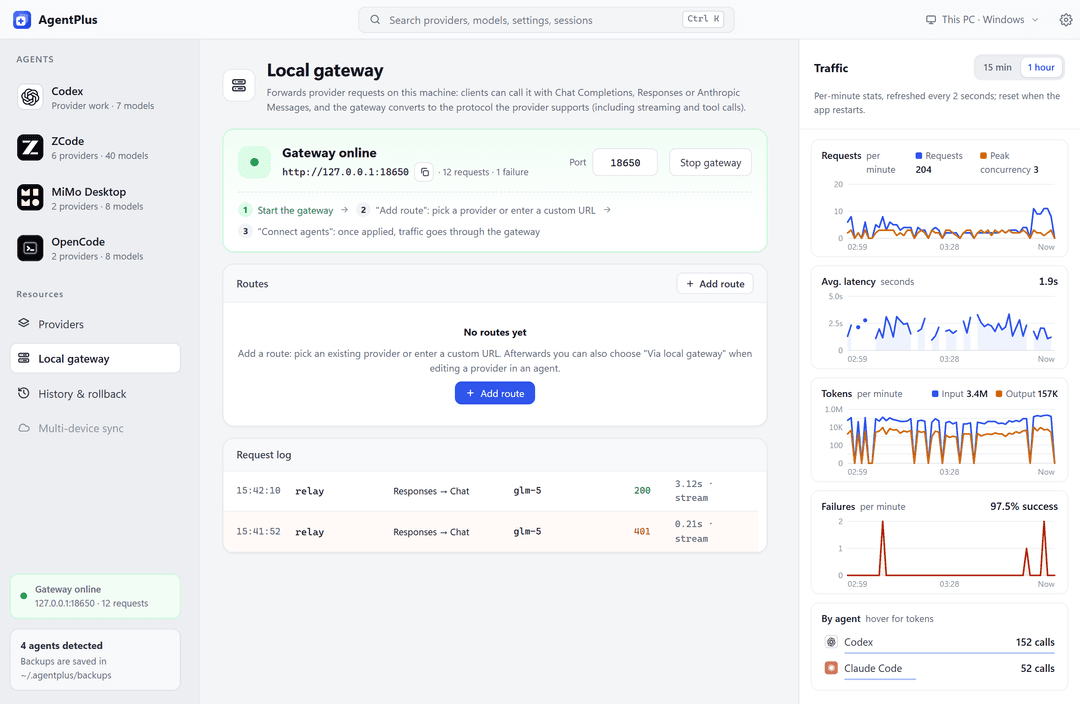 | |
| Gateway traffic, latency and failure rates | |
Supported agents
AgentPlus recognizes 18 agents and reads and writes the following config files:
| Agent | Config |
|---|---|
| Codex (desktop and CLI) | ~/.codex/config.toml, models.json |
| Claude Code | env in ~/.claude/settings.json |
| OpenCode | ~/.config/opencode/opencode.json(c), project-level opencode.json |
| MiMo Desktop | ~/.config/mimocode/mimocode.jsonc |
| ZCode | ~/.zcode/v2/provider_config.json |
| Gemini CLI | ~/.gemini/settings.json |
| Qwen Code | ~/.qwen/settings.json |
| Kimi Code | ~/.kimi-code/config.toml |
| Kilo Code | ~/.config/kilo/kilo.json(c) |
| CodeBuddy | ~/.codebuddy/models.json |
| WorkBuddy / WorkBuddy AI | ~/.workbuddy/models.json / ~/.workbuddy-ai/models.json |
| Droid (Factory) | ~/.factory/settings.json |
| Hermes | $HERMES_HOME/config.yaml |
| pi | ~/.pi/agent/models.json |
| OpenClaw | ~/.openclaw/openclaw.json |
| DeepSeek Harness | $DSH_HOME/profiles/<profile>/cordis.patch.yml (~/.dsh by default) |
| Trae | Detection only. Custom models live in your account; AgentPlus walks you through adding them by hand |
Only the agents it finds show up in the app. If yours is installed somewhere unusual, point AgentPlus at the folder in Settings → Agent detection.
Codex
- Use a fixed provider ID so past sessions stay visible when you switch API services.
- Save a model list per provider; switching loads it automatically.
- Browse sessions and see why one is hidden. Move a session to another provider (undoable), or copy its
codex resumecommand. - Checks the database, missing files and oversized logs, and backs up before cleaning up.
- Import the official model catalog once you've signed in with ChatGPT.
- Optional UI patches: Fast mode, full model names and a couple of others.
Claude Code
- Save a profile per provider; switching writes it into the
envblock ofsettings.json. Configs you wrote by hand can be imported too. - Set the default model, and which models Opus, Sonnet, Haiku and subagents use.
- APIs on other protocols go through the local gateway, which converts to and from the Anthropic protocol Claude Code expects.
- Turn off nonessential traffic and the Co-Authored-By line in Git commits.
OpenCode and Kilo Code
- Manage project-level configs, and see which settings come from the global config.
- Edit the common settings in a form: default model,
small_model, enabled providers, sharing, auto-update, permissions. - Providers you logged in with
opencode authshow up read-only.
ZCode and MiMo Desktop
- ZCode: model order, per-model context rules, reasoning display, memory, tray.
- MiMo Desktop: the models built into your account, skill folders, tray behavior, voice feedback.
- Restart either app from AgentPlus.
Other agents
- Gemini CLI: switch between profiles. If environment variables or a project's
.envoverride the settings, you get a warning. - Kimi Code and Hermes: only the blocks that changed are rewritten, comments and formatting left intact.
- CodeBuddy: one config for the IDE and the CLI, hot-reloaded within a second.
- WorkBuddy: the China edition and WorkBuddy AI (international) keep separate model lists and show as two agents; WorkBuddy has no hide switch, so hiding a model moves it out of models.json into AgentPlus.
- Droid: the config is re-read before writing, so edits made while Droid is running aren't lost.
- OpenClaw: change a URL or key and the model files it generates per agent are updated too.
- pi: written in the formats pi supports, so an invalid field can't make the file unreadable.
- DeepSeek Harness: providers are edited per profile (
dsh webor the desktop app); only the changed entries ofcordis.patch.ymlare rewritten, and keys stay in.credentials.yaml. - Variable references (
$VAR,${VAR},env_key) are left alone.
Import links
AgentPlus opens agentplus://v1/import?… links, which take the same query parameters as CC Switch's ccswitch://v1/import?… provider links: a site that already has an "Import to CC Switch" button only needs to swap the scheme.
agentplus://v1/import?resource=provider&app=claude&name=My%20Relay&endpoint=https%3A%2F%2Frelay.example.com&apiKey=sk-...&model=claude-sonnet-5
app:claude(Anthropic),codex(OpenAI Responses; include/v1inendpoint),gemini,opencode,openclaw,hermes; anything else is added as an OpenAI Chat-compatible provider. The agent named is ticked in the dialog.name,endpoint(the first of a comma-separated list),apiKey,homepage, andmodel/sonnetModel/opusModel/haikuModelfor the model list. CC Switch's base64configis read too;usage*parameters are ignored.agentplus://links may also setapi(responses,chat,anthropic,gemini) andmodels(comma-separated).
A link only fills in the dialog: nothing is saved until you click Add.
Building from source
AgentPlus is built on Tauri 2: React and TypeScript in src/, Rust in src-tauri/. You'll need Node.js 18+, Rust 1.88+ and the Tauri prerequisites.
Install dependencies and start the development app:
npm install
npm run tauri dev
Build and run checks:
npm run tauri build    # Build the installer
npm run check          # Frontend type checks and tests
cd src-tauri && cargo clippy --all-targets && cargo test
To preview the interface in a browser with demo data, run npm run dev.
License
AGPL-3.0-only. Copyright (C) 2026 cnklpz.
For uses outside the AGPL's terms, such as closed-source distribution, contact the author for a commercial license.
// faq
What is AgentPlus?
统一管理 AI 编程 Agent(Codex、Claude Code、OpenCode 等)的供应商与模型列表的桌面工具 · Desktop app to manage providers and model lists for AI coding agents. It is open-source on GitHub.
Is AgentPlus free to use?
AgentPlus is open-source under the AGPL-3.0 license, so it is free to use.
What category does AgentPlus belong to?
AgentPlus is listed under devtools in the Claudeers registry of Claude-compatible tools.
// embed badge

[](https://claudeers.com/agentplus)
// retro hit counter

[](https://claudeers.com/agentplus)
// reviews
// guestbook
// related in Developer Tools
 🔓
The agent harness performance optimization system. Skills, instincts, memory, security, and research-first development for Claude Code, Codex, Opencode, Curs…
 🔓
Makes your AI agent think like the laziest senior dev in the room. The best code is the code you never wrote.
 🔓
AI coding assistant skill (Claude Code, Codex, OpenCode, Cursor, Gemini CLI, and more). Turn any folder of code, SQL schemas, R scripts, shell scripts, docs,…
 🔓
Use Garry Tan's exact Claude Code setup: 23 opinionated tools that serve as CEO, Designer, Eng Manager, Release Manager, Doc Engineer, and QA