
AgentJournal
面向 Codex 与 Claude Code 的 macOS 工作日志:按天、按线程整理进展,支持自动摘要、可编辑任务树、推进建议、周月报和图片分享。 A local-first macOS journal for Codex & Claude Code: daily summaries, editable ta…
Install with your AI
Paste into Claude Code, Cursor, or any agent — it reads the repo and wires the tool into your project.
Install and set up AgentJournal (git-clone project) into my current project.
Found on https://claudeers.com/agentjournal
Repo: https://github.com/DavidSi123456/AgentJournal
Homepage/docs: —
Detected install method: git-clone → git clone https://github.com/DavidSi123456/AgentJournal
Category: productivity. Platforms: cli, api, desktop, web, mobile.
Read the repo's README for exact setup and env vars, then install it and wire it into my project.

Claudeers Health Verdict:
active; community-verified: false. Confirm the source before running anything.
git clone https://github.com/DavidSi123456/AgentJournal
// compatibility
| Platforms | cli, api, desktop, web, mobile |
|---|---|
| Operating systems | — |
| AI compatibility | claude |
| License | MIT |
| Pricing | open-source |
| Language | Swift |
AgentJournal
English
Daily progress, organized by thread. A native macOS journal for Codex + Claude Code.
See what you worked on each day and how each thread progressed across days. A purple interface brings both tools together: Codex threads are blue, Claude Code threads are orange, and the progress advisor uses green/teal. Choose Chinese or English for the app, independently of the language used for generated content.
See it in action
Three short walkthroughs from the English macOS demo. All conversations and notes are synthetic; no model requests are made, and demo edits stay in memory. These recordings do not verify the experimental Windows prototype.
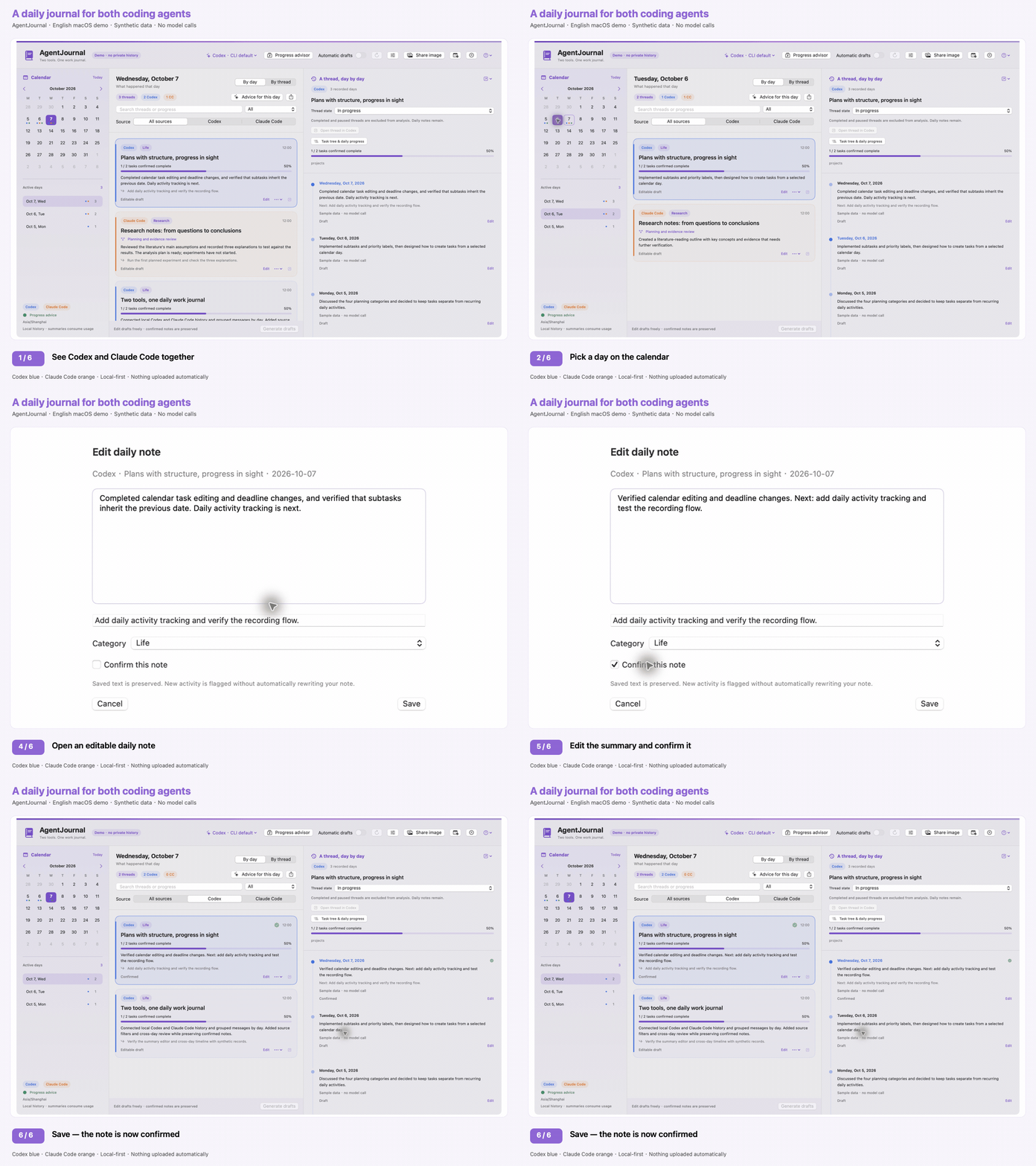
1. Review your day and confirm a note
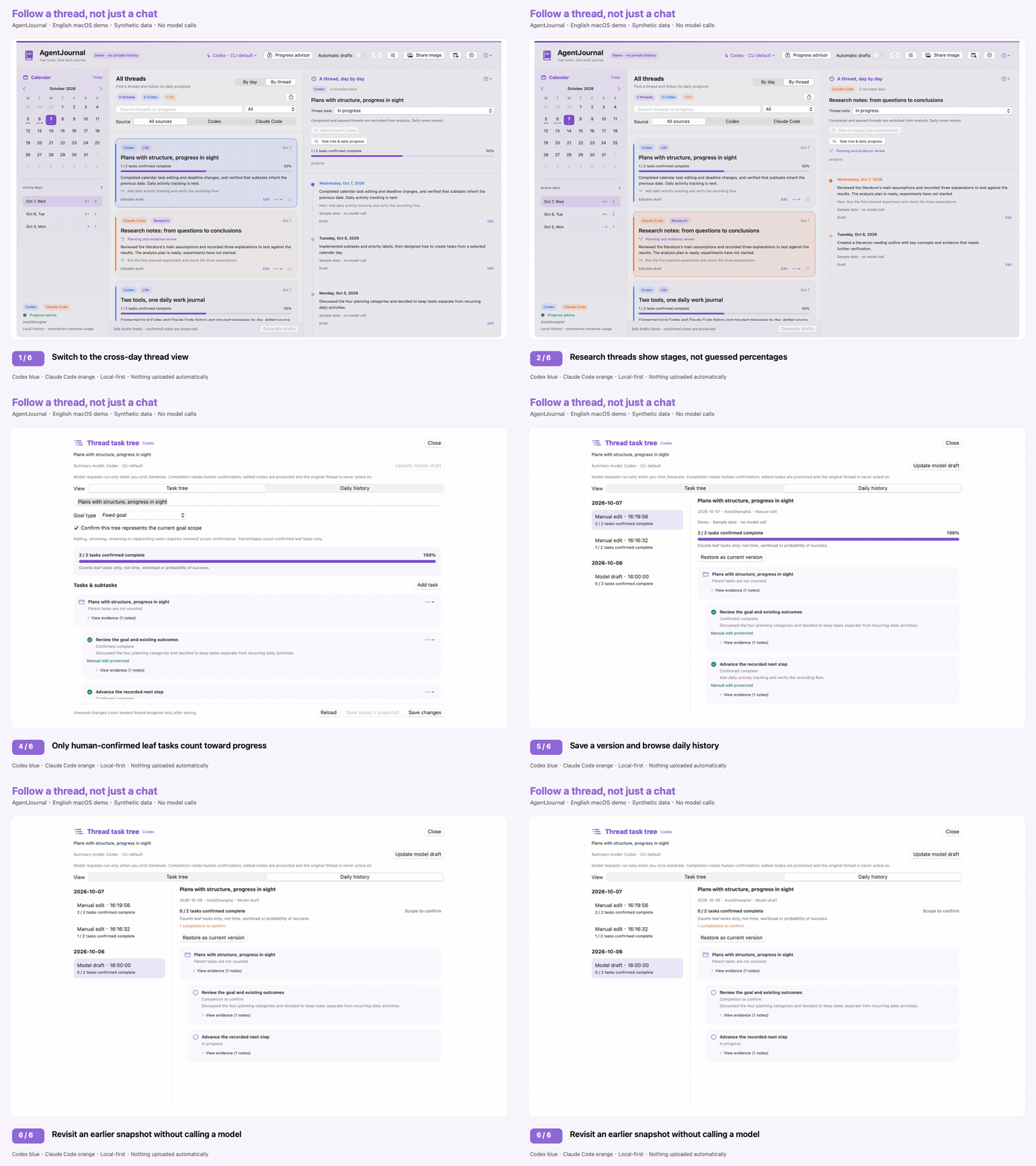
2. Follow a thread and revisit its progress
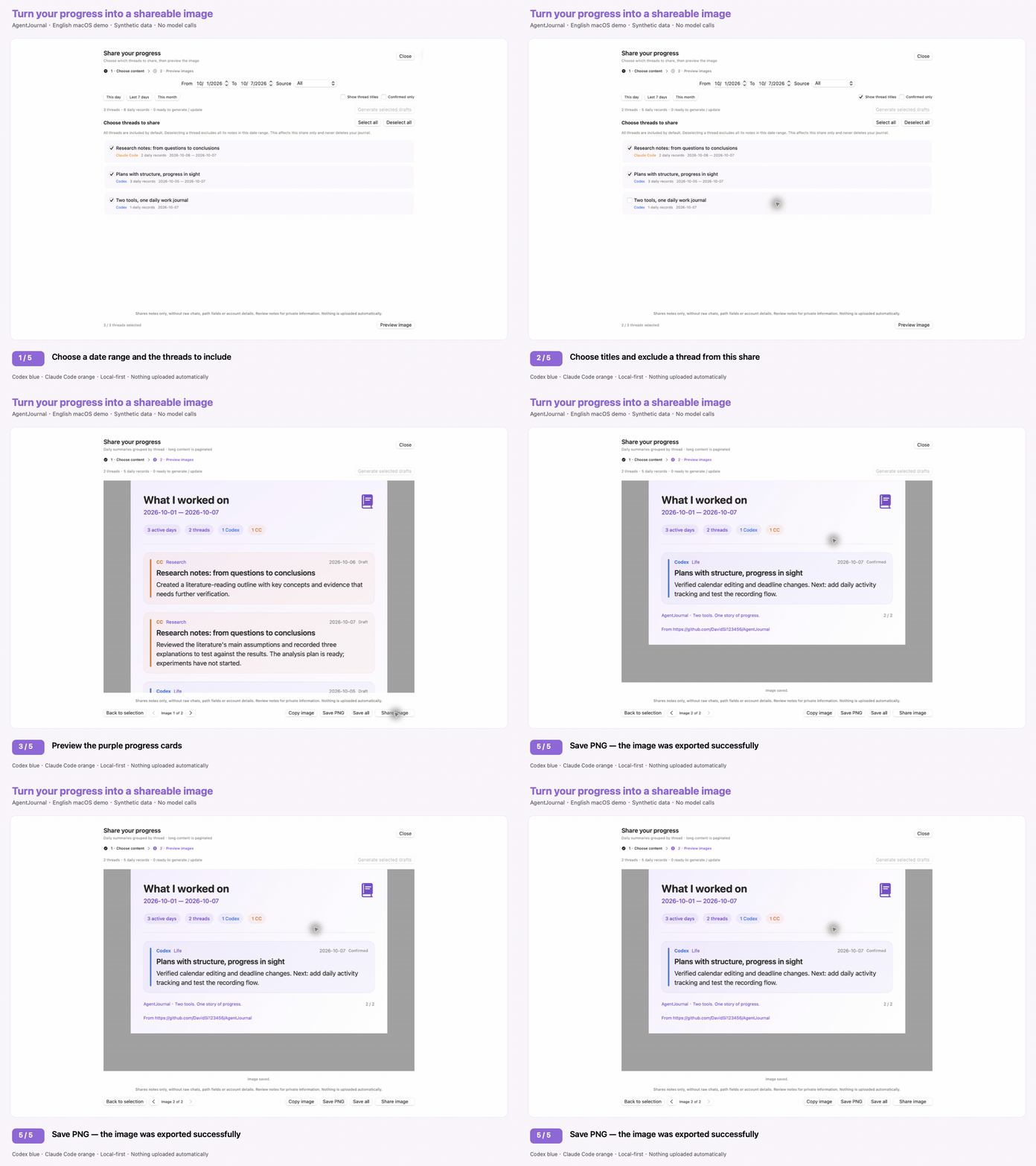
3. Export a shareable progress image
Features
- Day view: select a calendar day to see each thread's activity and editable summary draft.
- Bilingual app interface (English / Simplified Chinese), independent of summary language (English / Simplified Chinese / Match discussion). First launch includes a highlighted tour on synthetic demo data, with a Codex / Claude Code / both source choice; reopen the tour or interactive demo from the question-mark menu. Change preferences in Settings (⌘,).
- Thread view: find a thread and follow its daily progress on a timeline.
- Project view (macOS): select By project to group Codex and Claude Code threads by full working-folder path, across dates. Combine into one card is off by default: expand a folder to browse individual thread cards. Turn it on for a single project card bringing existing notes together and a project-wide daily timeline. The Original threads menu keeps editing, task trees and return links available per thread. Same-named folders in different locations and subfolders stay separate; missing folders stay per-thread. Combining the display adds no model call and does not merge source sessions or model analysis.
- Progress advisor: choose the model and compare threads using saved progress and next steps only. See up to three recommended continuations/reviews, explicit waiting conditions, confidence, and dated evidence. No planner deadlines, importance, category weighting, automatic messages, or task execution.
- Daily advice history: advice, evidence, actual model and generation time are saved locally, with multiple analyses per day. Browse dates and versions without calling a model. Green calendar dots mark days with saved advice; the advisor uses a green/teal accent distinct from Codex blue and Claude orange.
- Editable task trees (local preview): draft a per-thread hierarchy from saved notes, edit tasks and stages, confirm completed leaf tasks, and revisit daily versions. Fixed goals show task-count progress after scope confirmation; open-ended research shows stages instead of a guessed percentage.
- Advice feedback and thread states: retain pending/handled/waiting/dismissed feedback; mark threads active, waiting, paused or completed. Suppress handled suggestions for unchanged progress and exclude paused/completed threads without deleting their history.
- Request controls: set daily and automatic-generation limits, preview pending drafts, pause/cancel generation and inspect local CLI-job receipts. Counts are not token usage or provider billing.
- Backup and restore: export a private JSON backup, validate imports, retain pre-restore safety copies and recover interrupted restoration. Backups are unencrypted and must not be published.
- Weekly and monthly reviews: synthesize saved progress across days with inspectable evidence, retained versions, Markdown export and multi-page PNG sharing.
- Return to a Codex thread with its desktop deep link. For locally matched Claude Desktop Code sessions, try original-session navigation (experimental), or open Claude and search the copied title. Terminal resume commands are copy-only.
- Read local Codex active/archived rollouts and Claude Code CLI JSONL transcripts.
- Match Claude Desktop Code's local session metadata to the same CLI transcript ID, preserving desktop titles without duplicating threads or importing sessions.
- Filter by source, project text, category, or summary; export summaries as Markdown.
- Generate short drafts through an authenticated Codex or Claude Code CLI. The summarization engine is independent of the transcript source.
- Choose the engine and model from a dropdown. Codex choices come from its local cache or authenticated
model/list; Claude offers Sonnet / Opus / Haiku aliases. Keep the CLI default or enter a custom model name. Each engine remembers its last choice. - Select a date range and share progress as purple PNG cards, with blue Codex and orange Claude entries. Preview, copy, save all pages, or open the native macOS share menu. Thread titles are hidden by default.
- Record the actual model reported by the CLI. When unavailable, explicitly show “model not reported”; never guess it.
- Automatic generation is opt-in. Edited and confirmed text is preserved, even if a model draft is regenerated.
- Bounded, incremental indexing; no telemetry, account switching, credential storage, or cloud sync.
Requirements
- Current packaged Beta: Apple Silicon (arm64), macOS 14+. No Intel/universal, Windows or Linux binary is offered yet. The minimum deployment target is not proof of testing on every macOS version.
- Local runtime verification was performed on macOS 15.7.9; macOS 14 and other versions still need real-machine acceptance checks.
- Building from source additionally needs Swift 6-capable Xcode Command Line Tools or Xcode. Browsing an already built app does not require developer tools.
- Local Codex and/or Claude Code history. You do not need both tools to browse.
- For model summaries: an installed, authenticated Codex CLI or Claude Code CLI. Model access and usage are determined by that CLI account/provider.
- Tested locally with Codex CLI 0.147.0 and Claude Code 2.1.251. Transcript formats and CLI flags can change; other versions are not guaranteed.
Experimental Windows prototype
A first Swift Windows developer prototype is available in the source tree: daily/thread views, synthetic demo, editable notes and consent-gated CLI summaries. It shares the macOS reader/validation logic, but is not yet a Windows-verified standalone installer and does not include the full macOS feature set. See Windows setup and limitations. The existing macOS app remains the default build; no Windows UI dependencies are required for it.
Build and run
git clone https://github.com/DavidSi123456/AgentJournal.git
cd AgentJournal
zsh scripts/test.sh
zsh scripts/build_app.sh
open dist/AgentJournal.app
For a drag-to-Applications installer, run zsh scripts/build_dmg.sh. Open the versioned DMG, quit an older AgentJournal, drag the app into Applications, then eject the image and open the installed copy. Alternatively, extract the versioned ZIP outside a synced Desktop folder and install that copy; do not repackage the development dist/AgentJournal.app, whose Finder metadata can be altered by iCloud/File Provider. Updating the app preserves its existing storage identity.
Default ZIP/DMG builds are ad-hoc signed, not Developer ID signed or notarized; a downloaded test build may be blocked by Gatekeeper. Both assets include SHA-256 checksums and source/signing metadata. Verification does not launch the app and is not a clean-Mac installation test. For a trusted public binary, use your own Developer ID identity and notarize; never disable Gatekeeper globally. See release preparation.
External installation report (2026-10-08): the maintainer reports that AgentJournal has been installed and used successfully on another person's Mac. The tested build, macOS version, architecture and download/quarantine conditions were not recorded, so this is a reported smoke test—not verified acceptance of 0.6.2 on every supported Mac, nor proof of Apple signing/notarization. See verification records.
For a private-data-free demo:
open -n dist/AgentJournal.app --args --demo
# English UI and synthetic English notes, with no model calls:
open -n dist/AgentJournal.app --args --demo --demo-en
# Preview first-launch onboarding without writing preferences:
open -n dist/AgentJournal.app --args --demo --demo-en --demo-setup
Demo mode uses synthetic in-memory examples. It does not read local transcripts, write a journal, or call models. Use it for screenshots and public demos.
First use
- Open the app and choose App language, Summary language, and which sources to read: Codex, Claude Code, or both. The built-in tour highlights the real calendar, daily list, thread timeline, models, advisor, sharing, reports and management controls, using synthetic examples only. Unselected sources are not scanned. First-run private scans and model jobs wait until the tour is completed or explicitly skipped; examples never enter real notes, and the tour is not model consent. This also appears once after upgrading an older journal and preserves existing notes/model/language preferences. Use the question-mark menu to revisit the tour or explore the demo. Environment check remains in Settings; it checks directory access and CLI availability without reading chats/credentials, starting a CLI or making network requests. It does not verify login, CLI version or model access.
- Choose a date, or switch to By thread to browse all indexed threads.
- Choose the summary model from the header menu. In settings, refresh the Codex model list or enter a custom name, and configure directories, timezone, and exclusions. Availability depends on the CLI account/provider; changing the model does not rewrite existing drafts.
- Click Generate drafts or opt in to Automatic drafts. A disclosure explains that excerpts are sent to the configured model provider and consume account usage.
- Edit and confirm your notes. Automatic summaries never overwrite that text.
- Open Progress advisor, select the engine/model and click Analyze current progress. Each request asks for consent. Expand Progress evidence to check the dated notes; choose View timeline or Open in client yourself. No next-step text is sent to the source thread. Choose a saved date to revisit advice after restarting; use the timestamp menu to switch between analyses from the same day.
- Set thread states and advice feedback, manage limits/backups in Data & requests, or generate a saved-note review in Weekly / monthly reports.
Automatic generation runs only while the window is open. Threads must be idle for at least one minute. Unchanged content is not summarized again; failed attempts back off for five minutes. Historical auto-fill is considered only when explicitly enabled in Data & requests; browsing a thread does not automatically generate its entire history.
This is a macOS desktop Beta, not a web/mobile app or background service. Local CLI transcripts are supported as well as locally available Desktop Code transcripts; cloud-only sessions and other computers are not included. The current installer targets Apple Silicon / macOS 14+ and is ad-hoc signed, not Apple-notarized. Demo/tour mode performs no private scans, model calls, or writes to your real journal.
Match discussion asks the model to choose Chinese or English for each daily thread entry independently, prioritizing the language of human discussion rather than code or quoted text. Mixed discussions use the dominant user language; ambiguous cases fall back to the chosen app language. The model may occasionally infer incorrectly; choose a fixed language if consistency matters. App-language changes immediately update controls, date labels, category labels and share-card headings, but do not translate old notes or thread titles. Summary-language changes apply to future generation; use Regenerate model draft explicitly for an older record. Edited or confirmed text remains preserved.
Click Share image to first choose start/end dates (inclusive in the configured timezone), sources and threads. All matching threads are selected by default; deselecting a thread excludes all its daily records in the range, including counts and draft generation. Thread titles are hidden by default; turn on Show thread titles to include names. Click Preview image before copying, saving or sharing; Back to selection preserves your choices, without deleting notes or changing thread states. Generating selected drafts fills missing/outdated daily summaries after consent. This card-sharing view does not create a separate period-level narrative; use Weekly / monthly reports for a synthesized review. Edited and confirmed notes are preserved. Long content is split into numbered images rather than truncated. Copy/share acts on the current page; Save all writes every page into a new subfolder. Each image includes the project's full GitHub URL; the preview link is clickable, but an exported PNG contains visible link text only.
PNG rendering stays local and does not call a model or upload anything. Images exclude transcript excerpts, project path fields and account metadata; common local paths in summary text are redacted. Titles and human-written summaries can still contain sensitive information: review the preview before sharing. The native share menu sends an image only when you choose a destination.
The first scan indexes the complete local history. Large, multi-gigabyte transcript libraries can take several minutes; subsequent refreshes reuse the index and process appended data only.
Progress advisor
The advisor considers the 40 most recently active indexed threads, with up to three most recent recorded days per thread. Main-view date, source, search and category filters do not change this scope; the candidate list is visible. Dates establish progress order, not urgency. It sends only bounded titles (200 characters), dates, saved summaries (900 characters/day) and next steps (500 characters/day), plus freshness metadata. It does not read planner files or send raw transcript excerpts, working-directory fields, source models or daily status/category labels. Titles and notes can still contain private information.
Daily completion or confirmation does not mean a whole thread is finished. Recommendations need supporting record IDs from that same thread. Missing/outdated latest summaries or recently active threads cannot receive an actionable continuation; review or waiting is required. Confidence and prose judgments remain fallible model output, not ground truth. Analysis is manual, mutually exclusive with summary generation, cancellable, and uses the same no-tools, ephemeral CLI restrictions. Original notes and threads are never changed. Existing summary-language settings apply to generated advice; automatic language follows the supplied notes because original discussion text is not sent.
Successful analyses are appended to a separate local journal-advice.json, retaining the original bounded candidate notes, reasons, next actions, model, generation timezone/date and language setting. Earlier runs are never replaced or automatically expired. A new analysis always judges current progress and belongs to its generation day; browsing an old date does not call a model or invent advice for that day. Changing language/timezone or refreshing threads does not rewrite snapshots. Historical/outdated advice is labeled for review; source-thread buttons are unavailable if the thread is no longer indexed, while the saved advice and evidence remain readable. Results lost in older memory-only versions cannot be recovered.
Advice history may contain private titles and notes. Keep it out of Git and back it up with your journal. Corrupt, incompatible, symlinked or oversized archives are preserved and block new analysis, not daily-note editing. Failed/cancelled analyses are not archived; a valid result whose save fails is explicitly marked Not saved · lost on exit, with a no-model-call save retry. Once the advice file passes 32 MiB, the oldest snapshots move to append-only files in the Archive folder next to it, so saving keeps working; nothing is deleted. Archived advice and period reviews remain browsable, and full backups include all archive files. Data & requests → Backup shows the archived counts and opens the folder. The 64 MiB per-file ceiling remains as a safety check. Separate storage prevents older app versions from discarding advice when saving daily notes. Demo history remains synthetic and memory-only.
Following through, request controls and backup
Background summaries, advice and reports do not lock manual task-tree editing; the tree shows the active job and a stop button. Tree generation uses short, input-scoped summary references validated locally. Model completion proposals never count as confirmed work; proposals citing only outdated notes remain in progress with a visible notice. Invalid evidence or omitted tasks produce specific errors without changing existing history.
Open Task tree & daily progress in the thread timeline. Draft task tree / Update model draft uses the current summary engine/model and content-language setting; each request asks for consent and counts toward the shared daily limit. It sends only this thread's title, current tree and up to 60 saved daily notes (the earliest 8 and latest 52 for long histories), not raw chat excerpts. Coverage and dated evidence are visible; missing/outdated notes and truncated text mean the inferred scope may be incomplete. Generation is manual, never a launch-time job for every thread.
Model-reported completion remains Completion to confirm. Only human-confirmed leaf tasks contribute to the fixed-goal percentage; parent tasks are not double-counted, and this is not a time/workload estimate. Confirm the current goal scope before a percentage is shown; scope changes require renewed confirmation. Manually edited nodes are protected from subsequent model updates. Task confirmation never changes the separate thread state or confirms daily notes. Research threads have an editable stage and no overall percentage.
Saving edits, generating a draft, recording today's snapshot or restoring an earlier version appends a dated version to separate local journal-progress.json storage. Multiple versions per day are retained; days without an action are not fabricated. Browsing history does not call a model. A history restore creates a new version rather than deleting later snapshots. Trees and evidence can contain private text and belong in backups, not Git. This first version does not yet automatically archive large task histories; the per-file safety limit rejects a write without deleting earlier versions.
The thread timeline has an explicit Thread state selector. Active/waiting/paused/completed states are user decisions, independent of daily-note confirmation. Completed and paused threads stay in the journal but do not enter progress analysis. Advice cards accept pending/handled/waiting/dismissed feedback; every change is retained. Handled/dismissed advice is suppressed while that thread's bounded progress snapshot is unchanged. New progress can make it eligible again; completion/pausing only changes when you choose it. Waiting cannot become an execution recommendation. The advisor's model can be selected independently from daily summaries.
Open Data & requests in the header for a read-only pending-draft preview, immediate pause/stop, optional historical auto-fill and daily limits. By default, browsing an old thread does not generate its entire history. Limits start at 20 local CLI generation jobs total / 5 automatic jobs per calendar day in the app's time zone. One summary job handles up to four records. Failed/cancelled/started jobs count conservatively; the CLI may make multiple internal model requests. These are not token counts, billing figures, account quotas or limits on your other Codex/Claude usage. All summary/advice/report jobs reserve a persisted receipt before calling the CLI; a corrupted/newer receipt file blocks generation instead of resetting counts.
Backup & restore exports a private, unencrypted JSON backup containing saved notes, advice/evidence, feedback, thread states, request logs, period reports and excerpt-free thread metadata. It does not package transcript excerpts, index caches or CLI authentication files. Notes/titles/local settings may themselves contain sensitive text and paths: keep backups out of GitHub. Import validates the complete backup before replacement, requires confirmation, retains exact pre-restore originals under the local Restore Backups folder, keeps your current source/model/language settings, and turns automatic drafts off. When the originals are readable, this safety folder also contains an importable AgentJournal-PreRestore.json; damaged originals are still retained exactly. Existing request receipts are retained so an old backup cannot reset today's count. An interrupted restore is rolled back on the next launch before writes or generation resume. Saved notes remain browsable from restored metadata if original transcripts are unavailable; regenerating a daily draft still needs its transcript excerpts.
Backup format v3 includes task trees and their daily history, as well as archived advice, reviews and request receipts; v1/v2 imports remain supported and preserve local task trees when the legacy backup has none. Restore merges archives by record ID and retains existing local archived history, without re-expanding live files beyond their size limits. Repeated imports do not duplicate history. Archive imports participate in interrupted-restore rollback. Invalid/missing archives or backups larger than 128 MiB cause an explicit failure, never a silently incomplete backup. Backups also retain per-timezone note copies and pending date migrations.
Weekly and monthly reviews
Open Weekly / monthly reports in the header, choose a Monday-based week, month or custom date range, and explicitly allow generation. Reviews compare progress across days and synthesize completed outcomes, ongoing work, explicit blockers and recorded next steps rather than concatenating daily cards. They use only saved summaries/titles/next steps: missing drafts are not generated automatically. Up to 120 most recent daily notes are supplied with bounded text; missing notes, outdated evidence and limited coverage are disclosed. Each item cites selected-period record IDs and can expand its saved evidence. The model can still make semantic mistakes; citations are not proof of correctness.
Reports retain multiple original versions locally. Explicit user thread states set no later than the period end can suppress superseded next steps; they are not proof of particular accomplishments or completion during the period. Later status changes are not backdated into a historical review. Browsing, Markdown export and paginated PNG rendering do not call models or upload content. Check private information before sharing; PNG redaction covers common local paths, not arbitrary sensitive prose. Generated prose follows the existing Chinese/English/automatic preference, with automatic language inferred from saved notes rather than pretending to know the original conversation language.
Returning to source threads
Codex uses the documented codex://threads/<id> link. Claude Desktop Code needs a desktop-native local_... ID matched to the transcript's CLI session UUID. The current implementation tries claude://code/continue?session=<native-id>, observed in Claude Desktop 2.16120.0. This existing-session route is not a documented public contract and may be disabled by feature gates or change in later versions. The app explicitly labels it experimental: macOS accepting a URL does not prove the client navigated. If no mapping exists or a session is archived, AgentJournal opens Claude and copies the title for manual search. If an accepted link does not navigate, use Copy thread title in the notice and search in Code.
AgentJournal never uses claude://resume to return to a desktop session: that route imports a CLI session into a new desktop snapshot. CLI-only sessions cannot be guaranteed to exist in Desktop; copy claude --resume <id> if you want to continue in a terminal. No copied command is automatically executed, and no Accessibility permission or client database writes are required.
Locally verified original-session navigation on Claude Desktop 2.16120.0: the existing Code session opened with an empty composer, without importing a session or sending a message. This observation does not guarantee support in other versions or configurations.
Data and privacy
Defaults:
| Data | Location |
|---|---|
| Codex history | ~/.codex/sessions, ~/.codex/archived_sessions |
| Claude Code CLI history | ~/.claude/projects |
| Claude Desktop Code session metadata | ~/Library/Application Support/Claude/claude-code-sessions |
| Drafts and settings | ~/Library/Application Support/ThreadJournal/journal.json |
| Progress advice snapshots | ~/Library/Application Support/ThreadJournal/journal-advice.json |
| Thread states, feedback, request receipts and period reviews | ~/Library/Application Support/ThreadJournal/journal-workflow.json |
| Cached daily excerpts | ~/Library/Application Support/ThreadJournal/index.json |
| Archived older advice, period reviews and request receipts | ~/Library/Application Support/ThreadJournal/Archive/ |
AgentJournal was previously named ThreadJournal. The original storage folder and bundle identifier are intentionally retained so upgrades preserve existing notes, language choices, model settings and cached history. Only the app and export names change; no manual data migration is needed.
CODEX_HOME and CLAUDE_CONFIG_DIR are honored if inherited by the app. Finder launches may not inherit shell variables; set directory overrides in the app instead. Settings expect the home directory, not the sessions or projects child directory.
Claude Desktop mapping reads a whitelist of local session IDs, title, archived flag and last-activity timestamp; it does not use permission snapshots, MCP configuration, account credentials or cloud conversations. Metadata files are size/count/depth bounded and symlinks are skipped. The default Desktop metadata folder is scanned only with the standard ~/.claude transcript root; with a custom transcript root, set the optional Desktop session folder explicitly. Mapping is refreshed even if the transcript has not changed; journal entry keys and confirmed notes remain unchanged.
- Transcript folders are read-only. No auth files or keychain entries are read by the indexer. Authentication is delegated to the existing CLI; no credentials belong in this repository.
- Indexing stores only bounded user/assistant text excerpts, not entire conversations. Tools, thinking, screenshots, attachments, Codex exec jobs and subagents, and Claude sidechains/subagent folders are excluded.
- Model requests include up to 12 excerpts per daily thread record, truncated to 900 characters each. They can still contain private code or information. Review source content and use exclusions before opting in.
- Codex runs ephemerally in a read-only sandbox with execution, editing, plugins, hooks, agents, images and search disabled. Claude runs in safe/restricted, no-tools, no-session-persistence mode with MCP and hooks disabled and no user/project settings loaded. Restricted mode requires Claude Code 2.1.248+. This is not an OS-level network sandbox; requests still reach the CLI's configured provider, and organizational policies may apply.
- Drafts, cached excerpts and advice snapshots are personal data, kept outside the repository. Back them up. Exported Markdown also contains personal information.
- The index retains previously scanned records if original logs are cleaned up. Changing the timezone or exclusions rebuilds the index but carries those cleaned-up records forward on their original dates; newly excluded projects are dropped. Changing source directories starts a new index. Legacy v2 indexes without a source signature are migrated when their original roots can be verified; unverifiable originals are preserved as private
index-preserved-v2-*.jsoncopies, with a warning, instead of being discarded or mixed into another source. - Timezone changes match notes by message membership, including consecutive days whose IDs still exist but now represent different messages. Unambiguous notes follow their messages; conflicts/split days are disclosed, and per-timezone copies preserve original notes across restarts and backups. Existing edited/confirmed destination notes are not overwritten.
- Changed scans atomically persist the index before returning, off the main thread. Unchanged scans skip writes. No five-minute window relies solely on source logs still being available at restart.
- Once period reviews and request receipts make
journal-workflow.jsonpass 32 MiB, the oldest reviews and receipts older than 30 days move to theArchivefolder instead of blocking requests. Archives are never deleted; history browsing and backups include them. Archived request receipts still count toward applicable daily limits. - Never commit real JSONL transcripts, journal/index files, API keys, exports, or screenshots containing private conversations.
.gitignoreadds safeguards; review staged files before publishing.
Claude Code may clean up old transcripts. Internal JSONL formats are not stable APIs. Claude Desktop Code activity is included when its local CLI transcript exists under the configured Claude Code root; metadata alone does not provide a conversation. Independent Desktop chat/Cowork conversations, claude.ai chat, remote-host files, and cloud-only Codex history are not automatically included.
Architecture
AgentJournalKit is the shared library used by the standalone app and the local PlanDesk integration:
Codex / Claude read-only adapters
        ↓
daily activity (provider + thread ID + local date)
        ↓
bounded index → calendar / thread timeline
        ↓
optional CLI summarizer → draft → edit / confirm / export
Codex record keys keep their legacy shape for PlanDesk compatibility; Claude keys have a provider namespace to prevent collisions. PlanDesk retains its existing filenames and Shanghai timezone. Migration makes a v1 backup before writing; corrupt or unknown-version journal files are never overwritten.
Verification
zsh scripts/test.sh
# Compile once, then run the suite under both English and Chinese system defaults:
zsh scripts/test.sh --all-locales
The default test suite uses only synthetic data and fake summaries. Optional local verification:
# Reads local transcripts but prints only thread/day counts; temporary index is cleaned up.
AGENTJOURNAL_LIVE_READ=1 zsh scripts/test.sh --filter testOptionalLiveRead

# Consumes model usage with a tiny synthetic example, never your actual transcripts.
AGENTJOURNAL_LIVE_SUMMARY=codex zsh scripts/test.sh --filter testOptionalLiveSummary
AGENTJOURNAL_LIVE_SUMMARY=claude zsh scripts/test.sh --filter testOptionalLiveSummary
# Verify English output with a tiny synthetic prompt:
AGENTJOURNAL_LIVE_SUMMARY=codex AGENTJOURNAL_LIVE_LANGUAGE=en zsh scripts/test.sh --filter testOptionalLiveSummary

# Consumes model usage with synthetic saved progress, never actual journal notes.
AGENTJOURNAL_LIVE_ADVICE=codex zsh scripts/test.sh --filter testOptionalLiveAgentAdvice
AGENTJOURNAL_LIVE_ADVICE=claude zsh scripts/test.sh --filter testOptionalLiveAgentAdvice

# Reads the authenticated Codex model catalog without making a summary or thread.
AGENTJOURNAL_LIVE_MODELS=1 zsh scripts/test.sh --filter testOptionalLiveModelCatalog
GitHub Actions builds and tests on macOS without credentials or model calls. It also checks publish candidates and reachable history with the heuristic privacy guard. This project contains no remote dependencies. See the local verification record and the release acceptance checklist for completed checks versus pending real-machine acceptance.
Publishing
This folder is self-contained: it does not depend on PlanDesk or any personal workspace. The repository is AgentJournal. Review git status, staged contents and the privacy checklist in CONTRIBUTING.md before publishing:
ruby scripts/privacy_check.rb --self-test
ruby scripts/privacy_check.rb --history
# After staging, also check the exact staged blobs:
ruby scripts/privacy_check.rb --staged
The guard prints filenames/rule names, never matched secret values. It is a heuristic, not a complete security audit, and cannot establish that screenshots or arbitrary notes are safe. No real transcript, journal or credential belongs in this repository.
The optional Beta workflow runs only when manually dispatched for an existing reviewed Beta tag. It creates an unsigned draft prerelease, never automatically publishes or replaces an existing release. Developer ID signing/notarization is an explicit local opt-in documented in RELEASING.md; Apple credentials are not configured in Actions. Read CHANGELOG.md for changes.
References
- Codex non-interactive mode
- Codex desktop deep links
- Codex app-server model list
- Claude Code sessions
- Claude Code model configuration
- Claude Code CLI reference
Independent community software, not affiliated with or endorsed by OpenAI or Anthropic.
License
MIT. See LICENSE. This implementation does not vendor code from other session-manager repositories.
中文
每天做了什么,以及一个线程在不同天推进了什么,都放在一起。AgentJournal 是面向 Codex + Claude Code 的原生 macOS 工作日志软件。
整体采用紫色界面;Codex 线程为蓝色,Claude Code 线程为橙色,推进助手为青绿色。应用界面可以选择中文或英文,生成内容的语言可以独立设置。
看看实际操作
以下三段使用 中文 macOS 演示版,与前面的英文演示对应。线程标题和笔记均为虚构数据,不调用模型;演示修改只保留在内存中。这些演示不代表 Windows 实验版已通过验证。
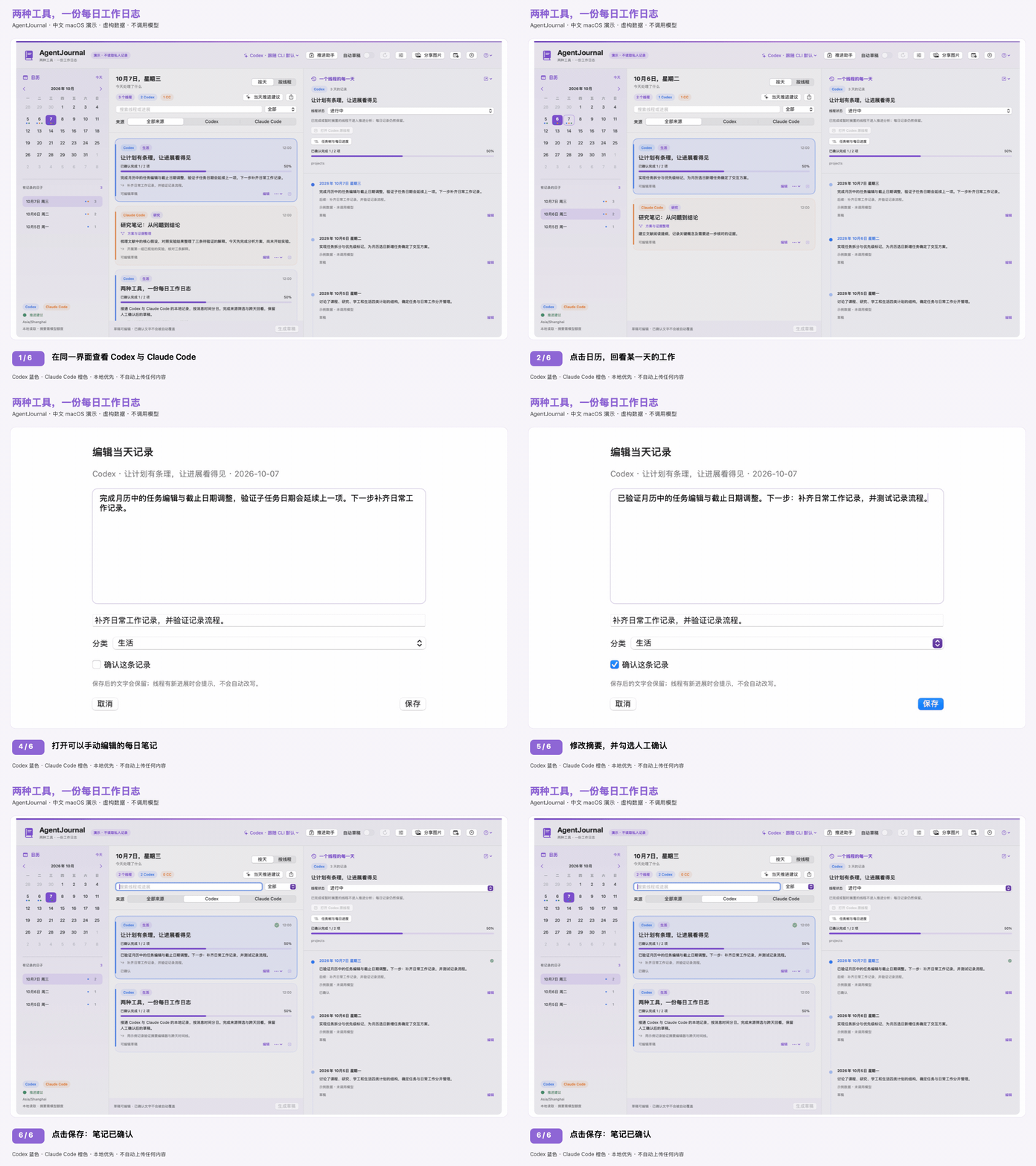
1. 回看一天的工作,确认每日笔记
2. 跟踪线程进度,回看每日历史
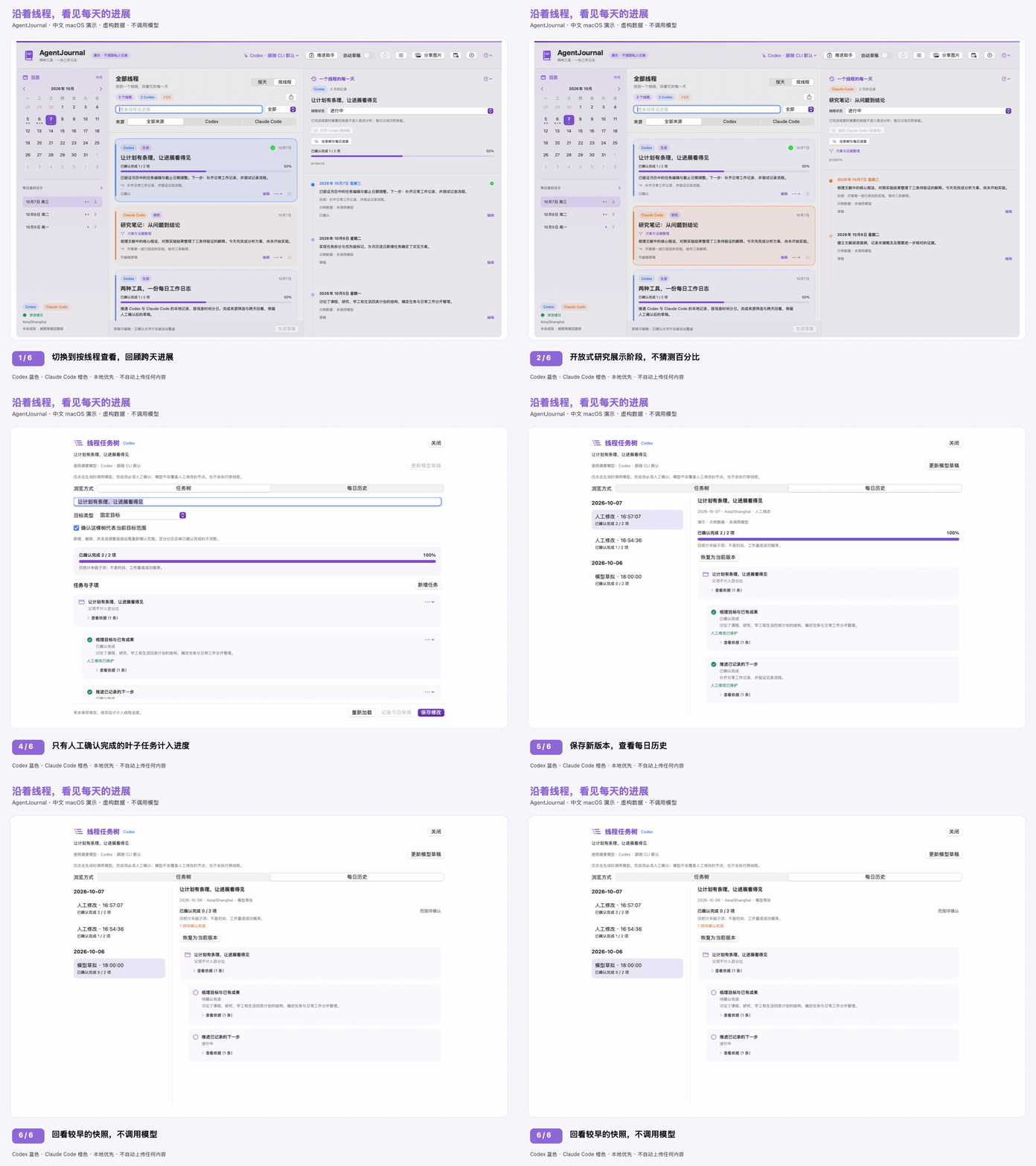
3. 导出可以分享的进展图片
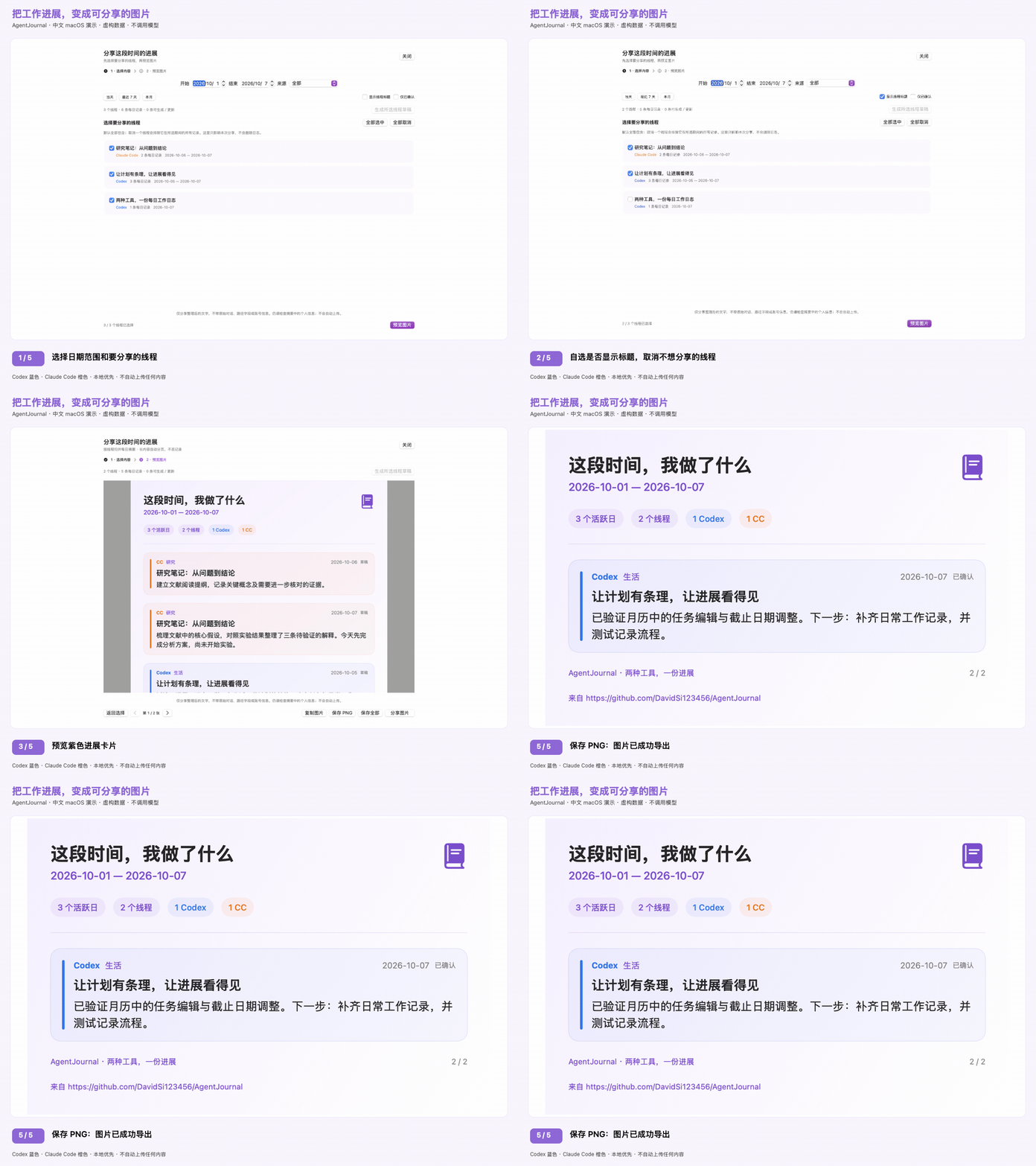
功能
- 按天查看:点击日历中的日期,查看当天各线程的活动和可编辑摘要草稿。
- 中英文界面:应用语言与摘要语言相互独立;摘要可以选择中文、英文或跟随讨论内容。首次打开时选择,之后可在设置(⌘,)中修改。
- 按线程查看:搜索线程,在时间线上回顾它每天的进展。
- 按项目查看(macOS):选择“按项目”,将完整工作目录相同的 Codex/CC 线程跨天归组。“合并为一张卡片”默认关闭,展开文件夹仍显示各线程卡片;开启后,每个项目只显示一张整合已有摘要的卡片,右侧按天汇总各线程进展。“原线程”菜单保留编辑、任务树和返回原会话入口。不同位置的同名文件夹、子文件夹分别展示,缺少目录的线程单独保留;合并展示不额外调用模型,也不合并原会话或模型分析。
- 推进助手:自选模型,只根据已保存的进展和下一步比较线程,给出最多三条推进或核对建议,以及等待条件、置信度和带日期的依据。不使用日程计划的 DDL、重要度或分类权重,不自动发消息或执行任务。
- 每日建议历史:本地保存建议、依据、实际模型和生成时间;同一天可以保留多个版本。浏览历史不调用模型,日历中的绿色圆点表示当天有建议记录。
- 可编辑任务树(本地预览):按线程从已保存摘要草拟目标与子项,支持手动修改、完成确认和每日版本回看。固定目标确认范围后展示子项完成率;开放式研究展示阶段,不猜测百分比。
- 建议反馈与线程状态:保留尚未处理、已处理、等待、不采纳等反馈;线程可设为进行中、等待、搁置或完成。进展未变化时不重复推荐已处理的建议,搁置和完成的线程不参与推进分析,但历史不会删除。
- 调用控制:设置每日总上限和自动生成上限,预览待生成草稿,暂停或取消生成,查看本软件的 CLI 生成任务记录。这些计数不是 Token 用量或供应商账单。
- 备份恢复:导出私人 JSON 备份,导入前校验,恢复前保留安全副本,并处理被中断的恢复。备份未加密,不应公开上传。
- 周报和月报:对比多天已保存的进展,综合成果、进行中事项、阻塞和下一步,保留可核对依据与历史版本,支持 Markdown 和分页 PNG 导出。
- 回到原线程:通过桌面深链接打开 Codex 线程;对于已匹配的 Claude 桌面 Code 会话,可尝试实验性的原会话跳转,或打开 Claude 后搜索已复制的标题。终端恢复命令只供复制,不自动执行。
- 读取本地 Codex 活跃及归档记录、Claude Code CLI 的 JSONL 对话记录。
- 将 Claude 桌面 Code 的本地会话元数据与对应 CLI 会话 ID 匹配,保留桌面标题,不重复建立线程或导入会话。
- 按来源、项目文本、分类或摘要筛选,导出 Markdown 日志。
- 通过已登录的 Codex 或 Claude Code CLI 生成简短草稿;摘要模型与原线程来源可以不同。
- 用下拉菜单选择引擎和模型:Codex 从本地缓存或已认证的
model/list获取列表,Claude 提供 Sonnet / Opus / Haiku 别名。也可沿用 CLI 默认模型或输入自定义模型名,各引擎分别记住上次选择。 - 选择日期范围,将进展导出为紫色图片卡片,Codex 和 Claude 内容分别使用蓝色、橙色标识;支持预览、复制、保存所有页和 macOS 原生分享。默认隐藏线程标题。
- 记录 CLI 实际返回的模型;无法取得时明确显示未报告,不猜测。
- 自动生成需要主动开启;重新生成模型草稿也不会覆盖手动编辑或已确认的文字。
- 有界、增量索引;没有遥测、账号切换、凭据存储或云同步。
使用要求
- 当前 Beta 安装包面向 Apple Silicon(arm64),macOS 14 及以上。暂未提供 Intel/通用、Windows 或 Linux 安装包。最低部署版本不代表所有系统版本都已测试。
- 本地运行验证使用 macOS 15.7.9;macOS 14 和其他版本仍需真实机器验收。
- 从源码构建需要支持 Swift 6 的 Xcode Command Line Tools 或 Xcode;使用已经构建好的应用不需要开发工具。
- 需要本地 Codex 或 Claude Code 历史;不必同时安装两种工具才能浏览。
- 生成模型摘要需要安装并登录 Codex CLI 或 Claude Code CLI,模型权限和用量由对应 CLI 账号及供应商决定。
- 本地验证使用 Codex CLI 0.147.0 和 Claude Code 2.1.251。记录格式和 CLI 参数可能变化,不保证其他版本兼容。
实验性 Windows 原型
源代码中新增了第一版 Swift Windows 开发原型:按天/线程浏览、内置演示、可编辑笔记、 确认后调用 CLI 摘要。复用 Mac 版解析与校验逻辑,但尚不是经过 Windows 验证的独立安装包, 也没有覆盖 Mac 版全部功能。详见 Windows 构建与限制。 Mac 版仍是默认构建,不需要下载 Windows 界面依赖。
构建和运行
git clone https://github.com/DavidSi123456/AgentJournal.git
cd AgentJournal
zsh scripts/test.sh
zsh scripts/build_app.sh
open dist/AgentJournal.app
需要拖入“应用程序”的安装镜像时,运行 zsh scripts/build_dmg.sh。打开带版本号的 DMG,退出旧版 AgentJournal,将应用拖入“应用程序”,推出镜像,再打开安装后的应用。也可以在不受同步服务管理的文件夹中解压带版本号的 ZIP 并安装。不要重新打包开发用的 dist/AgentJournal.app:iCloud/File Provider 可能修改它的 Finder 元数据。升级会沿用原有存储标识。
默认 ZIP/DMG 仅做临时签名,没有 Developer ID 签名或苹果公证,下载后的测试版本可能被 Gatekeeper 拦截。安装包附带 SHA-256 校验值及源码、签名状态元数据。校验过程不启动应用,也不等于完成了全新 Mac 的安装测试。可信的公开二进制分发需要自己的 Developer ID 证书和公证;不要全局关闭 Gatekeeper。详见发布准备。
**异机安装反馈(2026-10-08):**项目维护者反馈,AgentJournal 已在另一位用户的 Mac 上成功安装并使用。具体测试版本、macOS 版本、芯片及下载/隔离属性条件尚未记录,因此这里只记为用户反馈的基础试用,不代表 0.6.2 已在所有支持的 Mac 上完成验收,也不代表已通过苹果签名或公证。详见验证记录。
不读取私人数据的演示模式:
open -n dist/AgentJournal.app --args --demo
# 英文界面和英文示例日志,不调用模型:
open -n dist/AgentJournal.app --args --demo --demo-en
# 预览首次新手指引,不保存偏好:
open -n dist/AgentJournal.app --args --demo --demo-en --demo-setup
演示模式只使用内存中的模拟内容,不读取本地对话、不写日志、不调用模型。公开截图和演示请使用此模式。
初次使用
- 打开应用,选择应用语言、摘要语言,以及 Codex / Claude Code / 两者都有。内置指引使用合成示例,在真实界面上高亮日历、每日记录、线程时间线、模型、推进助手、分享、回顾和管理入口。未选择的来源不会扫描;首次引导完成或主动跳过前不读取私人日志、不启动模型,示例不会混入真实笔记,完成指引也不代表同意模型调用。升级旧日志时也只展示一次,并保留已有笔记、模型和语言偏好。以后可从问号菜单重看指引或体验演示。环境检查仍在设置中,只检查目录访问和 CLI 是否存在,不读聊天或凭据、不启动 CLI、不联网;不验证登录、CLI 版本或模型权限。
- 选择日期,或切换到按线程浏览所有已索引线程。
- 在顶部菜单选择摘要模型;设置中可以刷新 Codex 模型列表、输入自定义模型名,配置目录、时区和排除项。模型可用性取决于 CLI 账号和供应商,切换模型不会重写旧草稿。
- 点击生成草稿,或主动开启自动草稿。确认说明会告知对话片段将发给配置的模型供应商,并消耗账号用量。
- 编辑并确认笔记;自动摘要不会覆盖这些文字。
- 打开推进助手,选择引擎和模型,分析当前进展。每次请求都需要确认。展开进展依据查看带日期的笔记,自行选择查看时间线或回到客户端;软件不会把下一步文字发送到原线程。重启后仍可按日期查看建议,并在时间菜单中切换同一天的不同版本。
- 设置线程状态和建议反馈,在数据与调用管理中调整限额、备份,或进入周报/月报生成基于已保存笔记的回顾。
自动生成只在窗口打开时运行,线程至少空闲一分钟后才会考虑生成。内容不变时不会重复摘要,失败后等待五分钟再尝试。只有在数据与调用管理中明确启用历史自动补齐,才会考虑所选线程的历史日期;单纯浏览线程不会自动生成它的全部历史。
当前是 macOS 桌面 Beta,没有网页版、手机端或后台守护服务。本机 CLI 日志及本机可获取的 Desktop Code 日志均可读取,云端独有会话和其他电脑的线程不会纳入。现阶段安装包面向 Apple Silicon / macOS 14+,为临时签名,尚未经过 Apple 公证。演示和引导不读取私人日志、不调用模型、不写入真实笔记。
跟随讨论内容会让模型独立判断每个每日线程记录应使用中文还是英文,优先看人的讨论语言,而不是代码或引用文本。混合讨论采用主要用户语言,无法判断时使用应用语言。模型可能判断错误,需要稳定输出时请选择固定语言。更改应用语言会即时更新控件、日期、分类和分享卡片标题,但不会翻译旧笔记或线程标题。摘要语言只影响之后的生成;旧记录可手动重新生成模型草稿,手动编辑和已确认内容仍会保留。
点击分享图片后,先选择起止日期(按配置时区包含首尾两天)、来源和需要包含的线程。符合条件的线程默认全选;取消一个线程会排除它在所选期间的所有每日记录,也不会计入图片统计或所选草稿生成。线程名字默认隐藏,可开启显示线程标题;点预览图片后再复制、保存或分享,也可返回选择保留并调整勾选,不会删除日志或改变线程状态。生成所选线程草稿会在确认后补齐缺失或过时的每日摘要。这个卡片分享界面不生成独立的期间叙事;需要综合回顾时,请使用周报/月报。长内容会拆成编号图片,不直接截断;复制或分享作用于当前页,保存全部会把所有页写入新子文件夹。每张图片底部包含项目的完整 GitHub 链接;预览里可点击,PNG 中保留可见链接文字。
PNG 渲染在本地完成,不调用模型或自动上传。图片不包含对话原始片段、项目路径字段或账号元数据,摘要中常见的本地路径会做脱敏。但标题和人工笔记仍可能包含敏感信息,分享前请检查预览;只有选择目标后,系统分享菜单才会发送图片。
首次扫描会索引全部本地历史。多 GB 的记录可能需要几分钟,之后刷新会复用索引,只处理新增内容。
推进助手
助手最多考虑最近活跃的 40 个可参与分析的线程,每个线程最多使用最近三个有记录的日期。主界面的日期、来源、搜索和分类筛选不改变这个范围,界面会显示候选线程。日期用于判断进展顺序,而不是紧迫性。模型只收到有界的标题(200 字符)、日期、已保存摘要(每天 900 字符)、下一步(每天 500 字符)和新鲜度元数据;不读取日程计划文件,不发送原始对话、工作目录、原线程模型或每日状态/分类标签。标题和笔记仍可能包含私人信息。
完成或确认某天的笔记不等于整个线程完成。建议必须引用同一线程的记录 ID。最新摘要缺失、过时或线程仍活跃时,不能直接给出推进建议,应核对或等待。置信度与判断都是可能出错的模型输出,不是真实结论。分析需要手动发起,与摘要生成互斥,可以取消,并使用同样的无工具、临时 CLI 限制;不会修改原笔记或原线程。建议沿用生成内容语言设置,自动语言根据收到的笔记判断,因为原讨论文字不会发送。
成功分析会追加到独立的本地 journal-advice.json,保留当时有界的候选笔记、原因、下一步、模型、生成时区/日期和语言设置。旧版本不会被替换或自动过期。新分析始终判断当前进展,属于实际生成日;浏览旧日期不会调用模型,也不会伪造当天建议。切换语言、时区或刷新线程不会重写快照。历史或过时建议会提示核对;原线程不再索引时跳转按钮不可用,但建议及依据仍可阅读。旧版仅保存在内存、已经丢失的结果无法恢复。
建议历史可能包含私人标题和笔记,请勿提交到 Git,并与日志一起备份。损坏、版本不兼容、符号链接或超大归档会保留原文件并阻止新分析,不阻止每日笔记编辑。失败或取消的分析不会归档;有效结果保存失败时会明确标记退出后丢失,并可不调用模型地重试保存。建议文件超过 32 MiB 后,最早的快照会移到同目录 Archive 文件夹中的仅追加文件,保存可以继续,不会删除任何内容。历史建议和期间回顾仍可浏览,完整备份包含所有归档文件;数据与调用 → 备份恢复会显示归档数量并可打开文件夹。每文件 64 MiB 上限仍作为安全检查保留。独立存储也避免旧版应用保存每日笔记时丢弃建议。演示历史仍只在内存中保存。
建议反馈、线程状态、调用控制与备份
后台摘要、推进建议和回顾报告不会锁住手动任务树编辑,任务树会显示当前生成状态及停止入口。草拟任务树使用本次输入内的摘要短编号,并在本地校验归属。模型的完成提议不会直接计入完成进度;只引用过期摘要的完成提议保守保留为进行中并提示核实。错误引用或遗漏任务会给出具体错误,已有历史保持不变。
在线程时间线打开任务树与每日进度。自动草拟任务树/更新模型草稿沿用当前摘要引擎、模型及内容语言设置,每次都征求确认并计入每日总调用上限。只发送这个线程的标题、现有任务树与最多 60 条已保存的每日摘要及下一步;长历史保留最早 8 条和最新 52 条,不发送原始聊天摘录。界面展示覆盖情况和带日期的依据;缺失、过时或截断的摘要意味着模型可能没有掌握完整目标。不会启动时自动给所有线程生成。
模型认为完成的子项先标为待确认完成,人工确认并保存后才计入进度。固定目标只统计末级子项,不重复计算父项,也不代表时间或工作量;确认当前目标范围后才显示百分比,范围变化需要重新确认。人工修改的节点不会被后续模型更新覆盖。任务完成确认不改变独立的线程状态或每日笔记确认。开放式研究可编辑当前阶段,不显示总体百分比。
保存修改、生成草稿、记录今日快照或恢复历史版本时,会将当天的新版本追加到独立的本地 journal-progress.json。同一天保留多个版本,没有操作的日期不会编造快照;浏览历史不调用模型,恢复历史也不会删除后来的记录。任务树与依据可能包含私人文字,只应进入备份,不应提交 Git。本版暂不自动归档较大的任务树历史,达到文件安全上限时拒绝写入,已有版本不删除。
线程时间线提供明确的状态选择:进行中、等待、搁置、完成。这些是用户决定,与每日笔记确认独立。搁置和完成的线程仍保留日志,但不进入推进分析。建议卡片支持尚未处理、已处理、等待、不采纳,每次反馈变更都会保留。线程的有界进展快照不变时,已处理/不采纳的建议不会反复出现;新增进展后可重新参与判断,但完成/搁置状态只由用户主动修改。等待状态不能转换成执行推荐,推进助手的模型也可以与每日摘要分别选择。
顶部的数据与调用管理提供只读待生成预览、立即暂停/停止、可选历史自动补齐,以及每日限额。默认不会因为浏览旧线程就生成全部历史。默认上限是应用时区每个自然日 20 次本地 CLI 生成任务,其中自动任务最多 5 次;一次摘要任务最多处理四条记录。失败、取消和已开始的任务也保守计入,CLI 内部可能发起多次模型请求。因此这些不是 Token 数、账单、账号额度,也不限制你在其他 Codex/Claude 界面的使用。摘要、推进建议和周报任务都会在调用 CLI 前持久化记录;记录文件损坏或版本更新时会停止生成,而不是重置计数。
备份恢复导出未加密的私人 JSON,包含已保存笔记、建议及依据、反馈、线程状态、调用记录、期间回顾和不含对话片段的线程元数据;不打包原始对话片段、索引缓存或 CLI 认证文件。笔记、标题和本地设置本身仍可能含敏感文本或路径,请勿上传 GitHub。导入前校验整个备份并要求确认,恢复前的原文件完整保存在本地 Restore Backups 文件夹,保留当前来源目录、模型及语言设置,并关闭自动草稿。原文件可读时还会生成可以直接导入的 AgentJournal-PreRestore.json;损坏的原文件也原样保留。已有调用记录不会被清空,旧备份不能重置当天计数。恢复被中断时,下次启动先回滚,再允许写入或生成。原始对话不可用时仍可用恢复的元数据浏览笔记,但重新生成每日草稿仍需原对话片段。
备份格式 v3 包含任务树与每日历史,以及归档建议、回顾及调用记录,同时兼容导入 v1/v2;旧备份不含任务树时保留本机任务树。恢复按记录 ID 合并归档并保留本机已有归档历史,不会将归档重新塞入活跃文件导致超限;重复导入不会重复显示历史。归档导入也参与中断恢复的回滚。归档损坏、缺失或备份超过 128 MiB 时明确报错,不会悄悄生成不完整的备份。备份同时保留各时区的笔记副本和待完成的日期迁移。
周报与月报
打开顶部的周报/月报,选择周一开始的一周、整月或自选日期范围,再明确允许生成。回顾比较跨日进展,综合已完成成果、进行中工作、明确阻塞和已记录的下一步,而不只是拼接每日卡片。它只使用已保存的摘要、标题和下一步,不会自动补齐缺失草稿。最多传入最近 120 条每日笔记及有界文字,并说明缺失笔记、过时依据和覆盖限制。每项结论引用所选期间内的记录 ID,可以展开核对原笔记。模型仍可能出现语义错误,引用有效不代表判断一定正确。
回顾在本地保留多个原始版本。期间结束前用户明确设置的线程状态可用于抑制不再适用的下一步,但不是具体成果或期间内完成的证据;之后修改的状态不会倒填到历史回顾。浏览、Markdown 导出和分页 PNG 渲染不调用模型或上传内容。分享前检查私人信息;PNG 脱敏只覆盖常见本地路径,不覆盖任意敏感文本。输出遵循现有中文/英文/自动语言设置,自动语言根据已保存笔记判断,不假装知道原讨论语言。
回到原线程
Codex 使用已记录在文档中的 codex://threads/<id> 链接。Claude 桌面 Code 需要将桌面原生 local_... ID 与 CLI 对话 UUID 匹配。当前实现尝试 claude://code/continue?session=<native-id>,该路径曾在 Claude Desktop 2.16120.0 中观察并验证。它不是有文档承诺的公开接口,可能受功能开关限制,也可能在后续版本变化。软件明确标记为实验性:macOS 接受链接不代表客户端真的跳转成功。无法匹配或会话已归档时,AgentJournal 会打开 Claude 并复制标题供手动搜索;链接接受后没有跳转时,也可复制提示中的线程标题,在 Code 中搜索。
AgentJournal 不使用 claude://resume 返回桌面会话,因为该路径会把 CLI 会话导入为新的桌面快照。仅存在于 CLI 的会话不能保证在桌面存在;需要终端继续时,可复制 claude --resume <id>。复制的命令不会自动执行,也不需要辅助功能权限或写入客户端数据库。
本地曾在 Claude Desktop 2.16120.0 验证:打开原有 Code 会话,输入框为空,没有导入会话或发送消息。这不保证其他版本和配置也支持。
数据与隐私
默认位置:
| 数据 | 位置 |
|---|---|
| Codex 历史 | ~/.codex/sessions、~/.codex/archived_sessions |
| Claude Code CLI 历史 | ~/.claude/projects |
| Claude 桌面 Code 会话元数据 | ~/Library/Application Support/Claude/claude-code-sessions |
| 草稿和设置 | ~/Library/Application Support/ThreadJournal/journal.json |
| 推进建议快照 | ~/Library/Application Support/ThreadJournal/journal-advice.json |
| 线程状态、反馈、调用记录和期间回顾 | ~/Library/Application Support/ThreadJournal/journal-workflow.json |
| 缓存的每日对话片段 | ~/Library/Application Support/ThreadJournal/index.json |
| 归档的较早建议、期间回顾和调用记录 | ~/Library/Application Support/ThreadJournal/Archive/ |
AgentJournal 原名 ThreadJournal。特意保留原存储目录和应用标识,确保升级后已有笔记、语言、模型设置和缓存历史仍可使用。应用和导出名称改变,不需要手动迁移数据。
应用继承到 CODEX_HOME、CLAUDE_CONFIG_DIR 时会使用它们;从 Finder 启动可能没有 shell 环境变量,此时请在应用中设置目录。设置中填写的是工具的主目录,不是其中的 sessions 或 projects 子目录。
Claude 桌面匹配只读取白名单字段:本地会话 ID、标题、归档标记和最后活动时间;不使用权限快照、MCP 配置、账号凭据或云端对话。元数据读取限制大小、数量和深度,并跳过符号链接。只有对话目录使用标准 ~/.claude 时才默认扫描桌面元数据目录;自定义对话根目录时,需要另外指定可选桌面会话目录。即使对话没有变化也会刷新匹配,日志键和已确认笔记保持不变。
- 对话目录只读;索引器不读取认证文件或钥匙串。认证交给现有 CLI,凭据不应进入仓库。
- 索引只保存有界的用户/助手文字片段,不保存整段对话;排除工具输出、思考、截图、附件、Codex 执行任务与子代理,以及 Claude 支线/子代理文件夹。
- 模型请求每个每日线程最多包含 12 个片段,每个截到 900 字符;仍可能含私人代码或信息。开启前请检查来源并设置排除项。
- Codex 以临时、只读沙箱模式运行,关闭执行、编辑、插件、hooks、agents、图像和搜索;Claude 使用安全/受限、无工具、不保留会话的模式,禁用 MCP 和 hooks,不加载用户或项目设置。Claude 受限模式需要 Claude Code 2.1.248 及以上。这不是操作系统级网络沙箱,请求仍会到达 CLI 配置的供应商,也可能受组织政策约束。
- 草稿、缓存片段和建议快照是私人数据,存储在仓库之外,请做好备份。导出的 Markdown 也包含个人信息。
- 原日志清理后,索引会保留此前扫描的记录。修改时区或排除项会重建索引,但这些已清理的记录会按原日期保留;新排除的项目会被移除。更换来源目录会建立新索引。没有来源签名的旧版 v2 索引,在可确认原目录时迁移;无法确认时保留私人
index-preserved-v2-*.json原始副本并提示,不会丢弃或混入其他来源。 - 修改时区时按消息归属匹配笔记,包括日期 ID 仍在但内容已变化的连续日期。明确对应的笔记跟随消息迁移,冲突或拆分日期会提示,各时区副本跨重启、备份保留原笔记;已有目标日期的人工编辑或确认内容不会被覆盖。
- 扫描内容变化时,在后台原子落盘后再返回;无变化时不写。不再依赖原日志在五分钟延迟窗口内始终存在。
- 期间回顾和调用记录使
journal-workflow.json超过 32 MiB 时,最早的回顾和 30 天前的调用记录会移到Archive文件夹,而不是阻止请求。归档不会删除,历史浏览和备份均包含归档;归档调用记录仍计入适用的当日限额。 - 不要提交真实 JSONL、日志/索引文件、API 密钥、导出文件或包含私人对话的截图。
.gitignore只是防护之一,发布前仍要检查暂存内容。
Claude Code 可能清理旧对话,内部 JSONL 格式也不是稳定 API。配置的 Claude Code 目录中存在对应 CLI 对话时,才会纳入 Claude 桌面 Code 活动;元数据本身不能提供对话。独立桌面聊天/Cowork、claude.ai 聊天、远程机器文件和仅存在于云端的 Codex 历史不会自动纳入。
架构
AgentJournalKit 是独立应用和本地 PlanDesk 集成共同使用的库:
Codex / Claude 只读适配器
        ↓
每日活动(来源 + 线程 ID + 本地日期)
        ↓
有界索引 → 日历 / 线程时间线
        ↓
可选 CLI 摘要 → 草稿 → 编辑 / 确认 / 导出
为兼容 PlanDesk,Codex 记录键保留旧格式,Claude 使用来源命名空间避免碰撞。PlanDesk 保留原文件名和上海时区。迁移写入前会备份 v1 文件,损坏或未知版本的日志不会被覆盖。
验证
zsh scripts/test.sh
# 编译一次,分别在英文和中文系统默认语言下运行测试:
zsh scripts/test.sh --all-locales
默认测试只使用模拟数据和模拟摘要。可选本地验证:
# 读取本地对话,但只打印线程/日期数量;测试后清理临时索引。
AGENTJOURNAL_LIVE_READ=1 zsh scripts/test.sh --filter testOptionalLiveRead

# 使用少量模拟内容消耗模型用量,不发送真实对话。
AGENTJOURNAL_LIVE_SUMMARY=codex zsh scripts/test.sh --filter testOptionalLiveSummary
AGENTJOURNAL_LIVE_SUMMARY=claude zsh scripts/test.sh --filter testOptionalLiveSummary
# 用少量模拟提示验证英文输出:
AGENTJOURNAL_LIVE_SUMMARY=codex AGENTJOURNAL_LIVE_LANGUAGE=en zsh scripts/test.sh --filter testOptionalLiveSummary

# 使用模拟的已保存进展消耗模型用量,不发送真实日志。
AGENTJOURNAL_LIVE_ADVICE=codex zsh scripts/test.sh --filter testOptionalLiveAgentAdvice
AGENTJOURNAL_LIVE_ADVICE=claude zsh scripts/test.sh --filter testOptionalLiveAgentAdvice

# 读取已认证 Codex 模型列表,不生成摘要或新线程。
AGENTJOURNAL_LIVE_MODELS=1 zsh scripts/test.sh --filter testOptionalLiveModelCatalog
GitHub Actions 在 macOS 上构建和测试,不配置凭据或调用模型,也会用启发式隐私检查扫描待发布内容和本地可达历史。项目没有远程依赖。已完成检查与待验收项目见本地验证记录和发布验收清单。
发布
仓库目录是独立完整的,不依赖 PlanDesk 或任何个人工作区。项目仓库为 AgentJournal。发布前检查 git status、暂存内容和 CONTRIBUTING.md 中的隐私清单:
ruby scripts/privacy_check.rb --self-test
ruby scripts/privacy_check.rb --history
# 暂存后检查实际暂存的文件内容:
ruby scripts/privacy_check.rb --staged
检查器只打印文件名和规则名,不打印匹配的秘密值。它是启发式检查,不是完整安全审计,也不能证明截图或任意笔记可以公开。仓库中不应出现真实对话、日志或凭据。
可选的 Beta 工作流只在手动触发并指定已有、审阅过的 Beta 标签时运行。它创建未做 Developer ID 签名的草稿预发布,不会自动公开发布或替换已有 Release。Developer ID 签名/公证需要明确选择本地执行,见 RELEASING.md;Actions 中没有配置苹果凭据。版本变化见 CHANGELOG.md。
参考资料
// faq
What is AgentJournal?
面向 Codex 与 Claude Code 的 macOS 工作日志:按天、按线程整理进展,支持自动摘要、可编辑任务树、推进建议、周月报和图片分享。 A local-first macOS journal for Codex & Claude Code: daily summaries, editable task trees, progress advice, weekly/monthly reviews and shareable images.. It is open-source on GitHub.
Is AgentJournal free to use?
AgentJournal is open-source under the MIT license, so it is free to use.
What category does AgentJournal belong to?
AgentJournal is listed under productivity in the Claudeers registry of Claude-compatible tools.
// embed badge

[](https://claudeers.com/agentjournal)
// retro hit counter

[](https://claudeers.com/agentjournal)
// reviews
// guestbook
// related in Productivity
 🔓
Agent skills for Obsidian. Teach your agent to use Obsidian CLI and open formats including Markdown, Bases, JSON Canvas.
 🔓
Open source repository of plugins primarily intended for knowledge workers to use in Claude Cowork
 🔓
Garry's Opinionated OpenClaw/Hermes Agent Brain
 🔓
An open-source alternative to Claude Cowork (powered by opencode)