
agentic-autopentest
Autonomous AI penetration-testing skill for coding agents (Claude Code, Cursor, Copilot, Codex, Windsurf, Cline, Gemini, Aider) — proof-gated OWASP Web + API…
Install with your AI
Paste into Claude Code, Cursor, or any agent — it reads the repo and wires the tool into your project.
Install and set up agentic-autopentest (git-clone project) into my current project.
Found on https://claudeers.com/agentic-autopentest
Repo: https://github.com/haoit/agentic-autopentest
Homepage/docs: —
Detected install method: git-clone → git clone https://github.com/haoit/agentic-autopentest
Category: security. Platforms: cli, api, web.
Read the repo's README for exact setup and env vars, then install it and wire it into my project.

Claudeers Health Verdict:
unknown; community-verified: false. Confirm the source before running anything.
git clone https://github.com/haoit/agentic-autopentest
// compatibility
| Platforms | cli, api, web |
|---|---|
| Operating systems | — |
| AI compatibility | claude |
| License | MIT |
| Pricing | open-source |
| Language | Python |
AutoPentest
An autonomous AI penetration-testing skill for your coding agent.
Works with Claude Code, Cursor, GitHub Copilot, Codex,
Windsurf, Cline, Gemini CLI & Aider — install for all of them with one script.
Crawl → map the attack surface → hunt OWASP Web + API Top 10, business-logic & chained bugs →
report. Every finding is gated by Python so it is real and reproducible — no hallucinated CVEs.
AutoPentest is an AI-driven, autonomous web & API penetration-testing agent packaged as a portable skill for AI coding agents. It turns an LLM into a disciplined bug-bounty hunter: it explores a target, reasons about its attack surface, runs real exploit attempts, and — critically — refuses to report anything it cannot prove and reproduce. Point it at any in-scope URL and drive the whole engagement with a single command. The methodology and the Python "truth gates" are agent-agnostic; a one-command installer wires the skill into whichever agent(s) you use.
⚠️ Authorized testing only. Use this on systems you own or are explicitly authorized in writing to test — your own apps, a signed pentest engagement, a bug-bounty program within its rules, a CTF, or a local lab. Unauthorized scanning or exploitation is illegal in most jurisdictions. You are responsible for staying within
scope.json. Provided "as is", no warranty, no liability for misuse.
💡 Why AutoPentest
Most "AI pentester" setups fail in one of two ways: they hallucinate findings that don't exist, or they drown the real ones in scanner noise. Either way you can't trust the report — so you end up re-verifying everything by hand, and the automation saved you nothing.
AutoPentest is built around the opposite premise: an AI pentest report is only useful if every row in it is something that was actually demonstrated. So the skill wraps the model in deterministic Python gates that block a finding from being reported until it carries real, reproducible evidence. The LLM supplies creativity and breadth; the gates supply discipline and truth.
| Without gates | With AutoPentest |
|---|---|
| Plausible-sounding findings with no PoC | Each finding has a runnable PoC + captured request/response |
| "Might be vulnerable to SQLi" | Reproduced on an independent replay, absent in a negative control |
| Severity inflation | Unproven leads demoted to severity-less needs_validation |
| Confident hallucinations | CRIT/HIGH must survive a fresh refute-first verifier |
| State lost on crash / context compaction | Markdown file-store survives /compact and restarts |
🔒 What makes it different: TRUTH, not FORM
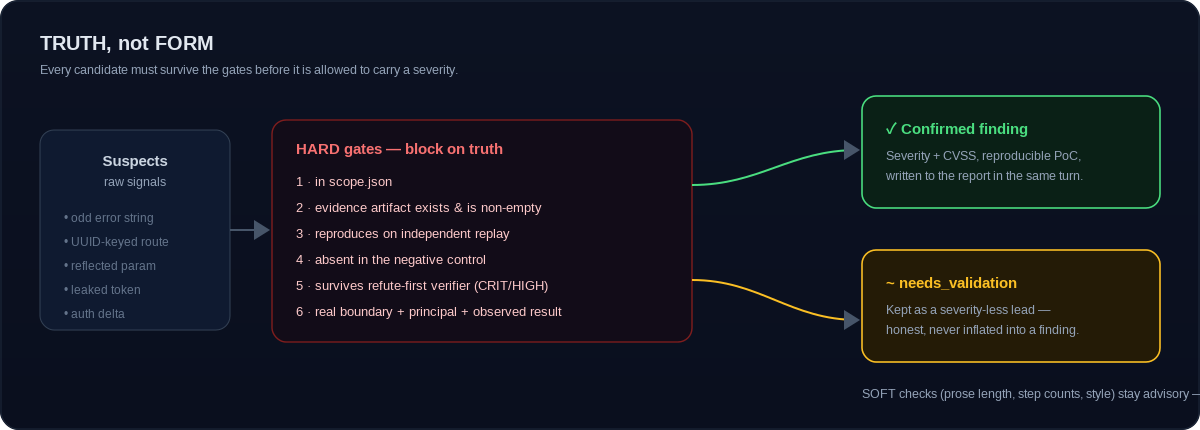
The core idea is a split between HARD gates (block on truth) and SOFT checks (advisory on form):
- A finding is reported only with a real boundary + principal + observed_result and a reproducible PoC — the success signal must reappear on an independent replay and be absent in a negative control.
- CRITICAL / HIGH must also survive a fresh refute-first verifier that tries ≥2 benign explanations before the finding is called confirmed.
- MEDIUM and above need captured proof (a saved request/response artifact or a replay), not prose. A command string without a captured result is not enough.
- Unproven leads become severity-less
needs_validationentries — never inflated findings.
SOFT checks (prose length, step counts, writing style) inform the model's judgement but never block a
true finding. Default PENTEST_GATE_MODE=reason runs HARD gates only; =strict adds the SOFT checks
for eval/CI parity.
⚙️ How it works — the 4-phase pipeline
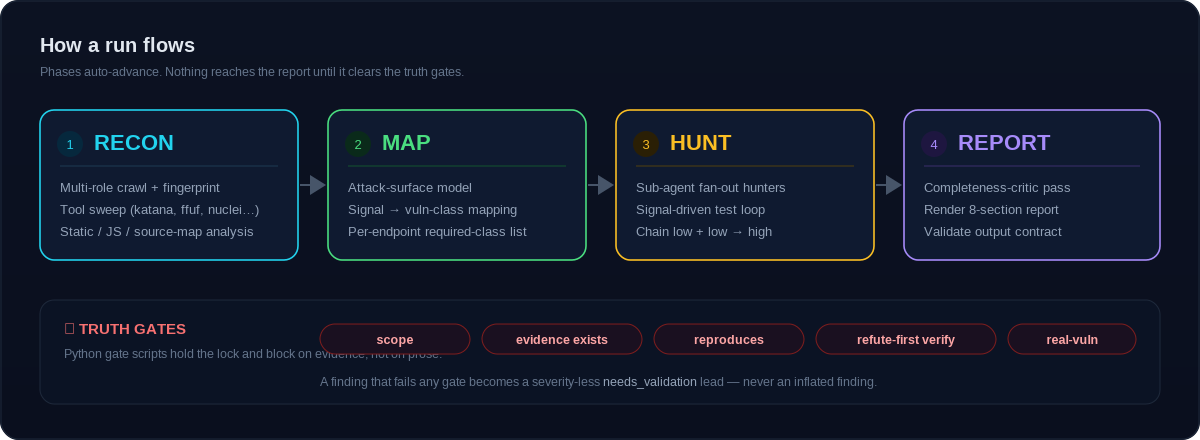
5 principles: Test First · Prove-With-Artifacts-Then-Refute · Persist-On-Confirm · Files-Are-Memory · Autonomous-but-Observable.
4 phases (auto-advance — no "continue?" prompts):
| Phase | What happens |
|---|---|
| 1 · RECON | Multi-role crawl + tech fingerprint + external tool sweep (katana, gospider, ffuf, nuclei, …) + static/JS/source-map analysis → a mental model of the app. |
| 2 · MAP | Build the attack-surface model, map each signal to the vuln classes it implies, and derive a per-endpoint required-class worklist. |
| 3 · HUNT | Fan out focused sub-agent hunters, run a signal-driven test loop, cross-cut classes (CORS, headers, host, takeover, cache, race, TLS), chain low + low → high, and adversarially verify each confirmation. |
| 4 · REPORT | A completeness-critic pass closes coverage gaps, then the skill renders and validates the 8-section report. |
State lives in a Markdown file-store (output/pentest/_store/, one .md per document) — so a run
survives /compact and crashes with no database and no daemon. Python gate scripts hold the lock
and enforce the rules; you call them, and they block you with a precise error when a finding isn't
proven.
🧰 Feature highlights
- 🤖 Fully autonomous — one command drives RECON → MAP → HUNT → REPORT end to end.
- 🎯 Target-agnostic — point it at any in-scope web app or API; it fingerprints the stack and adapts (Next.js SPA, API-only, WordPress, Spring + GraphQL playbooks included).
- 🛡️ OWASP Web + API Top 10 + business logic — IDOR/BOLA, auth/BFLA, injection, SSRF, SSTI, race conditions, mass assignment, GraphQL, and chained attacks.
- 🧠 LLM / prompt-injection class — when the target ships an AI feature, prompt-injection, system-prompt leak, insecure output handling and tool/agent/MCP abuse become first-class tests.
- 🔁 Refute-first verification — a fresh agent tries to disprove each CRIT/HIGH before it ships.
- ♻️ Convergence hunt loop (anti-miss) — HUNT runs in waves and closes only at a fixpoint: late-discovered endpoints are re-opened, every class found once is swept across all applicable endpoints (1 IDOR ⇒ check IDOR everywhere), and the loop ends when a full wave yields no new signal — bounded, measured, not "loop until N clean passes".
- 📎 Evidence-backed — captured request/response artifacts, reproducible
repro_check, negative controls. - 🌍 Context-judged PII redaction — the AI decides what is personal data (any country's ID
scheme, names, contacts, health, location…) by context, not by regex;
pii_review.pymakes sure every part of the report was judged and writes a redacted client export. - 💾 Crash-proof memory — Markdown file-store; resume cleanly after
/compactor a restart. - 🧩 Sub-agent fan-out — HUNT splits into focused hunters with minimal context each.
- 🚧 Scope enforced at the tool boundary — on Claude Code the installer wires a
scope_guard.pyPreToolUse hook into.claude/settings.jsonthat HARD-blocks any request to adenied_hostsentry or a host outsideallowed_hostsbefore it is sent (infra/local commands pass). Scope is a real rail, not just a prompt instruction; on other agents it stays advisory. - 🪶 Zero heavy deps — gate scripts are Python 3.9+ standard library only. No DB, no daemon.
🎯 What this skill covers
25 vulnerability-class playbooks + 4 stack playbooks, auto-selected from the target's surface and tech stack. The skill only loads the classes a given endpoint actually implies — but the full library is below.
Vulnerability classes
| Category | Classes covered |
|---|---|
| Injection | SQL injection · NoSQL injection · Server-Side Template Injection (SSTI) · XXE · CRLF / header injection |
| Cross-site & client-side | XSS (reflected / stored / DOM) · DOM-based prototype pollution · CORS misconfiguration · Client-Side Path Traversal (CSPT) · WebSocket abuse |
| Access control & auth | Broken authentication · BOLA / IDOR (incl. cross-tenant) · BFLA (function-level) · Mass assignment / BOPLA · Multi-tenant isolation · Rate-limit / anti-automation |
| Server-side | SSRF · Insecure deserialization · Unrestricted file upload · HTTP request smuggling · Web cache poisoning / deception |
| API & data exposure | GraphQL (introspection, batching, auth) · Hidden / shadow API discovery · Unsafe 3rd-party API consumption · Information disclosure |
| Business logic & timing | Business-logic flaws (flow-skip, state bypass, price/qty tampering) · Race conditions / TOCTOU / double-spend · Chained low + low → high |
| Infra & supply chain | Subdomain takeover · Dependency confusion · Known-CVE (1-day) hunting per pinned component |
| AI / LLM security 🧠 | Direct & indirect prompt injection · System-prompt leak · Insecure output handling · Tool / agent / MCP abuse |
OWASP Top 10 coverage
| OWASP Web Top 10 (2021) | OWASP API Top 10 (2023) |
|---|---|
| ✅ A01 Broken Access Control | ✅ API1 BOLA |
| ✅ A02 Cryptographic Failures (partial — TLS/exposure) | ✅ API2 Broken Authentication |
| ✅ A03 Injection | ✅ API3 Broken Object Property Level Auth |
| ✅ A04 Insecure Design (business logic) | ✅ API4 Unrestricted Resource Consumption |
| ✅ A05 Security Misconfiguration | ✅ API5 BFLA |
| ✅ A06 Vulnerable & Outdated Components | ✅ API6 Unrestricted Access to Business Flows |
| ✅ A07 Identification & Auth Failures | ✅ API7 SSRF |
| ✅ A08 Software & Data Integrity Failures | ✅ API8 Security Misconfiguration |
| ⚪ A09 Logging & Monitoring (out of scope) | ✅ API9 Improper Inventory Management |
| ✅ A10 SSRF | ✅ API10 Unsafe Consumption of APIs |
Stack playbooks
| Stack | What it tunes |
|---|---|
| Next.js / SPA | __NEXT_DATA__, RSC/server actions, client-side routing, source-map mining |
| API-only | OpenAPI/Swagger discovery, bearer/JWT flows, mass-assignment, BOLA sweeps |
| WordPress | plugin/theme enumeration, REST API, xmlrpc, known-CVE lane |
| Spring + GraphQL | actuator exposure, GraphQL introspection/batching, deserialization |
Not finding a class listed here on a target isn't a gap — the skill records why each applicable class was tested-clean, tested-blocked, or inapplicable, so coverage is auditable, not assumed.
🤝 Supported agents
The methodology (Markdown) and the gate scripts (Python) are agent-agnostic. The installer drops
the payload into .claude/ and wires a small pointer/rules file into each agent you use:
| Agent | Native entry file the installer writes | Support |
|---|---|---|
| Claude Code | .claude/skills/ + .claude/scripts/ + CLAUDE.md | 🟢 Native — Skill tool, sub-agent fan-out, auto-advancing phases |
| Cursor | .cursor/rules/autopentest.mdc (frontmatter: description + alwaysApply: false) | 🟡 Methodology + gates via project rule |
| GitHub Copilot | .github/copilot-instructions.md | 🟡 Methodology + gates via repo instructions |
| Codex / AGENTS.md | AGENTS.md | 🟡 Any AGENTS.md-aware agent |
| Windsurf | .windsurf/rules/autopentest.md (frontmatter: trigger: model_decision) | 🟡 Methodology + gates via workspace rule |
| Cline | .clinerules/autopentest.md | 🟡 Methodology + gates via rules folder |
| Roo Code | .roo/rules/autopentest.md | 🟡 Methodology + gates via rules folder |
| Gemini CLI | GEMINI.md | 🟡 Methodology + gates via context file |
| Aider | CONVENTIONS.md + .aider.conf.yml (read:) | 🟡 Aider doesn't auto-load by filename — installer adds the read: entry |
🟢 Claude Code gets the deepest integration (it was built on Claude Code's skill + sub-agent model). 🟡 Other agents read the same methodology and run the same Python truth-gates — the gates are what keep findings honest regardless of which model drives them. The agent just needs to run shell/
python3commands.
Why everything installs under .claude/ (not a Claude-only thing). The payload — methodology +
gate scripts — lives in .claude/skills/ and .claude/scripts/ for every agent, for two practical
reasons: Claude Code can only auto-discover a skill in .claude/skills/, and the scripts' built-in
help messages all reference .claude/scripts/..., so one shared location keeps those hints correct
everywhere. It's just a folder — the Python scripts resolve their own paths and run from anywhere,
and each non-Claude agent is pointed at those files by its own entry file (.cursor/rules/…,
AGENTS.md, …). CLAUDE.md is Claude Code's entry point only; no other agent depends on it. In other
words: .claude/ is shared storage, not a support boundary.
Installed into a workspace, the layout looks like this:
your-engagement/
├── .claude/
│   ├── skills/pentest/        # methodology  (read by every agent, via its own entry file)
│   └── scripts/pentest/       # Python truth-gates  (run by every agent)
├── scope.json                 # your authorized targets
├── CLAUDE.md                  # entry file — Claude Code
├── AGENTS.md                  # entry file — Codex & AGENTS.md-aware agents
├── .cursor/rules/autopentest.mdc        # entry file — Cursor
├── .github/copilot-instructions.md      # entry file — GitHub Copilot
├── .windsurf/rules/autopentest.md       # entry file — Windsurf
├── .clinerules/autopentest.md           # entry file — Cline
├── .roo/rules/autopentest.md            # entry file — Roo Code
├── GEMINI.md                  # entry file — Gemini CLI
├── CONVENTIONS.md             # entry file — Aider
└── .aider.conf.yml            # makes Aider load CONVENTIONS.md
(Only the entry files for the agents you selected are created.)
Neutral payload folder (optional). If you don't use Claude Code, you can keep the payload out of
.claude/ entirely — ./install.sh --agent cursor --root .autopentest installs it under
.autopentest/ and rewrites every path hint in the installed copy to match. (Selecting claude
forces the root back to .claude/, which Claude Code requires.)
📦 Install
One command — auto-detects the agents in your workspace and installs for all of them:
git clone https://github.com/haoit/agentic-autopentest.git
cd /path/to/your/engagement
/path/to/agentic-autopentest/install.sh
Pick specific agents, or install for everything:
./install.sh --all                      # every supported agent
./install.sh --agent claude --agent cursor       # just these two
./install.sh --agent cursor --root .autopentest  # neutral folder (no Claude)
./install.sh --dir ~/engagement --all   # into another workspace
./install.sh --list                     # list supported agents
Prefer to copy files manually?
cp -R skills/pentest             /path/to/engagement/.claude/skills/pentest
cp -R scripts/pentest            /path/to/engagement/.claude/scripts/pentest
cp -R skills/llm-pentest         /path/to/engagement/.claude/skills/llm-pentest          # companion KB (LLM/AI)
# PortSwigger web-payload KB is EMBEDDED in the pentest skill (skills/pentest/references/payloads/portswigger/) — nothing to copy separately
cp CLAUDE.md           /path/to/engagement/CLAUDE.md      # Claude Code routing anchor
cp scope.example.json  /path/to/engagement/scope.json     # then edit scope.json
(Windows: run install.sh from Git Bash or WSL.)
Then edit scope.json with your authorized target(s), denied hosts, forbidden actions, and stop
conditions:
{
  "engagement": "example-engagement-2026-01",
  "primary_target": "app.example.test",
  "allowed_hosts": ["app.example.test", "api.example.test"],
  "denied_hosts":  ["login.microsoftonline.com", "accounts.google.com"],
  "forbidden_actions": ["No DoS / load testing", "No brute force against real accounts"],
  "rate_limit": { "max_concurrent": 3, "min_delay_ms": 300, "jitter_ms": 300 }
}
You don't have to get scope.json perfect up front: the first step of every /pentest run is an
engagement intake — before any request reaches the target, the agent asks you (in one message)
what is in scope, what is out of scope, which actions are forbidden, and which test
accounts exist per role (plus staging/prod, testing window, stop conditions, contact). Your
answers are recorded by intake.py into scope.json and the engagement state; the RECON gate
blocks until that is done.
🔄 Updating
At the start of each session the skill runs update_check.py, which fetches the published
skills/pentest/VERSION (one small HTTPS GET to GitHub, cached 24 h, 3 s timeout, silent when
offline) and prints one line if a newer version exists. It only notifies — it never downloads
or runs new code, and it never contacts your target. Update yourself, between engagements:
/path/to/agentic-autopentest/install.sh --update --dir /path/to/engagement
--update fetches the repo, shows the changelog and the version jump, asks for confirmation,
fast-forwards your clone (it refuses if the clone has local changes or has diverged — re-clone in
that case), then reinstalls. scope.json, output/ and credentials are left untouched. It refuses
while an engagement run is still open (REPORT not closed) because gates and the state format can
change between versions; --force overrides, --yes skips the prompt.
Docker: docker pull the new image, recreate the container, then run
/opt/autopentest/install.sh --update --dir /work inside it.
Turn the check off for offline labs or when the rules of engagement forbid extra egress:
PENTEST_UPDATE_CHECK=0, or "update_check": false / "notes": {"offline": true} in scope.json.
🔐 Never commit
scope.json, credentials, oroutput/— the bundled.gitignorealready excludes them. Test credentials given at intake are written only tooutput/pentest/<host>/sessions/credentials.json(mode 0600), never into the scope file.
🐳 Docker — all tools + HexStrike MCP
Installing katana, nuclei, ffuf, httpx, subfinder, dalfox, jsluice, Playwright, and the rest by hand is painful. The bundled image ships the whole tool set + AutoPentest + the HexStrike AI MCP server (150+ security tools exposed over MCP) in one container, so your agent can run tools without installing anything locally.
Easiest — one command, no build (pulls the prebuilt multi-arch image from GHCR):
curl -fsSL https://raw.githubusercontent.com/haoit/agentic-autopentest/main/quickstart.sh | bash
Or with the repo cloned:
export PENTEST_WORKSPACE=~/engagements/acme     # your engagement folder (mounted at /work)
docker compose up -d                             # PULLS the prebuilt image — no build
docker compose exec autopentest bash             # a shell with every tool on PATH
Want to build it yourself (customise, or you don't trust a prebuilt image):
docker compose up -d --build # builds from source (large, ~15–20 min)
The image is published by CI to ghcr.io/haoit/agentic-autopentest for linux/amd64 + linux/arm64,
so it runs on Intel/WSL and Apple Silicon alike. The container installs the skill into
$PENTEST_WORKSPACE/.claude/ on start and runs the HexStrike API on 127.0.0.1:8888. Point your
agent at the HexStrike MCP:
# Claude Code (project scope): copy the ready-made config to your engagement root
cp docker/mcp/claude-code.mcp.json  "$PENTEST_WORKSPACE/.mcp.json"
# Cursor / Windsurf: cp docker/mcp/cursor.mcp.json  "$PENTEST_WORKSPACE/.cursor/mcp.json"
Both configs bridge to the container with docker exec -i autopentest python3 … hexstrike_mcp.py,
so nothing but Docker is needed on the host.
How the two layers combine: HexStrike is the tool-execution backend (it runs scanners); AutoPentest stays the brain (phases, SITE-MODEL, and the truth-gates that decide what counts as a finding). A HexStrike result is a lead until it passes the gates — see references/ops/hexstrike-mcp.md. HexStrike does not read
scope.json, so you remain the scope guard for anything you launch through it. Burp Suite (GUI) is not in the image; proxy to a host Burp if you need it.Set
HEXSTRIKE_DISABLE=1to run the toolbox without the HexStrike server. Authorized testing only.
🚀 Quick start
# Claude Code (native slash command):
/pentest https://app.example.test

# Any other agent — just ask it, in the workspace where you installed:
pentest https://app.example.test following the AutoPentest skill
The skill bootstraps the engagement, then auto-advances RECON → MAP → HUNT → REPORT, writing
findings to output/pentest/<host>/ and a single consolidated report to
output/pentest/<host>/reports/.
Resume after a crash or /compact:
python3 .claude/scripts/pentest/session_card.py show --run-id $PENTEST_SESSION   # → NEXT ACTION
# then read output/pentest/<host>/SITE-MODEL.md for the full picture in one read
📄 Example: what a report looks like
Every confirmed finding renders in a fixed 8-section format, so reports are consistent and diffable:
## VULN-example-003 — IDOR on GET /api/v1/invoices/{id}

- **Severity:** High   **CVSS:** 7.5   **Status:** lab_real_build
- **Title:** Any authenticated user can read another tenant's invoices
- **Description:** The invoice endpoint authorizes on authentication but not on
  ownership. A customer-role token for tenant A can read tenant B's invoice by id.
- **PoC (reproduction steps):**
  1. Log in as customer A, capture the bearer token.
  2. `curl -H "Authorization: Bearer $A" https://api.example.test/api/v1/invoices/8842`
  3. **Result:** 200 OK with tenant B's invoice body (amount, buyer, line items).
  4. **Negative control:** same request without the token → 401.
- **Impact:** Cross-tenant disclosure of financial records (confidentiality breach).
- **Recommendation:** Enforce object-level ownership checks on every resource id.
- **References:** OWASP API1:2023 — Broken Object Level Authorization (BOLA).
Leads that couldn't be proven don't get a severity — they land in a separate Needs validation section, so the reader always knows what was demonstrated vs. merely suspected.
🗂️ Repository layout
autopentest/
├── skills/pentest/
│   ├── SKILL.md                  thin index: 5 principles + 4 phases + where to load detail
│   ├── references/
│   │   ├── HIGH-SIGNAL-PATTERNS.md    signal → action playbook (most-loaded)
│   │   ├── vuln-classes/             per-class playbooks (sqli, xss, ssrf, auth, logic, …)
│   │   ├── phases/ phase1/ phase2/   phase methodology (split per §, loaded on demand)
│   │   ├── ops/                      gate philosophy, finding-quality, verdicts, schemas, …
│   │   └── playbooks/                per-stack (nextjs-spa, api-only, wordpress, spring-graphql)
│   └── eval/                     gate-honesty test + a minilab target
├── scripts/pentest/              the gate rails — step_done, ep_close, phase_close, poc_gate,
│                                 finding_close, flush, render_report, report_validate, …
├── install.sh                    one-command multi-agent installer
├── quickstart.sh                 one-liner: pull prebuilt image + wire up an engagement
├── docker-compose.yml            toolbox + HexStrike MCP in one container (pulls from GHCR)
├── docker/                       Dockerfile · entrypoint · ready-made MCP configs
├── .github/workflows/            CI: build + push multi-arch image to GHCR on release
├── assets/                       diagrams used by this README
├── CLAUDE.md                     entry file for Claude Code (other agents get their own —
│                                 install.sh generates them; see "Supported agents")
├── scope.example.json            copy to scope.json and fill in
├── LICENSE                       MIT
└── .gitignore                    excludes output/, scope.json, tokens, .env
🧩 Requirements
- An AI coding agent that can read a rules/instructions file and run shell commands — e.g. Claude Code (deepest integration), Cursor, GitHub Copilot, Codex, Windsurf, Cline, Gemini CLI, or Aider.
- Python 3.9+ (
python3) for the gate scripts — standard library only, no DB required. - Bash to run
install.sh(macOS/Linux, or Git Bash / WSL on Windows). - Optional external recon/scan tools the playbooks use if present:
katana,gospider,hakrawler,dirsearch,ffuf,nuclei,subfinder,gau,ast-grep, Burp Suite, Playwright. The skill degrades gracefully (and records the degradation) when a tool is absent.
🌍 Localizing the output language
Output (findings + report) is English by default. To localize to another language, change the
8-section headers in skills/pentest/SKILL.md and the matching strings in
scripts/pentest/render_report.py and scripts/pentest/report_validate.py. The gate contract
(render_report ↔ report_validate ↔ finding_close) must stay in sync.
❓ FAQ
Is this a scanner like Nuclei or Burp?
No. AutoPentest orchestrates scanners (it will call nuclei, ffuf, etc. if present) but its job
is the reasoning layer on top: understanding the app, choosing what to test, running exploit attempts,
and proving the results. It's closer to an autonomous bug-bounty hunter than to a signature scanner.
Will it hallucinate vulnerabilities?
That's the whole thing it's designed to prevent. A finding cannot enter the report unless it passes the HARD gates — scope, captured evidence, reproduction on replay, absence in a negative control, and (for CRIT/HIGH) a fresh refute-first verifier. Unproven leads are demoted, not reported as findings.
Does it need a database?
No. All state is a Markdown file-store under output/pentest/_store/. No MongoDB, no SQLite, no
daemon — which is also what lets a run survive /compact and crashes.
Can I use it on production?
Only with written authorization and a carefully scoped scope.json (deny lists, rate limits, forbidden
actions, stop conditions). The skill is built to respect scope, but you are responsible for staying
within it and within the law.
What targets does it support?
Any web app or HTTP API. It fingerprints the stack and loads matching playbooks (Next.js SPA, API-only, WordPress, Spring + GraphQL, and generic). It's target-agnostic by design.
🤝 Contributing
Issues and PRs welcome — new vuln-class playbooks, signal patterns, stack playbooks, and gate improvements especially. Please:
- Keep user-facing output and docs in English.
- Keep the gate contract (
render_report↔report_validate↔finding_close) in sync. - Don't weaken the truth gates — the whole value of the project is that a reported finding is real.
📜 License
MIT — see LICENSE. Set the copyright holder to your name or organization before publishing.
Keywords: AI penetration testing · autonomous pentest agent · AI agent skill · Claude Code · Cursor · GitHub Copilot · Codex · Windsurf · Cline · Gemini CLI · Aider · LLM security testing · OWASP Top 10 automation · API security testing · AI red teaming · bug bounty automation · prompt injection testing · AI AppSec · automated security audit · web app pentest AI
Works with your favorite AI coding agent. If this project helps you, consider leaving a ⭐ — it helps others find it.
// faq
What is agentic-autopentest?
Autonomous AI penetration-testing skill for coding agents (Claude Code, Cursor, Copilot, Codex, Windsurf, Cline, Gemini, Aider) — proof-gated OWASP Web + API findings. It is open-source on GitHub.
Is agentic-autopentest free to use?
agentic-autopentest is open-source under the MIT license, so it is free to use.
What category does agentic-autopentest belong to?
agentic-autopentest is listed under security in the Claudeers registry of Claude-compatible tools.
// embed badge

[](https://claudeers.com/agentic-autopentest)
// retro hit counter

[](https://claudeers.com/agentic-autopentest)
// reviews
// guestbook
// related in Security & Compliance
 🔓
A complete AI agency at your fingertips - From frontend wizards to Reddit community ninjas, from whimsy injectors to reality checkers. Each agent is a specia…
 🔓
π RuView turns commodity WiFi signals into real-time spatial intelligence, vital sign monitoring, and presence detection — all without a single pixel of video.
 🔓
Prowler is the world’s most widely used open-source cloud security platform that automates security and compliance across any cloud environment.
 🔓
🐶 A curated list of Web Security materials and resources.