
Agent-Signal-Bar
本地优先的 macOS AI Agent 信号灯:状态栏 + 桌面悬浮信号灯,自动监控 Codex / Claude Code。Local menu bar and floating desktop status lights for AI agents.
Install with your AI
Paste into Claude Code, Cursor, or any agent — it reads the repo and wires the tool into your project.
Install and set up Agent-Signal-Bar (release-binary project) into my current project.
Found on https://claudeers.com/agent-signal-bar
Repo: https://github.com/guan-ops/Agent-Signal-Bar
Homepage/docs: https://agentsignalbar.app
Detected install method: release-binary → inspect the README
Category: automation. Platforms: cli, desktop, web.
Read the repo's README for exact setup and env vars, then install it and wire it into my project.

Claudeers Health Verdict:
active; community-verified: false. Confirm the source before running anything.
Grab the latest release asset from GitHub.
# download a build from https://github.com/guan-ops/Agent-Signal-Bar/releases
git clone https://github.com/guan-ops/Agent-Signal-Bar
// compatibility
| Platforms | cli, desktop, web |
|---|---|
| Operating systems | — |
| AI compatibility | claude |
| License | Apache-2.0 |
| Pricing | open-source |
| Language | Swift |
Agent Signal Bar
Menu bar and floating desktop status lights for AI agents on macOS.
Floating signal light · New Zealand crossing sounds · Local-first · Codex Desktop monitoring · Claude Code hooks

| Layout | Minimal Dots | Classic Lamp |
| Horizontal | 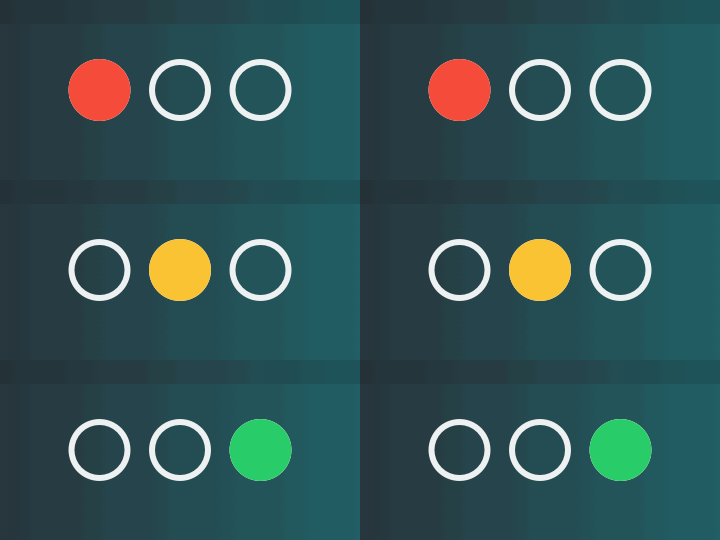 | 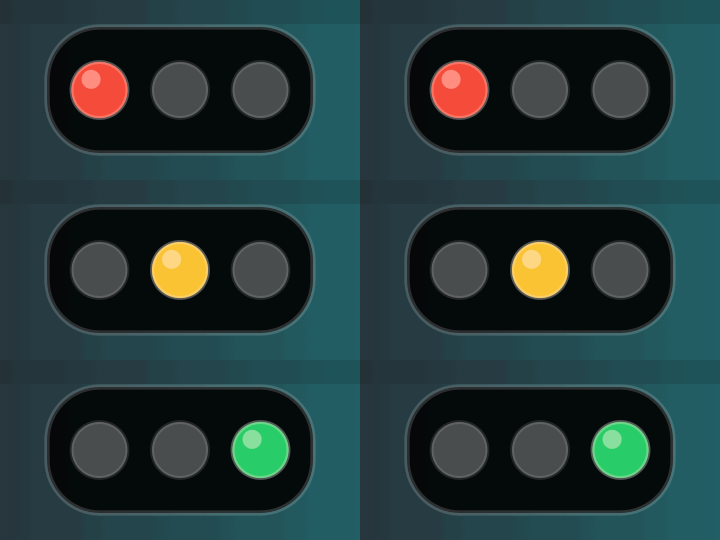 |
| Vertical | 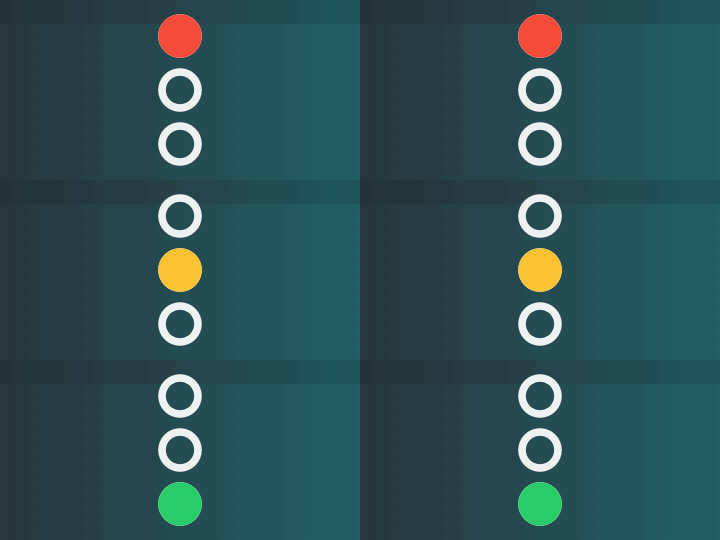 | 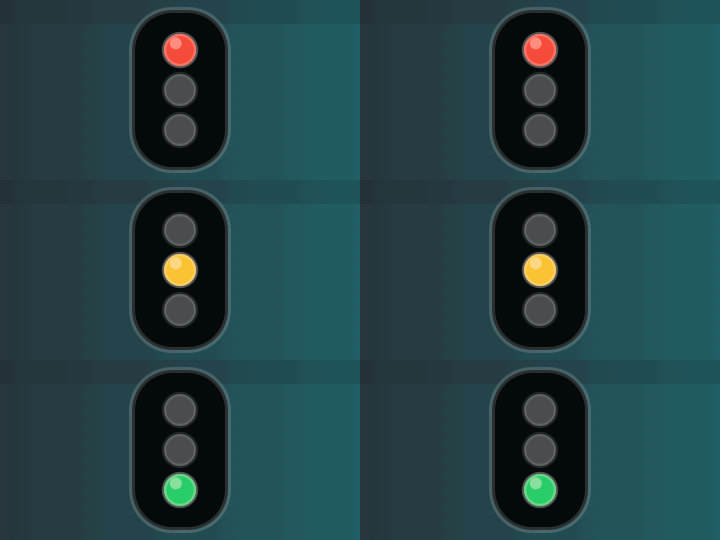 |
All styles use the red/yellow/green sequence effect.
Agent Signal Bar is a local-first macOS app that uses three red, yellow, and green signal lights in the menu bar and on the desktop to show the current state of local AI agents. It helps you see whether Codex, Claude Code, or a local script is idle, thinking, working, done, waiting for approval, or blocked without switching back to a terminal or editor.
Floating Signal Light

The floating signal light stays visible on the desktop, syncs with the menu bar light, and supports dragging, resizing, vertical or horizontal layouts, compact running-agent, quota, and token badges, plus small popovers for current sessions and usage. Sound alerts can be configured separately for completion, green flashing, and warning states.
Listen to the bundled New Zealand crossing sounds: green flash sound · completion sound.
Download And Open
For normal use, download the app from GitHub Releases, not from the green Code button. The Code > Download ZIP file is source code and does not contain a ready-to-open app installer.
- Open the latest release.
- Download
AgentSignalBar.dmg. - Open the DMG and drag
AgentSignalLight.apptoApplications. - Open Agent Signal Bar from
Applications.
After the first install, use Agent Signal Bar > Check for Updates... or Settings > About > Updates to let Sparkle download and install future releases.
If macOS blocks the first launch because the build is not notarized yet, right-click the app and choose Open, or use System Settings > Privacy & Security > Open Anyway.
Developers can also download the source code and run ./script/build_and_run.sh.
Menu Bar Panel
| Detailed Panel | Simple Menu |
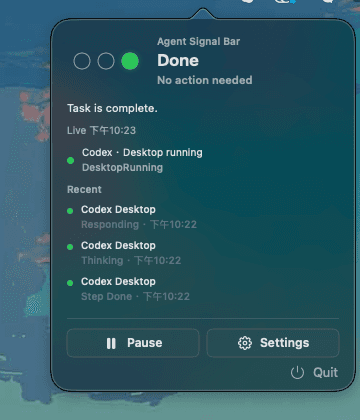 | 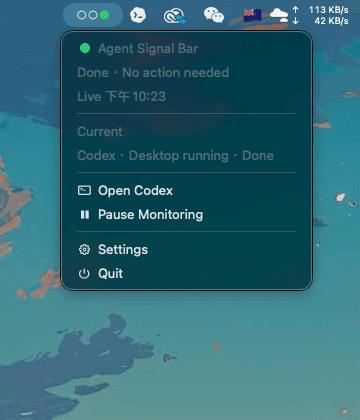 |
Click the menu bar signal light to open either the detailed panel or the simple native-style menu. Both show the current status and live agent activity. The detailed panel keeps the quick actions focused on pausing monitoring, opening settings, and quitting; the simple menu can also show open-agent shortcuts when relevant.
Usage Dashboard

The Usage page combines Codex quota, local token usage, and tool-call totals from local Codex logs. Daily bars support hover details, including per-model token and estimated cost breakdowns.
Settings Liquid Glass Comparison
| Without Liquid Glass | Default Liquid Glass |
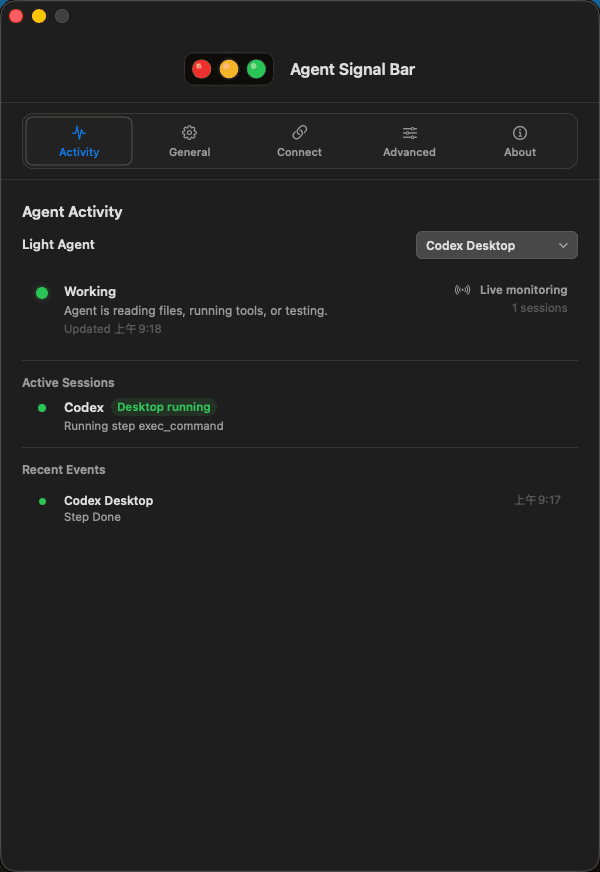 | 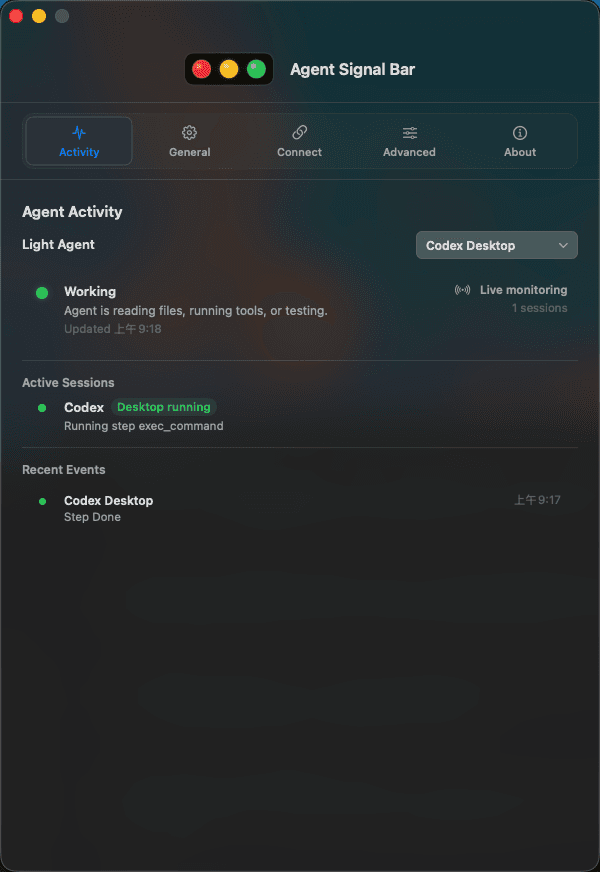 |
Both images are real screenshots of the current Activity page. The left image shows the normal solid settings window, while the right image shows the default Standard Liquid Glass style with the desktop background participating in the window material. Liquid Glass is on by default and can be adjusted between Standard and Enhanced in General > Liquid glass.
Features
- macOS menu bar signal light with horizontal and vertical layouts.
- Floating desktop signal light with drag, resize, badges, current-session popover, and synced animation.
- Separate sound choices for completion, green flashing, and warning states, including New Zealand crossing sounds.
- Two visual styles: classic signal board and minimal dots.
- Menu bar panel with current status, running agents, recent activity, pause/settings actions, and quit.
- Settings window with Activity, General, Connections, Advanced, and About pages.
- Codex Desktop activity monitoring without required hooks, plus optional Codex hooks, Claude Code hooks, and generic JSON event input.
- Multi-session aggregation so permission, failure, and blocked states are not overwritten by normal working states.
- Local CLI for scripts, automation, and custom agents.
- Multilingual UI with system-language detection and manual language switching.
- Customizable light effects, including blink speed, breathing strength, and per-state effect choices.
- Theme selection and launch at login.
- No cloud service is required. State files, hooks, and diagnostics stay on your Mac.
Signal Language
| Agent state | Default effect | Meaning |
|---|---|---|
Idle idle | steady green | Nothing needs attention |
Thinking thinking | fast green flash | The agent is reasoning about the task |
Working working | slow green flash | The agent is editing files, running tools, or testing |
Step done tool_done | slow green flash | One step finished and the workflow may continue |
Done done | steady green | The task is complete and will return to idle shortly |
Attention attention / notification | flashing yellow | Check when convenient |
Permission permission / permission_request | flashing red | Approval is needed now |
Blocked blocked / failure / error | fast flashing red | Immediate action is needed |
Stale stale | gray/yellow warning | The state file is old, damaged, or untrusted |
Off off / pause | all lights off or static gray | Monitoring is paused |
Default effect settings:
- Thinking: fast green flash
- Working: slow green flash
- Done: steady green
Effects can be customized in the Advanced page of the settings window.
Light Effect Preview

Aggregation Priority
When multiple agents or sessions are active, the menu bar shows the highest-priority state:
paused > blocked > permission > needs_review > stale > active > completed > ready
Red states are never overwritten by normal work. Yellow attention states are also protected from newer working events. done is visible for 30 seconds by default, then returns to idle.
Quick Start
Build and run:
./script/build_and_run.sh
Verify the app:
./script/build_and_run.sh --verify
Open the settings window for UI verification:
./script/build_and_run.sh --ui-verify
Run local diagnostics:
./script/doctor.sh
./script/doctor.sh --full
Package the app:
./script/package_app.sh --release
Build local zip and DMG artifacts:
./script/package_release.sh
Sparkle update feeds are generated as dist/appcast.xml. Local packaging uses the Sparkle signing key from Keychain; GitHub Actions requires the private key in the SPARKLE_PRIVATE_KEY secret.
CLI
Install the CLI:
./script/install_cli.sh
Update state:
./scripts/agent-signal idle
./scripts/agent-signal thinking --session codex-main --agent codex
./scripts/agent-signal working --session codex-main --agent codex --event PreToolUse
./scripts/agent-signal permission --session claude-main --agent claude-code --event PermissionRequest
./scripts/agent-signal blocked --session job-1 --agent script --event Failed
./scripts/agent-signal done --session codex-main --agent codex --event Stop
Read state:
./scripts/agent-signal status
./scripts/agent-signal status --json
Reset to idle:
./scripts/agent-signal reset
Wrap any command as an agent run:
./scripts/agent-signal-run \
  --session nightly-build \
  --agent script \
  -- ./run-build.sh
Agent Integration
Codex Desktop can work without manually installing hooks. Keep Monitor Codex Desktop enabled in the app and Agent Signal Bar will read local Codex session logs to detect thinking, working, step-done, and done states. Hooks are optional for Codex Desktop, but they are still useful for Codex CLI/TUI, Codex IDE compatibility, project-scoped automation, Claude Code, and other local agents that report events directly.
Codex Desktop activity comes from the local Codex session log. Normal browser usage does not trigger Agent Signal Bar unless it is part of an active Codex task that is using tools.
Integration verification status:
- Codex has been tested in real use and is fully verified.
- Claude Code hook support is implemented, but it has not yet been verified with a live Claude Code workflow.
Install hooks when you need CLI/IDE or Claude Code integration:
./script/install_hooks.py --target all --codex-scope project --dry-run
./script/install_hooks.py --target all --codex-scope project --install
For development, project-scoped Codex hooks are recommended so project-level and user-level hooks do not fire at the same time.
Generic JSON input:
echo '{"event":"AgentStarted","agent":"local-script","session_id":"local-main"}' \
  | ./scripts/generic-agent-signal-hook

echo '{"event":"ApprovalRequired","agent":"local-script","session_id":"local-main"}' \
  | ./scripts/generic-agent-signal-hook
State File
Default state file:
/tmp/agent-signal/status.json
Example:
{
  "schema_version": 1,
  "aggregate": "working",
  "updated_at": "2026-05-28T03:45:00Z",
  "sessions": {
    "codex-main": {
      "agent": "codex",
      "signal": "working",
      "last_event": "PreToolUse",
      "updated_at": "2026-05-28T03:45:00Z"
    }
  },
  "events": [
    {
      "id": "D4204E0A-5B5D-4DFB-A3BC-643E6C7C6F8F",
      "session_id": "codex-main",
      "agent": "codex",
      "signal": "working",
      "event": "PreToolUse",
      "updated_at": "2026-05-28T03:45:00Z"
    }
  ]
}
Environment variables:
export AGENT_SIGNAL_LIGHT_STATE_FILE=/path/to/status.json
export AGENT_SIGNAL_LIGHT_STATE_DIR=/tmp/agent-signal
export AGENT_SIGNAL_LIGHT_EVENT_LIMIT=50
export AGENT_SIGNAL_LIGHT_COMPLETED_TTL_SECONDS=90
export SIGNAL_LIGHT_SESSION_TTL_SECONDS=1800
Project Layout
Sources/
  AgentSignalLight/        macOS app, menu bar, settings window
  AgentSignalLightCore/    state model, aggregation, hook mapping
  AgentSignalLightUI/      signal rendering and icon geometry
  AgentSignalCLI/          agent-signal CLI
scripts/                   CLI wrappers and hook wrappers
script/                    build, install, diagnostics, packaging scripts
docs/                      integration docs, state schema, release checklist
Tests/                     Swift tests
Documentation
- Signal language
- State schema
- Codex setup
- Claude Code setup
- Local script setup
- GitHub release management
- Release checklist
- Changelog
License
Source code is licensed under the Apache License 2.0.
Non-code assets use separate terms:
- Bundled audio files, including the New Zealand crossing sounds, plus app icons, logos, screenshots, GIFs, and marketing artwork are covered by ASSET_LICENSES.md.
- The
Agent Signal Barname and brand assets are covered by TRADEMARKS.md.
Attribution is recorded in NOTICE.
© 2026 XiongYang Guan (guan-ops)
// faq
What is Agent-Signal-Bar?
本地优先的 macOS AI Agent 信号灯:状态栏 + 桌面悬浮信号灯,自动监控 Codex / Claude Code。Local menu bar and floating desktop status lights for AI agents.. It is open-source on GitHub.
Is Agent-Signal-Bar free to use?
Agent-Signal-Bar is open-source under the Apache-2.0 license, so it is free to use.
What category does Agent-Signal-Bar belong to?
Agent-Signal-Bar is listed under devtools in the Claudeers registry of Claude-compatible tools.
// embed badge

[](https://claudeers.com/agent-signal-bar)
// retro hit counter

[](https://claudeers.com/agent-signal-bar)
// reviews
// guestbook
// related in Automation & Workflows
 🔓
🔓 🔓
🔓The API to search, scrape, and interact with the web at scale. 🔥
 🔓
🔓🌐 Make websites accessible for AI agents. Automate tasks online with ease.
 🔓
🔓Taste-Skill - gives your AI good taste. stops the AI from generating boring, generic slop