
agent-farm
A 2.5D farm where every AI agent (Claude Code, Codex, Cursor, Gemini, OpenCode, Ollama…) is a farm animal showing its live status.
Install with your AI
Paste into Claude Code, Cursor, or any agent — it reads the repo and wires the tool into your project.
Install and set up agent-farm (git-clone project) into my current project.
Found on https://claudeers.com/agent-farm
Repo: https://github.com/irons163/agent-farm
Homepage/docs: —
Detected install method: git-clone → git clone https://github.com/irons163/agent-farm
Category: automation. Platforms: cli, api.
Read the repo's README for exact setup and env vars, then install it and wire it into my project.

Claudeers Health Verdict:
unknown; community-verified: false. Confirm the source before running anything.
git clone https://github.com/irons163/agent-farm
// compatibility
| Platforms | cli, api |
|---|---|
| Operating systems | — |
| AI compatibility | claude |
| License | MIT |
| Pricing | open-source |
| Language | JavaScript |
🌾 Agent Farm · AI 代理農場
繁體中文 · English
一座用 Blender 算圖的 2.5D 等角農場:電腦上每個 AI agent 都是一隻農場動物。誰在工作、誰在思考、誰在等你回覆,看一眼就知道。
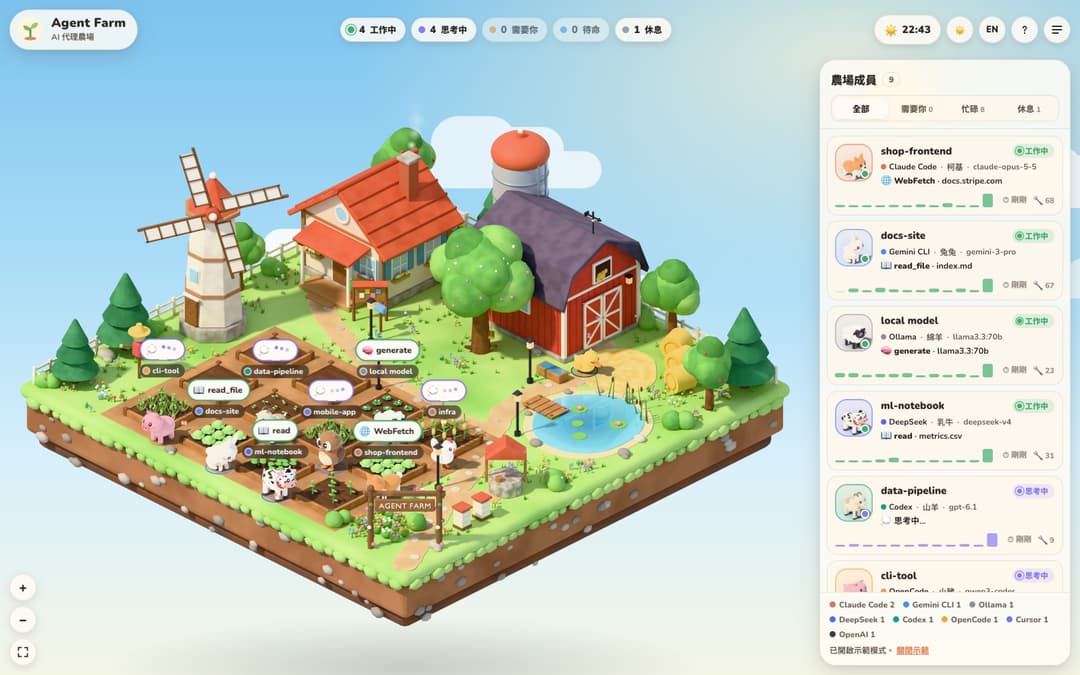
- 支援多平台:Claude Code、OpenAI Codex、Cursor、Gemini CLI、Google Antigravity、OpenCode、Ollama 會自動偵測;其他任何程式用一行 HTTP 請求就能加入。
- 每個 agent 一種動物:狐狸、貓、兔子、貓頭鷹、乳牛、豬、綿羊、母雞、鴨子、柯基、山羊、小馬,同一個工作階段會一直是同一隻。
- 零安裝:不用
npm install、不用 Blender,美術圖已經算好放在 repo 裡。 - 只在你的電腦上跑:唯讀各平台的本機紀錄,不上傳任何東西。
- 白天/夜晚、繁中/English、手機版、需要你回覆時跳桌面通知。
下載
| 版本 | 下載 |
|---|---|
| Apple Silicon(M 系列) | AgentFarm-1.1.2-macOS-AppleSilicon.dmg |
| Intel | AgentFarm-1.1.2-macOS-Intel.dmg |
| Windows 10/11(64 位元) | AgentFarm-1.1.2-Windows-x64-setup.exe |
Linux(x64:.AppImage 或 .deb;arm64:.AppImage) | 最新發行版 |
打開 DMG,把 Agent Farm 拖進 Applications,就這樣。不用安裝 Node.js,不用開終端機。
App 會自動在背景跑伺服器、開視窗。關掉視窗之後繼續跑在選單列(右上角圖示);有 agent 在等你回覆時會跳原生通知。
Windows / Linux: 用法相同,只是常駐在系統匣而不是選單列。Windows 安裝檔目前還沒有程式碼簽章,SmartScreen 會顯示「Windows 已保護您的電腦」,請按其他資訊 → 仍要執行。Linux 的 AppImage 需要先 chmod +x,或直接安裝 .deb。GNOME 預設沒有系統匣,要裝 AppIndicator 擴充套件才看得到圖示(沒裝的話,再開一次 App 就能把視窗叫回來)。
也可以從原始碼跑:
快速開始
需要 Node.js 20 以上(要看 OpenCode 的話需要 22.13 以上)。
git clone https://github.com/irons163/agent-farm.git
cd agent-farm
npm start
打開 http://127.0.0.1:5180。電腦上最近 12 小時用過的 agent 會自己出現。
還沒有 agent 在跑也沒關係,可以先看示範:
npm run demo
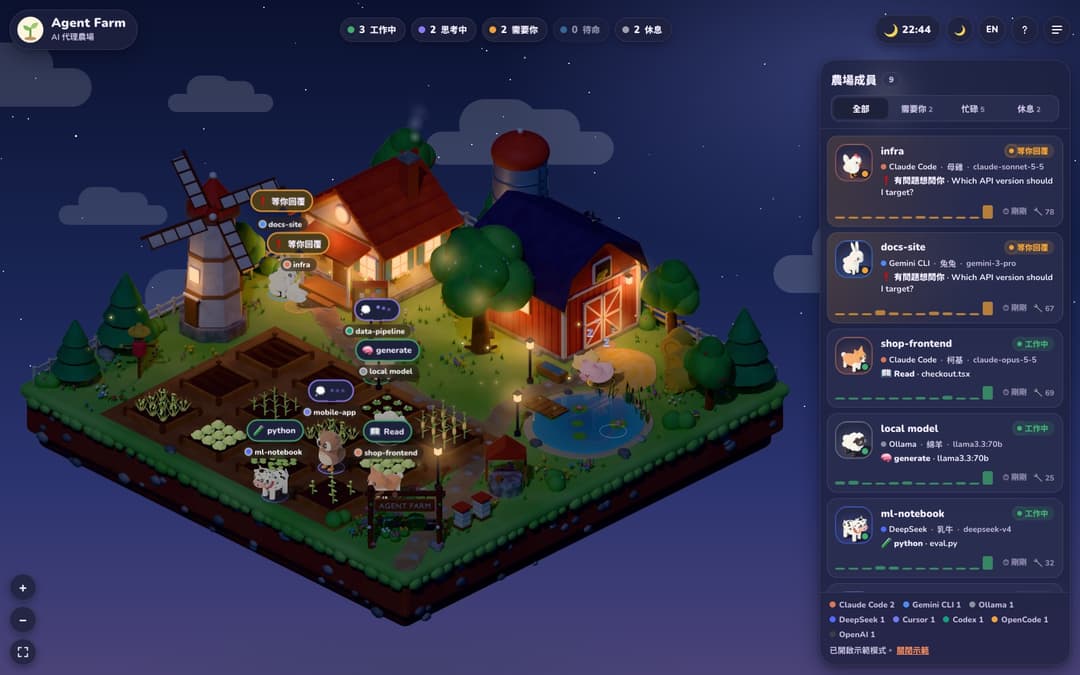
動物在做什麼
| 狀態 | 動物 |
|---|---|
| 🌱 工作中 | 在自己的菜圃幹活,工具用得越多,作物長得越大 |
| 💭 思考中 | 站在菜圃旁,頭上冒思考泡泡 |
| ❗ 等你回覆 | 跑到農舍門廊等你(要授權、有問題要問),並跳通知 |
| ⚠️ 出錯 | 頭上有烏雲閃電 |
| ✅ 待命 | 在草地上散步 |
| 💤 休息 | 閒置 15 分鐘後回到穀倉旁睡覺 |
風車轉速和煙囪的煙會隨工作中的 agent 數量變化。農場上最多 12 隻,其他的列在右側清單裡。滾輪縮放、拖曳移動,點動物看牠最近做了什麼。
支援的平台
| 平台 | 從哪裡讀(唯讀) | 狀態 |
|---|---|---|
| Claude Code | ~/.claude/projects/(或 CLAUDE_CONFIG_DIR) | ✅ 已實測 |
| OpenAI Codex(CLI/桌面版) | ~/.codex/sessions/(或 CODEX_HOME) | ✅ 已實測 |
| Cursor Agent | ~/.cursor/projects/*/agent-transcripts/ | ✅ 已實測 |
| Google Antigravity | ~/.gemini/antigravity/ | ✅ 已實測 |
| OpenCode | ~/.local/share/opencode/opencode.db | ✅ 已實測 |
| Gemini CLI | ~/.gemini/tmp/*/chats/ | ⚠️ 依紀錄格式實作,尚未實測 |
| Ollama | http://127.0.0.1:11434/api/ps(或 OLLAMA_HOST) | ⚠️ 尚未實測 |
| 任何其他程式 | POST /api/report,見下面 | ✅ |
在 macOS 上開發和測試;Linux 和 Windows 的路徑都有處理,但還沒實際測過,有問題歡迎開 issue。
讓其他 AI 也上農場
OpenAI Agents SDK、LangGraph、AutoGen、DeepSeek、你自己的機器人……任何程式都能回報狀態:
curl -X POST http://127.0.0.1:5180/api/report -H 'content-type: application/json' \
  -d '{"id":"support-bot","platform":"openai","status":"working","tool":"search","detail":"order #1932"}'
node bin/farm-report.mjs --id researcher --platform deepseek --status thinking
import requests
requests.post("http://127.0.0.1:5180/api/report", json={
    "id": "researcher", "platform": "deepseek", "status": "working", "tool": "web_search"})
status 可以是 working、thinking、waiting、error、idle、sleeping,或用 offline 讓牠離開。其他可選欄位:name、model、project、task、detail、tokens、animal(指定動物)、color(#RRGGBB)。
Claude Code 即時掛鉤(選用)
不加也能用:狀態是從對話紀錄判斷的。加上 hooks 之後,「等待授權」這類狀態會即時、準確地顯示。網頁右上角「?」裡有一段已經填好路徑的設定,貼進 ~/.claude/settings.json 就好。
設定
| 參數 | 環境變數 | 預設 | 說明 |
|---|---|---|---|
--port 5181 | PORT | 5180 | 連接埠 |
--demo | FARM_DEMO=on | off | 顯示示範動物 |
--host 0.0.0.0 | HOST | 127.0.0.1 | 開放給其他裝置,需要搭配權杖,見「安全性」 |
--token … | FARM_TOKEN | 無 | 權杖 |
FARM_WINDOW_HOURS | 12 | 超過幾小時沒動作就不顯示 | |
FARM_SLEEP_MIN | 15 | 閒置幾分鐘後去睡覺 | |
FARM_ONESHOT_MIN | 30 | 一次性工作階段結束後幾分鐘消失 | |
FARM_COLLECTORS | 全部 | 只啟用部分平台,例如 claude-code,codex |
參數要加在 -- 後面,例如 npm start -- --port 5181,在 Windows 也能用。
臨時工作階段:在暫存資料夾(/tmp、/var/folders)裡跑的,或只問一句、沒用任何工具的一次性工作階段,會標上「臨時」並排在最後,不會搶真實 agent 的動物和菜圃。要完全隱藏:右上角「?」→「臨時工作階段」→ 隱藏。
安全性與隱私
農場畫面會顯示你的提示詞片段、專案路徑和工作階段 ID,所以:
-
預設只聽
127.0.0.1,而且只接受localhost、127.0.0.1這類主機名稱(擋 DNS rebinding)。瀏覽器送來的寫入請求必須來自農場自己的網址,其他網站和本機其他網頁都改不了。 -
各平台的紀錄只讀不寫,不會上傳到任何地方。唯一會連外的是 Google Fonts 字型。App 也不會自己檢查更新;想知道有沒有新版,請從說明頁或托盤選單的「檢查更新」開啟發行頁面。
-
想在手機或區網其他電腦上看,一定要設權杖,否則伺服器不會啟動:
npm start -- --host 0.0.0.0 --token 換成一串很長的亂碼每台裝置第一次打開
http://<這台電腦的 IP>:5180/?token=<權杖>,之後會用 cookie 記住。farm-report和 Claude Code hook 會讀環境變數FARM_TOKEN。權杖走的是明文 HTTP,只在信任的網路上這樣用。
常見問題
Port 5180 is already in use:農場可能已經在跑了;或換一個連接埠:npm start -- --port 5181。- 看不到我的 agent:右上角「?」會列出每個平台有沒有偵測到。超過 12 小時沒動作的工作階段不會顯示。
- OpenCode 顯示需要更新 Node:讀 OpenCode 的資料庫要 Node.js 22.13 以上。
授權
// faq
What is agent-farm?
A 2.5D farm where every AI agent (Claude Code, Codex, Cursor, Gemini, OpenCode, Ollama…) is a farm animal showing its live status.. It is open-source on GitHub.
Is agent-farm free to use?
agent-farm is open-source under the MIT license, so it is free to use.
What category does agent-farm belong to?
agent-farm is listed under automation in the Claudeers registry of Claude-compatible tools.
// embed badge

[](https://claudeers.com/agent-farm)
// retro hit counter

[](https://claudeers.com/agent-farm)
// reviews
// guestbook
// related in Automation & Workflows
 🔓
 🔓
The API to search, scrape, and interact with the web at scale. 🔥
 🔓
🌐 Make websites accessible for AI agents. Automate tasks online with ease.
 🔓
Taste-Skill - gives your AI good taste. stops the AI from generating boring, generic slop